Thanks for following up this thread, @RBlazer.
A credit card account is a liability type by nature. Therefore, the CREDIT side will increase its balance and the DEBIT side will reduce its balance. When you pay your credit card company, that payment will post to the DEBIT side. This means you're reducing your credit card balance or the amount you owe to the credit card company.
When you receive credits or refunds from your vendor, these will show under the Payments columns. You can categorize them using the expense transaction you use for your purchases. Then, add the vendor's name who gave the credits.
If you pay your credit card charges in QuickBooks Desktop, you can pay them by writing a check. However, we recommend paying the credit card at the end of a reconcile.
Here's the detailed steps on how to pay credit card charges before reconciliation:
- From the Banking menu, select Write Checks.
- Select the bank account you want to use for paying the credit card from the Bank account ▼ dropdown.
- Select the date of your payment.
- Select the name of your credit card company from the Pay to the order of ▼ dropdown.
- Enter the amount of your payment.
- Select the Expenses tab.
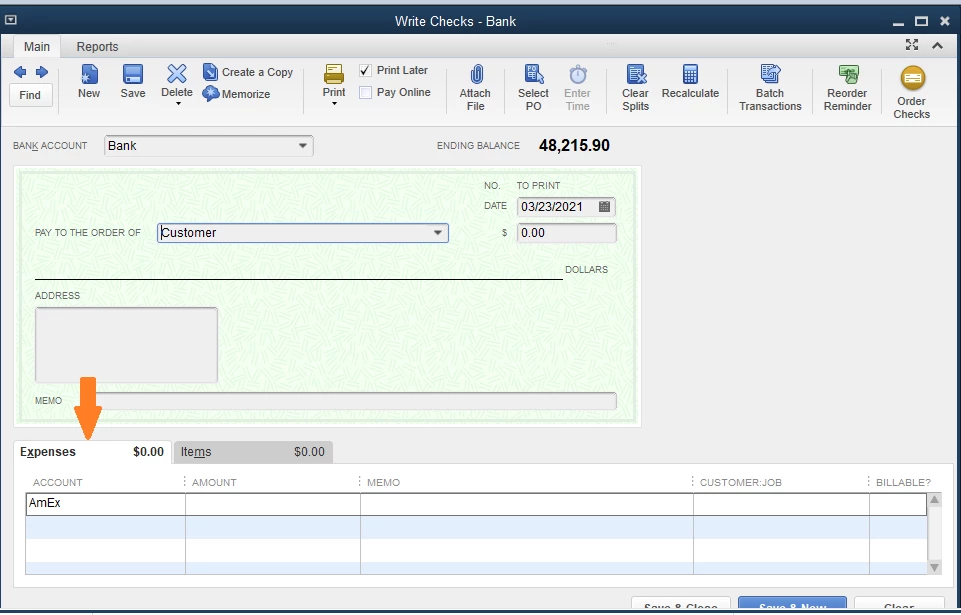
- On the Account ▼ dropdown, select your credit card account.
- Note: If you are making the payment for the sub accounts, enter a line for each sub account then type the amount you want to pay. The total amount should be equal to the total amount reflected for the parent account.
- Select Save & Close.
If you'd like to record your credit card payment after reconciliation, refer to this article to the Pay credit card charges after reconciliation: Set up, use, and pay credit card accounts.
Once done, you can match them with the downloaded transaction in the bank feeds.
Should you have any further questions about categorizing credit card transactions, I'm always here to help you.


