May 16, 2025
Solved

Can anyone suggest on how to clean up erroneous Balance Sheet entries in quickbooks online

  • May 16, 2025
  • 1 reply
  • 0 views

I manage a small nonprofit, and the person handling our accounting entries made some unusual choices. In 2015-2016, they listed PAYPAL as a bank account in QuickBooks. They recorded purchases (like postage) as expenses, and any incoming funds (donations, etc.) as income. The income was then transferred to the organization’s checking account, and I can see journal entries reflecting these transfers. However, when I run the Income and Expense statement for those years, I also see PAYPAL listed as an expense category so from my perspective these expenses were being counted already.

Essentially, there were 3 accounts created in the chart of accounts: 1 labeled "PAYPAL SALES" (for income) ,  "PAYPAL FEES" (for expenses), along with a separate PAYPAL Bank Account .  All 3 of these show up in quickbooks with a zero balance.

Every year when I print the balance sheet, I see two entries that clearly originate from 2015 and 2016. However, these entries have carried forward into the balance sheet through to 2024.

Is there something I can do to clean this up and remove them from the 2024 tax filing year onwards? Or should I leave the 2024 balance sheet as it is and address it for 2025 instead?

To give some context, our nonprofit is small, with earnings well below $50K per year, so we only file the 990 postcard. However, I want to tidy up QuickBooks so these two entries don’t show up on the balance sheet anymore.

Is there an easy way to clean this up? I’m not an accountant, and the person who made these errors is no longer with us. Unfortunately, we have no funds to pay an accountant for help. Should I clean this up myself, or is it better to leave it alone?


Attached are the entries for 2015 and 2016 balance sheet so it is obvious this started in these 2 years. The last is a screenshot of 2024 balance sheet lines. As I said we are a small nonprofit so the financial impact is low but I feel this needs to be cleaned up.


I need some simple instructions on how to clean this up in QuickBooks online.


If anyone can please help I will be VERY appreciative.
Best answer by GlinetteC

Yes, you can remove those entries after ensuring that they are duplicates or not reflected in your bank statement, vze56v6x. Let’s walk through the process together.


Please verify your PayPal account if those entries were already transferred to your checking account. Once confirmed, you can delete them. Another way is to create a journal entry to offset and ensure that financial statements reflect accurate information. Additionally, if they've been reconciled, you’ll need to redo the entire reconciliation to keep your books accurate. Let me show you how:


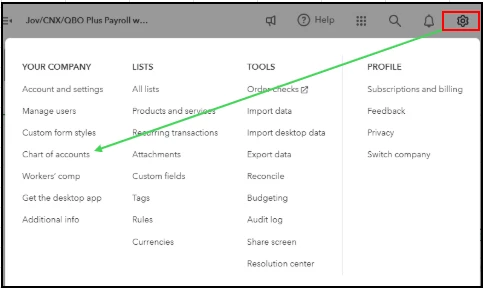
  1. Click the Gear icon at the top.
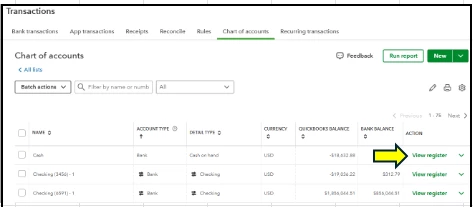
  2. Select Chart of Accounts.
  3. Locate and choose the account you’re working on, and click on View Register.
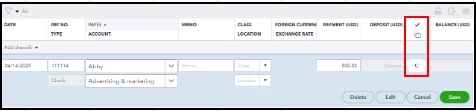
  4. Select the transactions you want to unreconcile.
  5. Keep on clicking the R status until it shows blank or cleared (C).
  6. Click on Save.
  7. Choose Yes to confirm.


I can see that you've seen entries from 2015 and 2016 carry over into the 2024 balance sheet. Remember, all data in QuickBooks will reflect on the balance sheet, even if you filter the reporting period, as it shows the actual account balances.


Regarding your question about cleaning this up for 2024, you can remove the transactions, but please ensure they aren’t part of your actual bank statement to maintain consistency in QuickBooks.


In addition, you can generate a financial report to view a detailed breakdown of historical financial performance.


Are you familiar with our QuickBooks Live Expert Assisted team? They are great at streamlining how you manage entries and oversee your financial activities. I strongly suggest looking into their services; their assistance could greatly enhance your accounting experience!


If you have any additional questions or concerns about managing your transfers, don’t hesitate to drop a comment below. We're here to assist you.

1 reply

GlinetteCAnswer
May 16, 2025

Yes, you can remove those entries after ensuring that they are duplicates or not reflected in your bank statement, vze56v6x. Let’s walk through the process together.


Please verify your PayPal account if those entries were already transferred to your checking account. Once confirmed, you can delete them. Another way is to create a journal entry to offset and ensure that financial statements reflect accurate information. Additionally, if they've been reconciled, you’ll need to redo the entire reconciliation to keep your books accurate. Let me show you how:


  1. Click the Gear icon at the top.
  2. Select Chart of Accounts.
  3. Locate and choose the account you’re working on, and click on View Register.
  4. Select the transactions you want to unreconcile.
  5. Keep on clicking the R status until it shows blank or cleared (C).
  6. Click on Save.
  7. Choose Yes to confirm.


I can see that you've seen entries from 2015 and 2016 carry over into the 2024 balance sheet. Remember, all data in QuickBooks will reflect on the balance sheet, even if you filter the reporting period, as it shows the actual account balances.


Regarding your question about cleaning this up for 2024, you can remove the transactions, but please ensure they aren’t part of your actual bank statement to maintain consistency in QuickBooks.


In addition, you can generate a financial report to view a detailed breakdown of historical financial performance.


Are you familiar with our QuickBooks Live Expert Assisted team? They are great at streamlining how you manage entries and oversee your financial activities. I strongly suggest looking into their services; their assistance could greatly enhance your accounting experience!


If you have any additional questions or concerns about managing your transfers, don’t hesitate to drop a comment below. We're here to assist you.

vze56v6xAuthor
May 16, 2025

I’m not sure what you meant by “ensuring they aren’t duplicates on the bank account statement.” Why would these show as duplicates there?


Here’s what actually happened: when the entries were originally created, they were recorded in the PayPal bank account register in QuickBooks. The employee used the “Transfer Funds” function to move funds from the PayPal account to our main checking account. Ideally, these transactions should have been entered directly into the main checking account, but that’s not what was done. The only entry QuickBooks created was a record of the fund transfer between the two accounts.


Additionally, the PayPal register includes expenses such as PayPal fees (e.g., for postage). These fees appear as negative amounts, which I believe is how we ended up with the current negative balance.


My goal is to simply clear the two PayPal-related lines from the balance sheet effective this year. I don’t want to alter prior years’ reports—they should remain as originally recorded. I just want to clean things up moving forward. How can I do that in QuickBooks Online? 

Apologies but I am

a novice at this and our org isn’t in a position to pay for accounting fees right now.

May 17, 2025

I appreciate you sharing detailed information, Linda. I'll explain this further below.


When my colleague mentioned checking for duplicates on the bank account statement, it means we have to review the transactions to identify any duplicate entries in QuickBooks that require matching. If there are no duplicates, please ensure that PayPal transactions are correctly categorized.


In QuickBooks Online (QBO), when you link your PayPal account to your checking account, ensure to categorize the funds coming from PayPal as a transfer on the Banking page. After that, exclude the transaction downloaded into your checking account, as the transfer entry for PayPal is already recorded.


Moreover, since this involves older entries, I recommend consulting with an accountant to avoid errors in your books and reconciliation, as changes can affect the reconciliation process. If needed, you can create a Journal Entry (JE) to correct any transactions or postings in the reports, and an accountant can assist with this as well. You can also check out our Find an accountant or bookkeeper page to find one in your area who provides a free consultation.


Please note that a journal entry may not be necessary if your PayPal transactions can be managed by categorizing the entries.


Furthermore, to email, export, or print your reports in QBO, scroll down to Manage your report section of this article: Run a report. This will help you track your business performance and make informed decisions.


If you have further questions or need additional clarification in managing your PayPal transactions, feel free to reply to this thread. The Community team is here to support you. Have a nice day!