Yes, you can add inventory items with different purchase prices, schaafag6-gmail-.
To do so, you need to use the Reorder feature to reflect the new amount of your purchases. Let me show you how:
- Go to Sales then Products and Services.
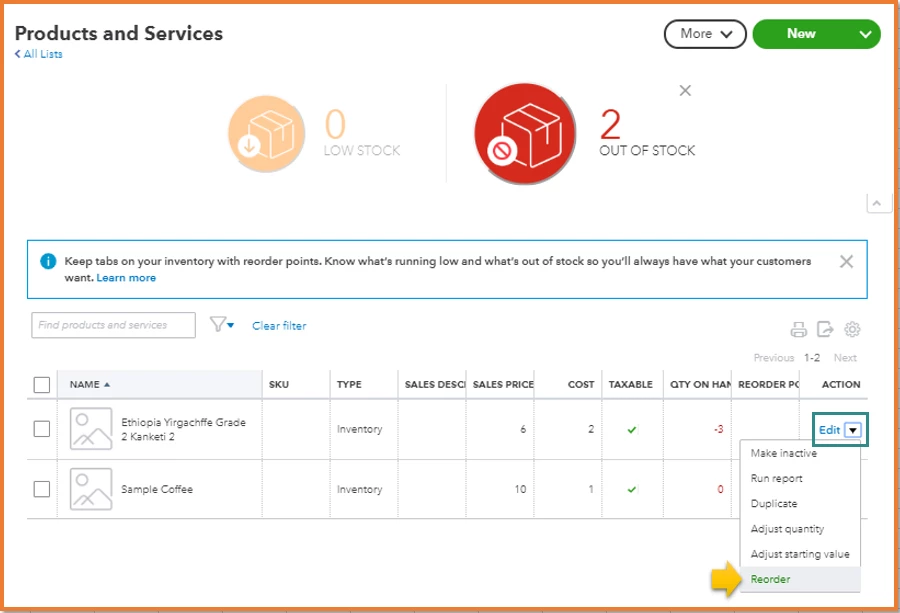
- At the top, you’ll quickly see if you have low stock or out of stock items.
- Select Low stock or Out of stock to see those items.
- Click the triangle icon under Action, then choose Reorder.
- This creates a purchase order for a single vendor.
- Complete all the details of the purchase order, including the new price.
- Click Save and close or Save and send.
To check what's still on order, feel free to visit this page: Reorder inventory or supplies from vendors.
I'm also adding this link for your future reference: Add inventory products in QuickBooks Online.
Let me know if you need anything else about adding inventory items. Just tag my name and I'll get back to you.


