October 3, 2023
Solved

Can I copy a check registry entry

  • October 3, 2023
  • 2 replies
  • 0 views

QB Online: Can I copy an existing check register item like a deposit or check and then use it to add a new registry item?


Best answer by Rea_M

Hello, Sonoran49.


Yes, you can copy an existing check or deposit to add a new registry item in QuickBooks Online (QBO). But you're unable to do this directly through your register. I'll guide you on how to do this accordingly.


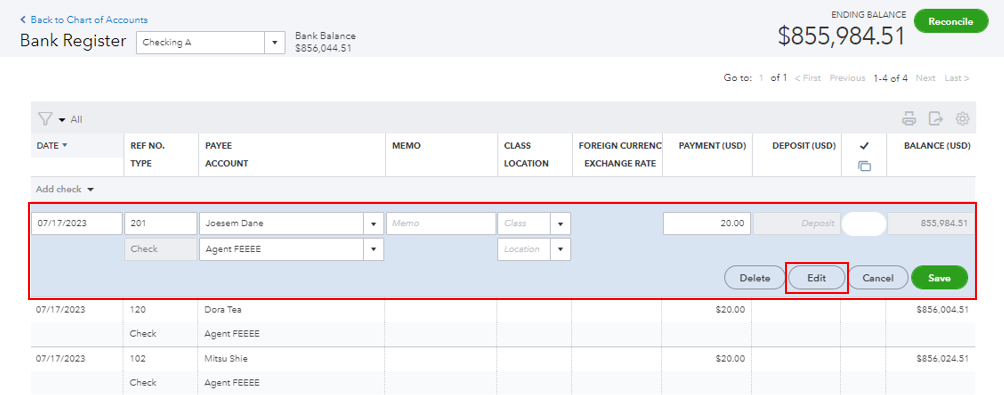
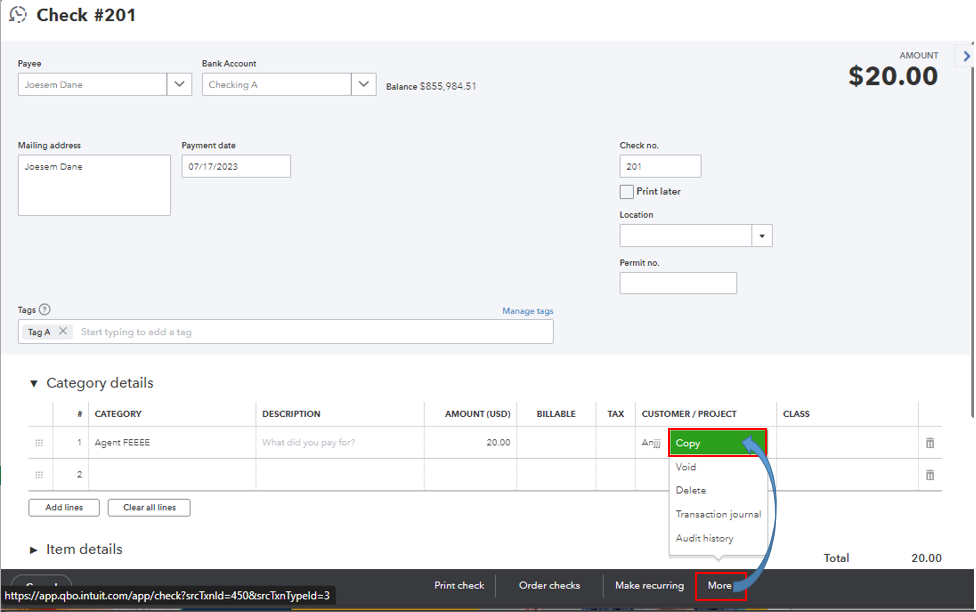
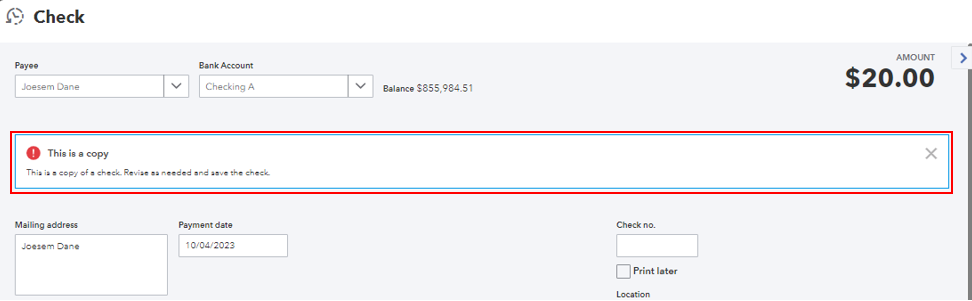
In your check register, choose the transaction you want to copy and select the Edit option to open its details. In the transaction (check or deposit) window, click More and select the Copy option. QuickBooks will inform you that the transaction is a copy and that you can revise it as necessary. Please see the screenshot below for your reference.


Additionally, QuickBooks lets you add attachments to customers' and vendor profiles, as well as their transactions. You may want to check out this article on how to do this accordingly: Add or delete attachments in QuickBooks Online.


If there's anything else you need to manage and copy transactions in QBO, let me know by dropping a comment below. I'm always ready to help. Take care.

2 replies

Rea_MAnswer
October 3, 2023

Hello, Sonoran49.


Yes, you can copy an existing check or deposit to add a new registry item in QuickBooks Online (QBO). But you're unable to do this directly through your register. I'll guide you on how to do this accordingly.


In your check register, choose the transaction you want to copy and select the Edit option to open its details. In the transaction (check or deposit) window, click More and select the Copy option. QuickBooks will inform you that the transaction is a copy and that you can revise it as necessary. Please see the screenshot below for your reference.


Additionally, QuickBooks lets you add attachments to customers' and vendor profiles, as well as their transactions. You may want to check out this article on how to do this accordingly: Add or delete attachments in QuickBooks Online.


If there's anything else you need to manage and copy transactions in QBO, let me know by dropping a comment below. I'm always ready to help. Take care.

Sonoran49Author
October 3, 2023

Thank you! I never got past the point of clicking the entry... I didn't hit edit because I didn't want to edit it. 

October 3, 2023

Hi there, @Sonoran49.


I'm delighted to know that my colleague @Rea_M was able to address your question successfully. 


Feel free to ask or reach out to the Community anytime you have other concerns aside from this. Take care! 

October 22, 2024

Is this no longer an option?  When I click "More" in a deposit window, all I see is Delete, Transaction Journal, and Audit History.  No "Copy" option.

October 22, 2024

Thanks for hopping into the conversation, @vjensen! I understand how important it is to efficiently manage your deposits, so let’s find a solution that works for you. While QuickBooks Online doesn’t let you directly copy a bank deposit, you do have a couple of handy options at your disposal.


Option 1: You can manually duplicate the deposit. Just create a new bank deposit while keeping your original one open in another tab or window for easy reference. Pop over the amounts, accounts, and any notes from the original to your new deposit.


Option 2: If you find yourself making the same types of deposits often, consider setting up a recurring transaction. Just click the Make recurring button from the Bank Deposit window and fill in the Template name, Type, Account, and the Interval that suits your needs.


To help you further, here are some useful resources for managing your deposits:


If you have any more questions or need clarification on anything, don’t hesitate to reach out. I’m here to help you make the most of your QuickBooks experience. Wishing you a fantastic day ahead!