March 21, 2019
Solved

Can I create an A/P remittance detail report that has paid vendors which have numerous bills ? I need the ck#, total paid, each bill no. & each bill amt listed.

  • March 21, 2019
  • 2 replies
  • 0 views
Original commenter did not share additional details

Best answer by Angelyn_T

Hi there, @aschipinski.


You can open/run the Bills and Applied Payments report to see the bills and the vendor payments in QuickBooks Online (QBO). I'm here to help guide you how.


To open the report:


  1. Click on Report at the left pane.
  2. Look for the report's name (Bills and Applied Payments) in the reports search field.

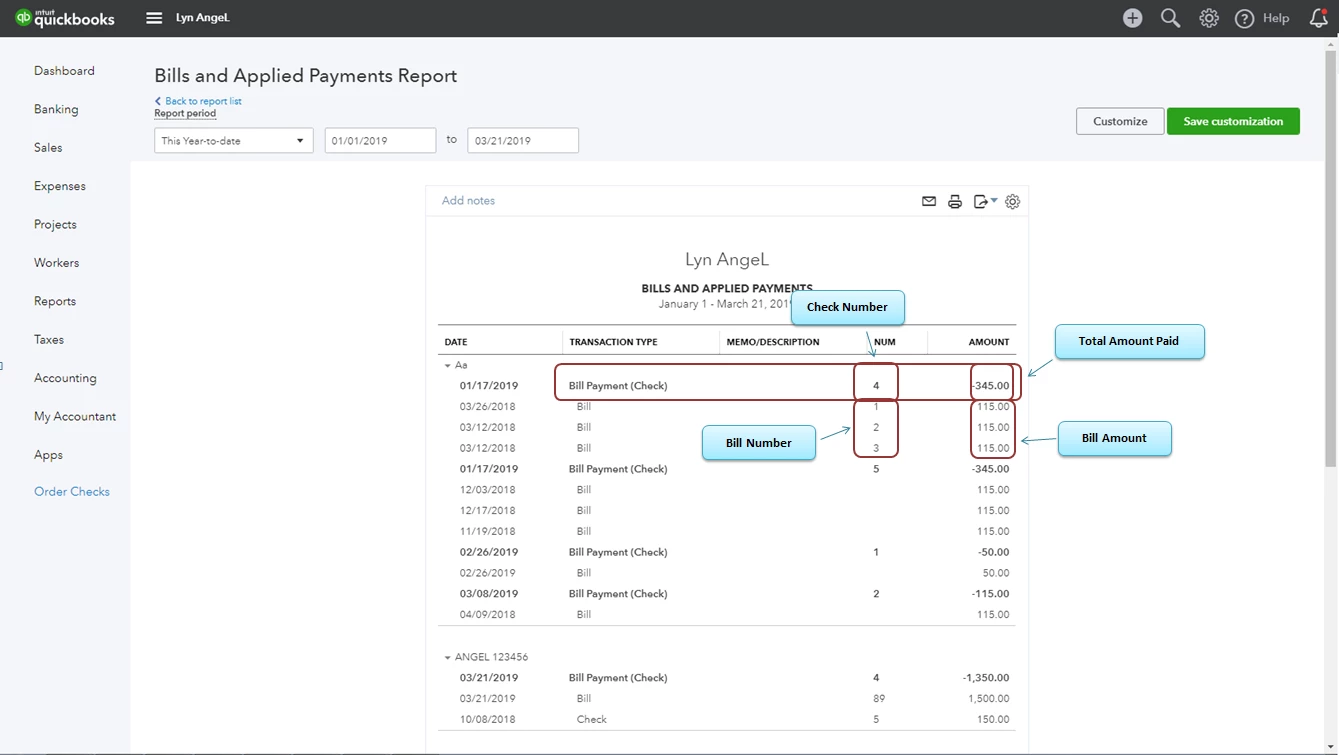
This report shows the Bill Payment Check Number, Total Amount Paid by Vendor, Bill Number, and Bill Amount.


For more reference about running and customizing reports in QBO, you may check this article: Run Reports.


I'm always here to help you if you have any other questions about running reports in QBO. Have a great day ahead!

2 replies

Angelyn_T
Angelyn_TAnswer
March 21, 2019

Hi there, @aschipinski.


You can open/run the Bills and Applied Payments report to see the bills and the vendor payments in QuickBooks Online (QBO). I'm here to help guide you how.


To open the report:


  1. Click on Report at the left pane.
  2. Look for the report's name (Bills and Applied Payments) in the reports search field.

This report shows the Bill Payment Check Number, Total Amount Paid by Vendor, Bill Number, and Bill Amount.


For more reference about running and customizing reports in QBO, you may check this article: Run Reports.


I'm always here to help you if you have any other questions about running reports in QBO. Have a great day ahead!

March 22, 2019

Thank you so much!  This is exactly what I needed. It shows the Bill Payment Check Number, Total Amount Paid by Vendor, Bill Number, and Bill Amount.


Angelyn_T
March 22, 2019

You're always welcome, @aschipinski.


Please know that I'll be right here to help you if you have any other QuickBooks concerns by adding a post/comment below.


I've also included this article you can read to learn more about customizing reports in QBO: How to customize reports.


Wishing you continued success! :)