

August 17, 2021
Solved

Can I duplicate an existing PO, change the PO number and job information, and save as a NEW PO to reduce the data entry on repeat orders?

  • August 17, 2021
  • 1 reply
  • 0 views
In desktop, we could open a PO, update the PO number, ship to, job info and save as a new PO. This greatly reduces the time to create PO's for repeat orders that are shipping to different locations for the customer.
Best answer by LeizylM

I appreciate you for sharing detailed information about your PO concerns, RGF1. 


I'm here to make sure you'll get the help you need on how to copy and edit your purchase order in QuickBooks Online. 


Here's how:


  1. Go to the Expenses menu. 
  2. Locate the Purchase order you've created.
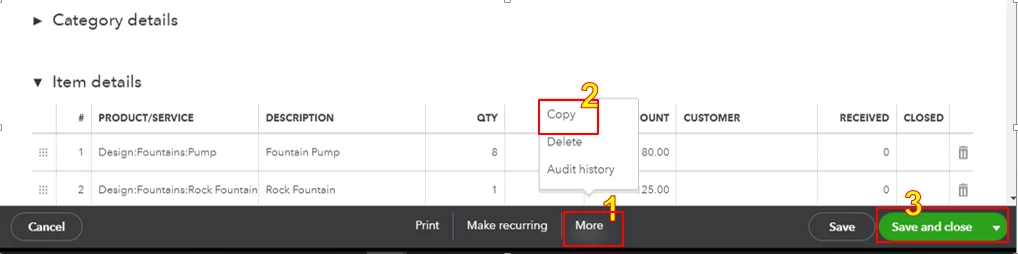
  3. Click More at the bottom and select Copy
  4. Once done, click Save and close. 


Please see the screenshots below.


I have articles that will provide you steps on how to process a purchase order from an estimate as well as steps on how to track and run purchase order reports in QuickBooks Online:


I’m happy to offer assistance again if you have more questions for Quickbooks Online. Post a new thread or reply here and I’ll be there.

1 reply

LeizylMAnswer
August 17, 2021

I appreciate you for sharing detailed information about your PO concerns, RGF1. 


I'm here to make sure you'll get the help you need on how to copy and edit your purchase order in QuickBooks Online. 


Here's how:


  1. Go to the Expenses menu. 
  2. Locate the Purchase order you've created.
  3. Click More at the bottom and select Copy
  4. Once done, click Save and close. 


Please see the screenshots below.


I have articles that will provide you steps on how to process a purchase order from an estimate as well as steps on how to track and run purchase order reports in QuickBooks Online:


I’m happy to offer assistance again if you have more questions for Quickbooks Online. Post a new thread or reply here and I’ll be there.