April 5, 2021
Solved

Can I e-file a late 1099 with QBO? If so, how?

  • April 5, 2021
  • 1 reply
  • 0 views

My company filed all but one 1099 for 2020.

How do I e-file late in QBO? Or do I need to file on paper form direct with the IRS? 

Thanks! 

Best answer by jamespaul

Hello, sh1rst. 


I'll share important details about handling late 1099 forms in QuickBooks Online. 


You can still e-file the late 1099 form. The system will allow you to do it up until April 30th (February 2 to April 30). Any forms to be filed beyond May 1st will have to be done manually. 


To file it, you'll simply want to go to the Vendors page then click the Prepare 1099s button. Ensure to select only the vendor with the late 1099 form. Here's how: 
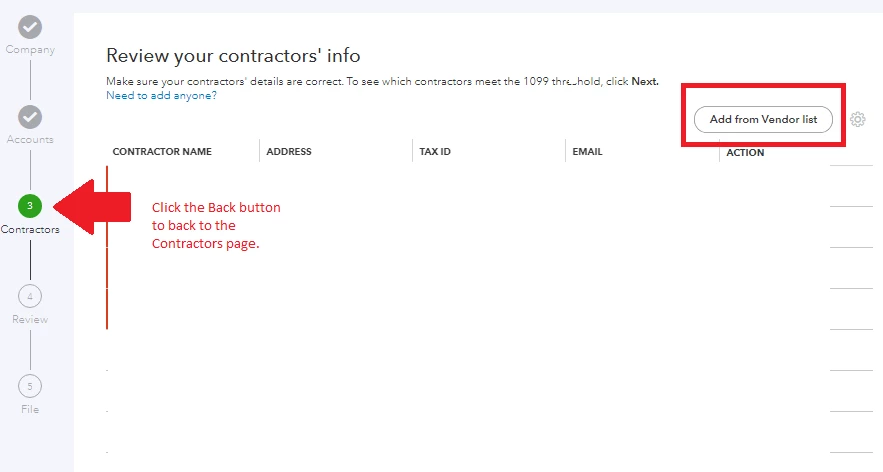
 

  1. After clicking the Prepare 1099s button, proceed with Continue your 1099s
  2. Go back to the Contractors section by clicking the Back button.
  3. Click the Add from the Vendor list button.  
  4. Deselect the vendor or contractors that you don't need and select only the one with the late form.
  5. Click Save, then continue preparing the late 1099. 


While you can still e-file the form, this will still be considered late by the IRS. I would recommend contacting them so they can assess the fees. 


For reference about filing the 1099 forms, you can check this article: Create and file 1099s using QuickBooks Online.


If you need to run reports for your expenses and other data, you can check out the guides from the Reports topic page.  


I'll share what else you need to know if you have more questions about QuickBooks Online's processes. Just reply here and I'll add the details. 

1 reply

jamespaulAnswer
April 6, 2021

Hello, sh1rst. 


I'll share important details about handling late 1099 forms in QuickBooks Online. 


You can still e-file the late 1099 form. The system will allow you to do it up until April 30th (February 2 to April 30). Any forms to be filed beyond May 1st will have to be done manually. 


To file it, you'll simply want to go to the Vendors page then click the Prepare 1099s button. Ensure to select only the vendor with the late 1099 form. Here's how: 


  1. After clicking the Prepare 1099s button, proceed with Continue your 1099s
  2. Go back to the Contractors section by clicking the Back button.
  3. Click the Add from the Vendor list button.  
  4. Deselect the vendor or contractors that you don't need and select only the one with the late form.
  5. Click Save, then continue preparing the late 1099. 


While you can still e-file the form, this will still be considered late by the IRS. I would recommend contacting them so they can assess the fees. 


For reference about filing the 1099 forms, you can check this article: Create and file 1099s using QuickBooks Online.


If you need to run reports for your expenses and other data, you can check out the guides from the Reports topic page.  


I'll share what else you need to know if you have more questions about QuickBooks Online's processes. Just reply here and I'll add the details. 

sh1rstAuthor
April 8, 2021

Thanks, this was helpful.
