February 23, 2019
Solved

Can I inactivate multiple accounts at one time rather than having to inactivate one at a time

  • February 23, 2019
  • 5 replies
  • 0 views
Original commenter did not share additional details
Best answer by PreciousB

I'm here to help, Costman99.


Currently, we don't have an option to inactivate multiple accounts by batch. You'll have to manually inactivate it one at a time.


Here's how:


  1. Click Accounting on the left pane.
  2. Select Chart of Accounts.
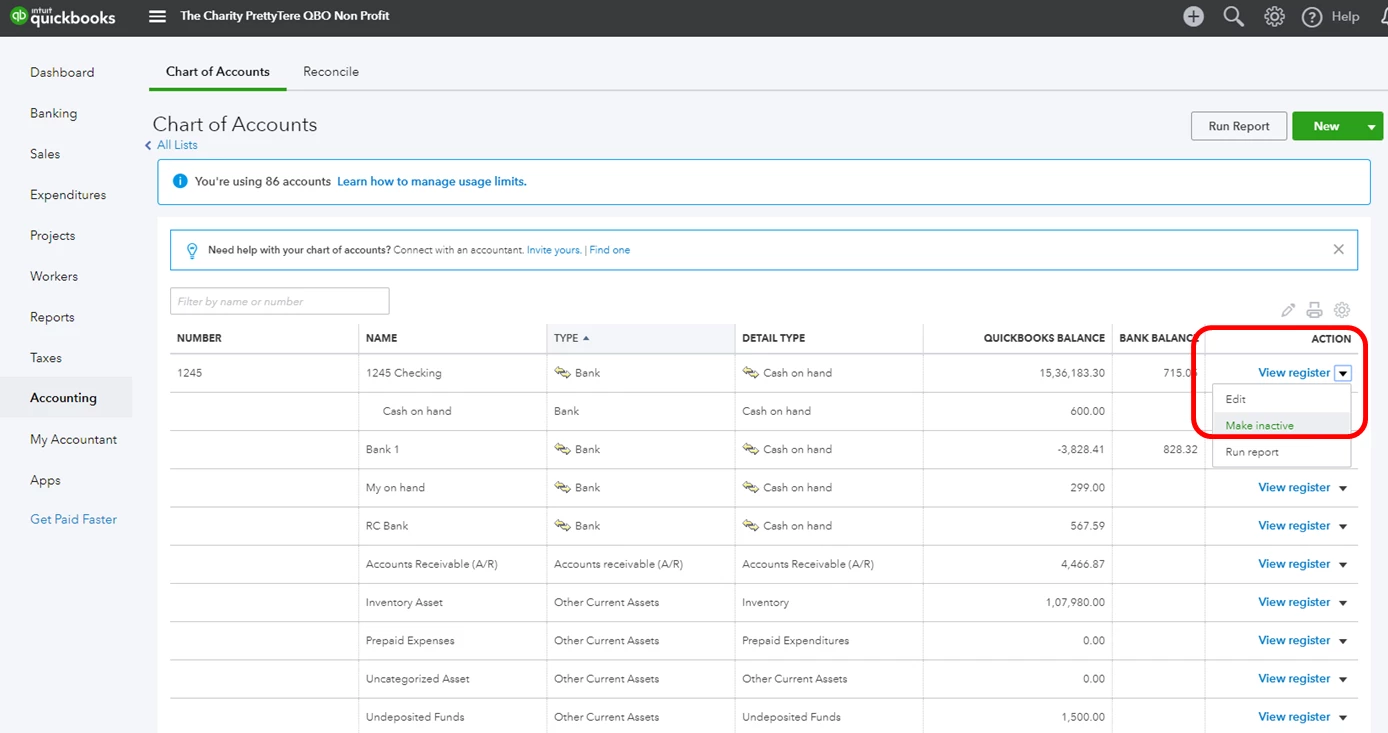
  3. Click the arrow beside View Register.
  4. Choose Make inactive (see the screenshot below).
  5. Select Yes to confirm.


I've passed your thoughts to our Product Developers so they’ll consider adding this option.  I'd appreciate it if you could also send this as feedback to our product engineers. Your input would be a big help in getting this implemented.


Here’s how:


To send feedback in QBO:

  1. Click the Gear icon.
  2. Choose Feedback.

That's it. Please reach out to me if there is anything else I can help you with. I'll always be here to assist you.


5 replies

PreciousB
PreciousBAnswer
February 23, 2019

I'm here to help, Costman99.


Currently, we don't have an option to inactivate multiple accounts by batch. You'll have to manually inactivate it one at a time.


Here's how:


  1. Click Accounting on the left pane.
  2. Select Chart of Accounts.
  3. Click the arrow beside View Register.
  4. Choose Make inactive (see the screenshot below).
  5. Select Yes to confirm.


I've passed your thoughts to our Product Developers so they’ll consider adding this option.  I'd appreciate it if you could also send this as feedback to our product engineers. Your input would be a big help in getting this implemented.


Here’s how:


To send feedback in QBO:

  1. Click the Gear icon.
  2. Choose Feedback.

That's it. Please reach out to me if there is anything else I can help you with. I'll always be here to assist you.

February 25, 2020

It's discouraging how many things are much harder to do with online instead of desktop.  I need to make multiple accounts inactive and it is taking me FOREVER to do.  Once I select the account to make inactive, it then takes me back to the beginning where I have to scroll down and find my next account and then go through the same process over and over and over again.  We recently changed some of our accounts and manner of reporting expenses so I have may 100 or more accounts to make inactive.  I'll probably have to set aside a whole day to do this.  There really needs to be a way to at least select ones from the same page to delete at once.

IntuitLily
February 25, 2020

I understand the inconvenience of having to go through such a process, @Morgan1509.


At this time, we don't have an option to inactivate multiple accounts when using QuickBooks Online. This would be a great feature especially if you have multiple accounts that you'll need to make inactive.


I'll be sure to pass this along to our developers. This way, they can check and consider this in future product updates. 


In the meantime, I recommend visiting our QuickBooks Online Blog to know more about our latest happenings. From there, you'll get the recent news, features, and updates about QBO and what our Product Team is working on.


Please post again in the Community if you need anything. I want to help in any way I can. Have a good one.

May 17, 2021

Thank toy for your response. I was able to get around the problem by renaming the Group 'old', which automatically changed the sub-groups. I then established the same Group name without the 'old', and then selected the the sub-groups that I needed and switched the relationship back and I was able to reduce my chart of account considerably.

I was a little disappointed, that why I was making changes in the cart it keep going back to the top of the chart, I was hoping that I could stay in the area that I was working in. I also think that Intuit should have giving us the ability to go back to the previous page from the top of the current page. I always had to scroll down to the bottom of the page to go back a page.

I am still working my way thru the process, and it is good that we have the ability to talk to people that have mastered the software. Thanks again. I may be back.

August 16, 2021

Have to agree with what everyone is saying here. Couple this with the required "Detail Type" and having a default COA automatically populated which has no relevance for the company you're creating is absolutely crazy.  If it wasn't for the "ease" of working with remote clients I would definitely stay with desktop.  You need real-life accountants that actually work in the system to give the programmers guidance/input.

September 3, 2021

I agree that I was disappointed by not being able to inactive accounts in a batch in QB online.  But, I found a way to make it go a little faster by not having it send me back to the top every time.


Print the Chart of accounts

Type the account name that you want to inactive in the "Filter by name" box at the top

Then it creates a short list and eliminates scrolling and searching

Also subaccounts are in-actived when their top account is in-actived,


Worked out well for me!

September 16, 2021

This is absurd. I add a new client who is limited to 250 accounts on the chart of accounts and QBO defaults the COA with 140 accounts. Now I have to delete them one by one.


Why does QBO automatically populate their default chart of accounts? We cannot make make accounts go inactive in a batch? Its 2021, this is ridiculous. 


All I want to do when having a new client set up is have the few default QBO accounts and then import my own chart of accounts with custom account numbers and detail. Run this issue up the ladder. This is an overall time suck for us accountants. I will no longer be advising my clients to use QBO. 


July 25, 2023

There is definitely a way to do this in QBO now, though I can't find it anywhere in the training, just on the test:

[removed]

Not very helpful, as none of the options listed here work... anyone have any new info on this?

-Stacy