Oct 27, 2020 3:29 PM UTC
Solved

Can I include a decimal point within an account number to help when creating sub-accounts in my Chart of Accounts?

If account numbers are limited to 7 digits in Chart of Accounts, can one of those digits be a decimal point?
Candice C
Candice CAnswer
Oct 27, 2020 5:20 PM UTC

Greetings, @judy47. 


Congrats on making your first post here in the Community. I hope your day is going well so far. 


After trying this in my test account, I was able to add a decimal in the "Account Number" field for an account. However, there isn't a limit of seven digits in the "Account Number" field. You can enter more than seven numbers. Let's try it out with the steps below. 


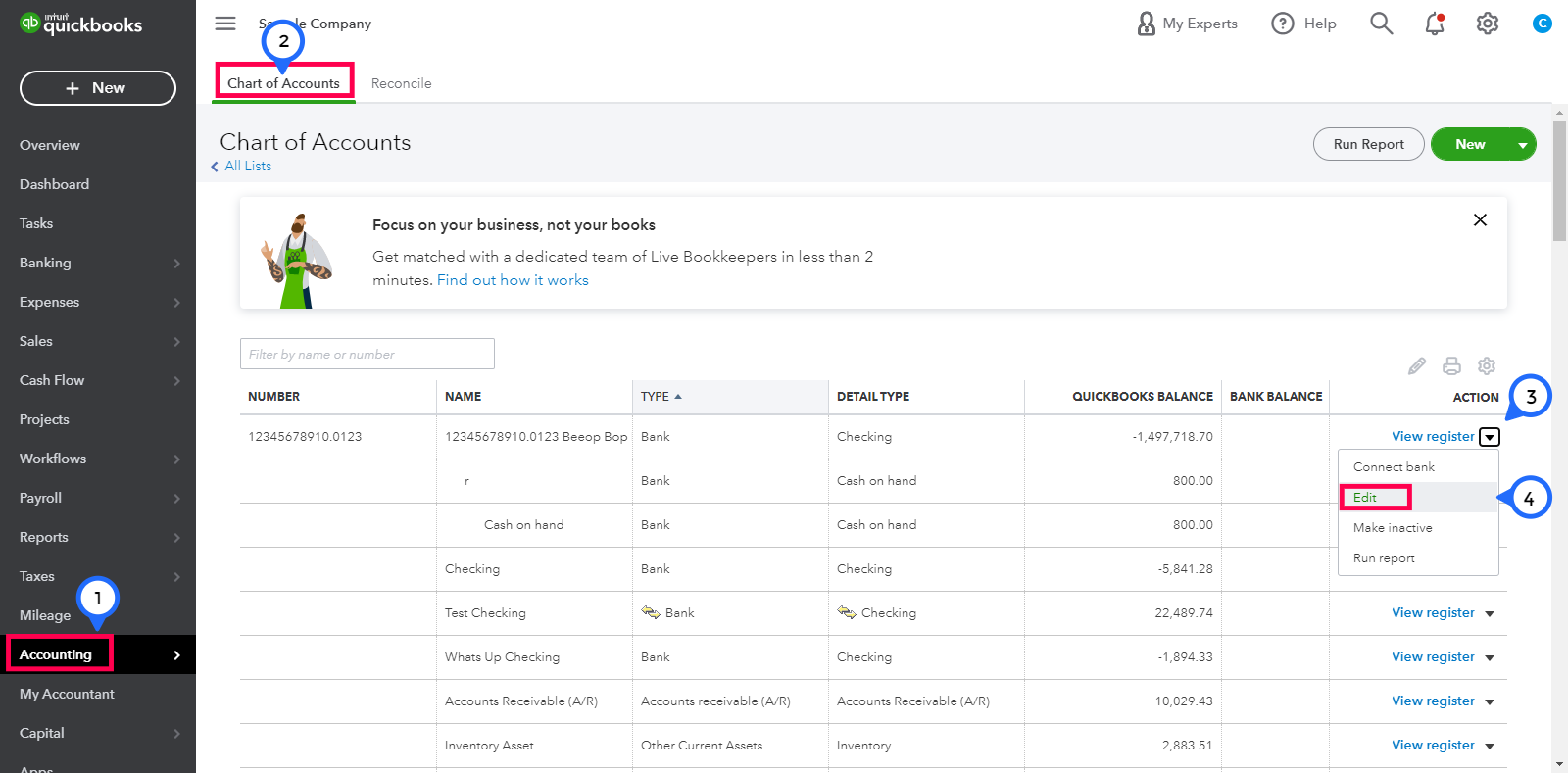
  1. Go to the Accounting tab on the left-hand menu bar. 
  2. Choose the Chart of Accounts portion. 
  3. Locate the account and click the View Register drop-down menu in the "Action" column.
  4. Select the Edit option. 


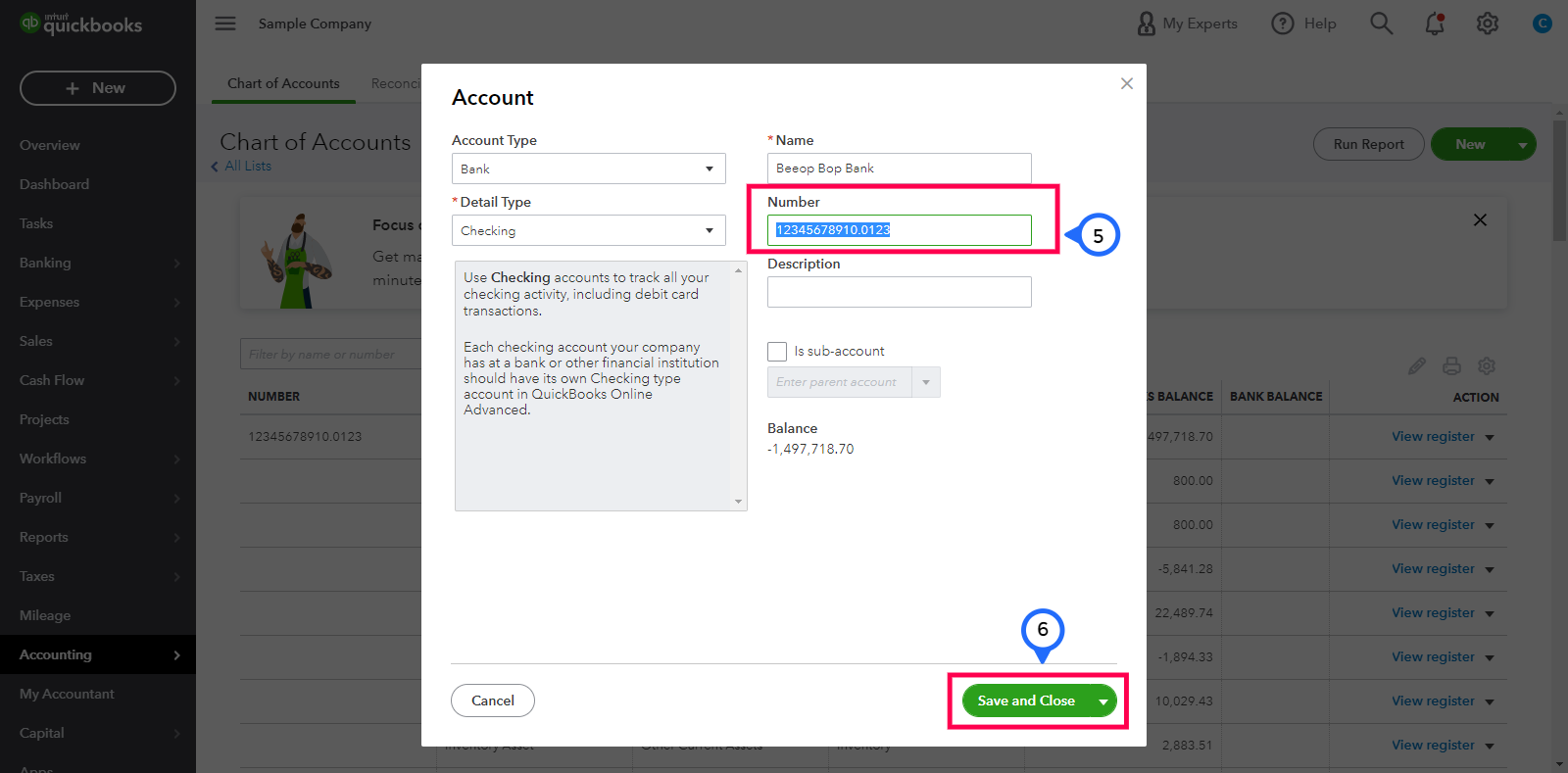
       5. In the "Number" box, type in the number with a decimal. 

       6. Once you're done, press the Save and Close button. 


Here's an article that can give some additional details about using account numbers in your chart of accounts. For future reference, you can cruise on over to this link about reconciling an account or our tutorials page within the Community. 


By doing the instructions above, you'll be able to add a decimal within the account number for your chart of accounts. If you have any other questions or concerns, please don't hesitate to ask. The Community is always here to have your back. Have a splendid day! 

2 replies

Candice C
Candice CAnswer
Oct 27, 2020 5:20 PM UTC

Greetings, @judy47. 


Congrats on making your first post here in the Community. I hope your day is going well so far. 


After trying this in my test account, I was able to add a decimal in the "Account Number" field for an account. However, there isn't a limit of seven digits in the "Account Number" field. You can enter more than seven numbers. Let's try it out with the steps below. 


  1. Go to the Accounting tab on the left-hand menu bar. 
  2. Choose the Chart of Accounts portion. 
  3. Locate the account and click the View Register drop-down menu in the "Action" column.
  4. Select the Edit option. 


       5. In the "Number" box, type in the number with a decimal. 

       6. Once you're done, press the Save and Close button. 


Here's an article that can give some additional details about using account numbers in your chart of accounts. For future reference, you can cruise on over to this link about reconciling an account or our tutorials page within the Community. 


By doing the instructions above, you'll be able to add a decimal within the account number for your chart of accounts. If you have any other questions or concerns, please don't hesitate to ask. The Community is always here to have your back. Have a splendid day! 

judy47Author
Oct 29, 2020 6:43 PM UTC

Thank you for your quick and detailed response.  I am in the process of adding new sub-accounts for our new fiscal year, before I start entering budgets.  Decimals are making clarity of accounts easier to identify.  I appreciate the assistance.  Judy47