June 22, 2020
Solved

Can I print a report of all accounts including inactive

  • June 22, 2020
  • 1 reply
  • 0 views

Good morning everybody,

In QB Desktop, is there a way to print a report of ALL accounts in the COA including inactive?


Thank you.


Best answer by DivinaMercy_N

Thank you for posting here in the Community, @Border Collie Boy Part 2


Yes, in QuickBooks Desktop (QBDT) you have the option to print all accounts in Chart of Accounts including those inactive. Let me walk you through on the process.


Here's how:


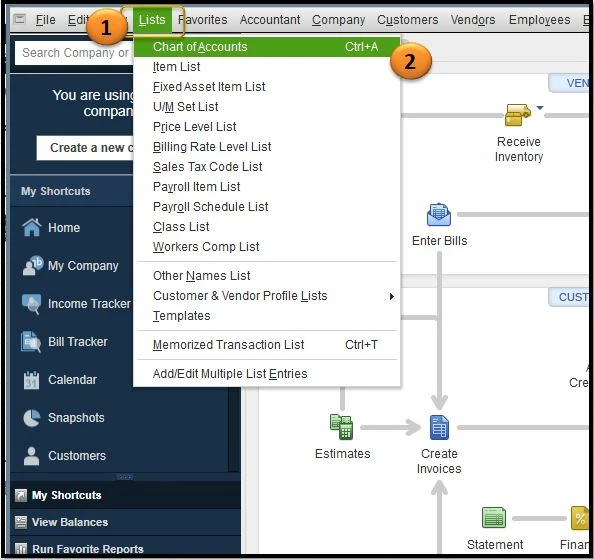
  1. Go to the Lists tab.
  2. Select Chart of Accounts.
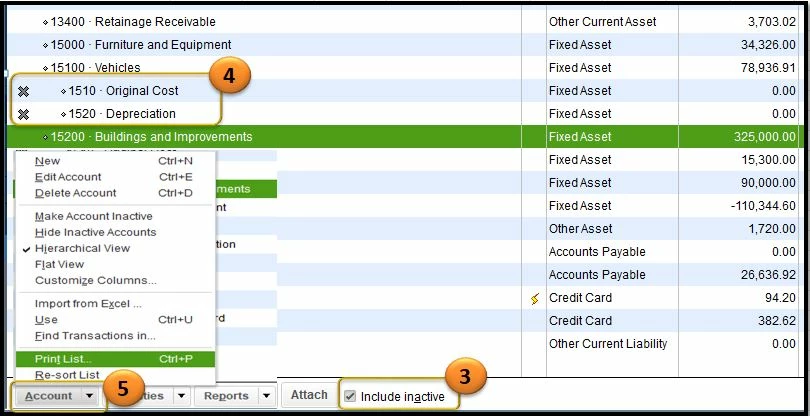
  3. Put a checkmark in the box beside Include inactive
  4. When you see those accounts with an X sign, that means they are all inactive accounts.
  5. From the Account drop-down, choose Print List.
  6. Hit OK if prompted.
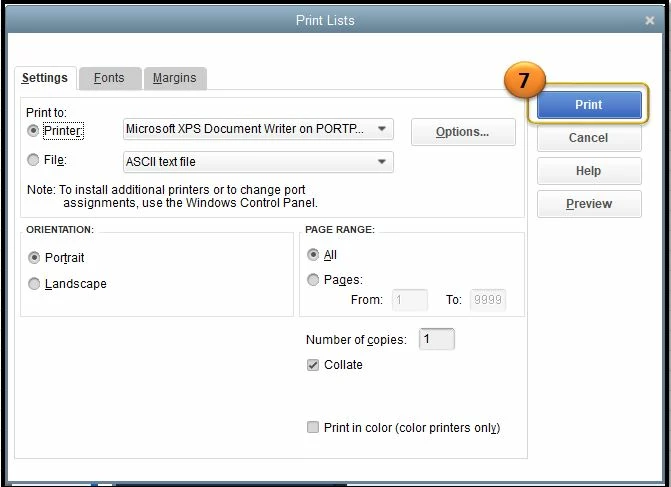
  7. Then modify the printer preference and once done click Print (see screenshots for reference).
 

Also, here is a helpful article that you can read through for future use:  Customize reports in QuickBooks Desktop. This page will guide you in modifying the data, add or delete columns, add or remove information on the header/footer, and even personalize the font and style of the report you generate.


Please know that you're always welcome to post if you have any other concerns. I'm always here to help. Have a good one. 

1 reply

DivinaMercy_N
June 22, 2020

Thank you for posting here in the Community, @Border Collie Boy Part 2


Yes, in QuickBooks Desktop (QBDT) you have the option to print all accounts in Chart of Accounts including those inactive. Let me walk you through on the process.


Here's how:


  1. Go to the Lists tab.
  2. Select Chart of Accounts.
  3. Put a checkmark in the box beside Include inactive
  4. When you see those accounts with an X sign, that means they are all inactive accounts.
  5. From the Account drop-down, choose Print List.
  6. Hit OK if prompted.
  7. Then modify the printer preference and once done click Print (see screenshots for reference).
 

Also, here is a helpful article that you can read through for future use:  Customize reports in QuickBooks Desktop. This page will guide you in modifying the data, add or delete columns, add or remove information on the header/footer, and even personalize the font and style of the report you generate.


Please know that you're always welcome to post if you have any other concerns. I'm always here to help. Have a good one. 

June 22, 2020

Perfect answer.  Thank you very much.

DivinaMercy_N
June 22, 2020

Hi there, @Border Collie Boy Part 2.


I'm glad that the solution worked for you! I want you to know that helping you is our priority. And in case you need help in the future, please know that I am just a reply away.


Also, you may consider visiting our QuickBooks help page, this page consists of helpful articles under Reports and accounting, Account management, Banking and bank feeds, etc.


Feel free to get back here in the Community if you've got more QuickBooks concerns. More power to your business!