But if I delete it from the account it just shows back up again in the waiting to be reviewed section.
I appreciate you for performing the steps provided by my peer above, @diskwizz. I'm here to ensure you're able to fix the $20 discrepancy when reconciling your Chase account in QuickBooks Online (QBO).
You're on the right track in deleting the transaction from your register. Also, it's a great way that you've verified from your bank statement that you only have $20 expense. With this, I'd suggest excluding the duplicate $20 money-in transaction in the For Review tab. That way, it won't add to your register, so the difference will be zero when reconciling your account. I'll guide you how.
- Go to the For Review tab from the Banking menu.
- Locate the $20 money-in transaction and check its box.
- Click the Batch actions drop-down.
- Choose Exclude Selected.
Once done, the transaction will move to the Excluded tab. The screenshot below shows you the steps. For the detailed instructions, check out this article: Exclude a bank transaction you downloaded into QuickBooks Online.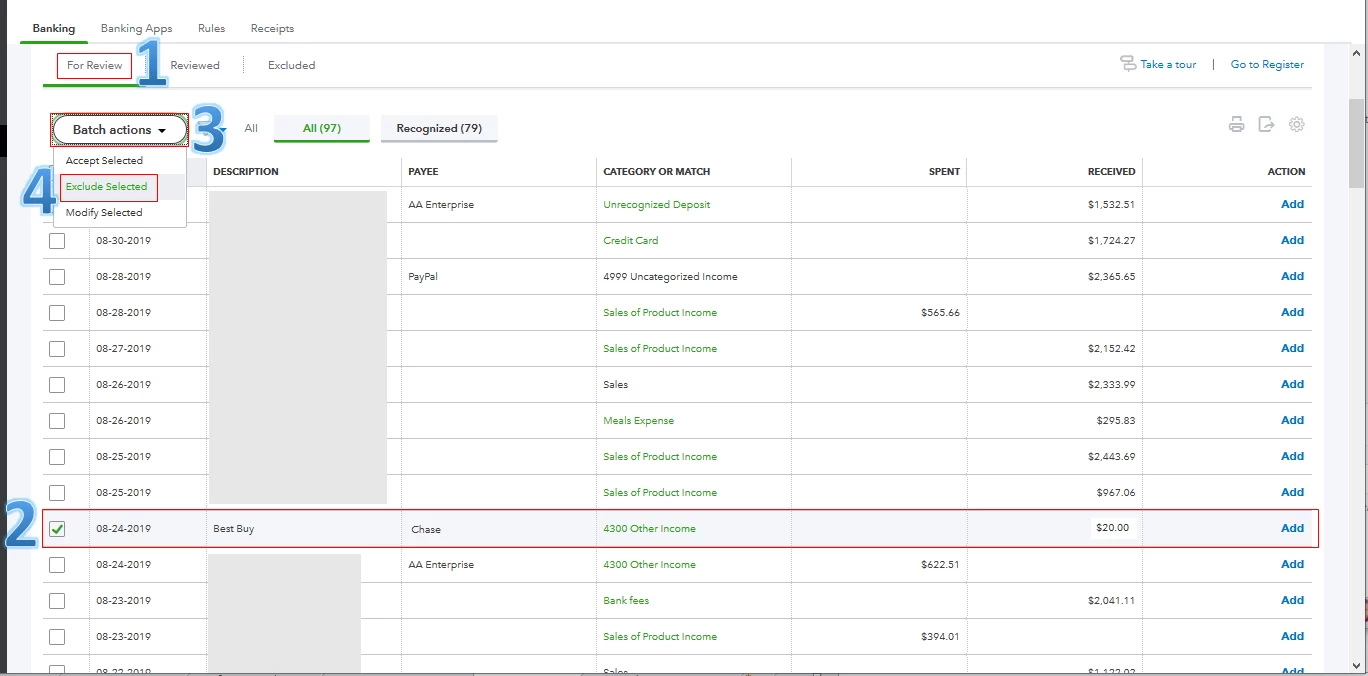
After that, reconcile your Chase account for April again. It helps you ensure the account in QBO matches your bank statement.
Furthermore, I'd recommend visiting this resource hub: Reconcile Workflow. It contains in-depth information about starting, fixing any differences, and completing the reconciliation process. Just click the links beside QuickBooks Online.
I'll be right here to help if you have other concerns. Enjoy the rest of your day, @diskwizz.

