August 14, 2023
Solved

Can QBO tell me what the total of my outstanding invoices were on a given date?

  • August 14, 2023
  • 1 reply
  • 0 views
I like to track this information at the end of each month, but I've missed the last few months, and now I'd like to figure it out for the end of each of the last 3 months.
Best answer by MariaSoledadG

I have an option on how you can track your total outstanding invoices in QuickBooks Online, Pete.


The quickest and easiest way to keep track of your income and expenses is to run reports specific to your needs. QuickBooks Online (QBO) offers financial reports that give a snapshot of your business. 


You'll want to run the Open Invoices report and customize them so it would show the total balance of your outstanding invoices. To do so, follow the steps outlined below:


  1. Go to the Reports tab, then search for Open Invoices.
  2. Under the Report period, select the correct date that you want to show.
  3. (Optional) Click the Customize button if you want to remove or add some information. 
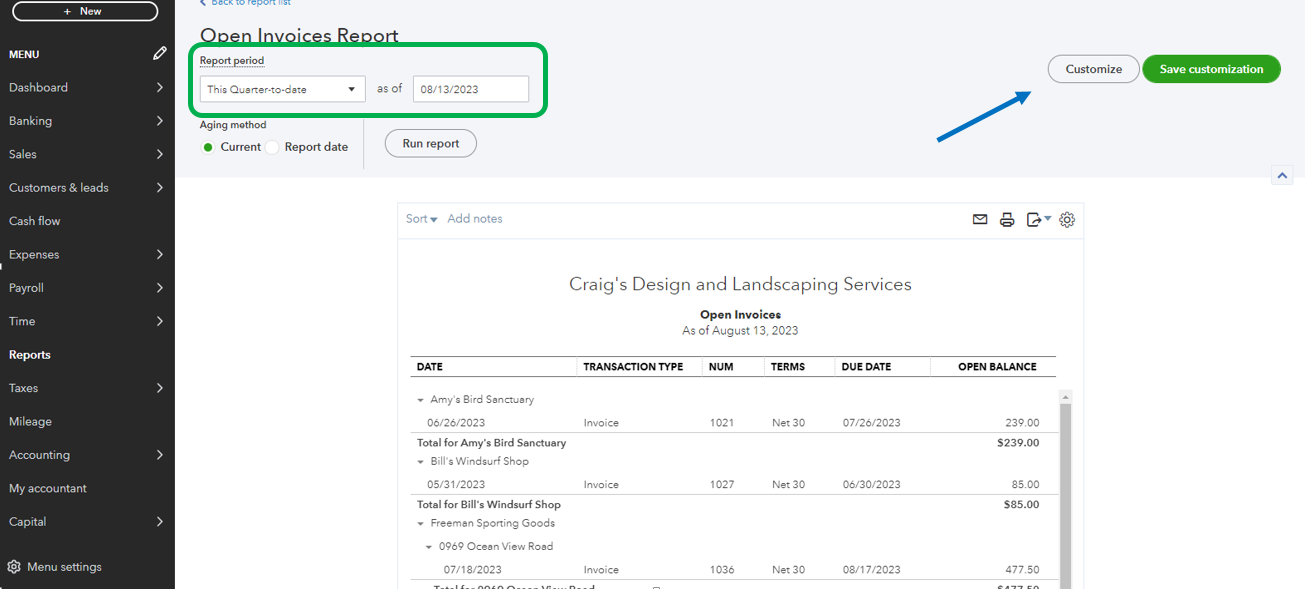
  4. Hit Run report.
     

Additionally, check out some of our available lists of reports that you can use: Reports Included In Your QuickBooks Online Subscription.


If there's anything else that you need help with the total outstanding invoices, let us know so we can get back to you. The Community is always right here to address all your needs.


1 reply

MariaSoledadG
August 14, 2023

I have an option on how you can track your total outstanding invoices in QuickBooks Online, Pete.


The quickest and easiest way to keep track of your income and expenses is to run reports specific to your needs. QuickBooks Online (QBO) offers financial reports that give a snapshot of your business. 


You'll want to run the Open Invoices report and customize them so it would show the total balance of your outstanding invoices. To do so, follow the steps outlined below:


  1. Go to the Reports tab, then search for Open Invoices.
  2. Under the Report period, select the correct date that you want to show.
  3. (Optional) Click the Customize button if you want to remove or add some information. 
  4. Hit Run report.
     

Additionally, check out some of our available lists of reports that you can use: Reports Included In Your QuickBooks Online Subscription.


If there's anything else that you need help with the total outstanding invoices, let us know so we can get back to you. The Community is always right here to address all your needs.
