

December 3, 2022
Solved

Can the recurring payment reminders be shown on the business overview?

  • December 3, 2022
  • 1 reply
  • 0 views
In the new layout, I have to first go to the gear find the recurring transactions then click on yet another button to see the reminder list. It has been buried. Is there a way to show it on the business overview or some place where it is easier to reach?
Best answer by PNSTLInc

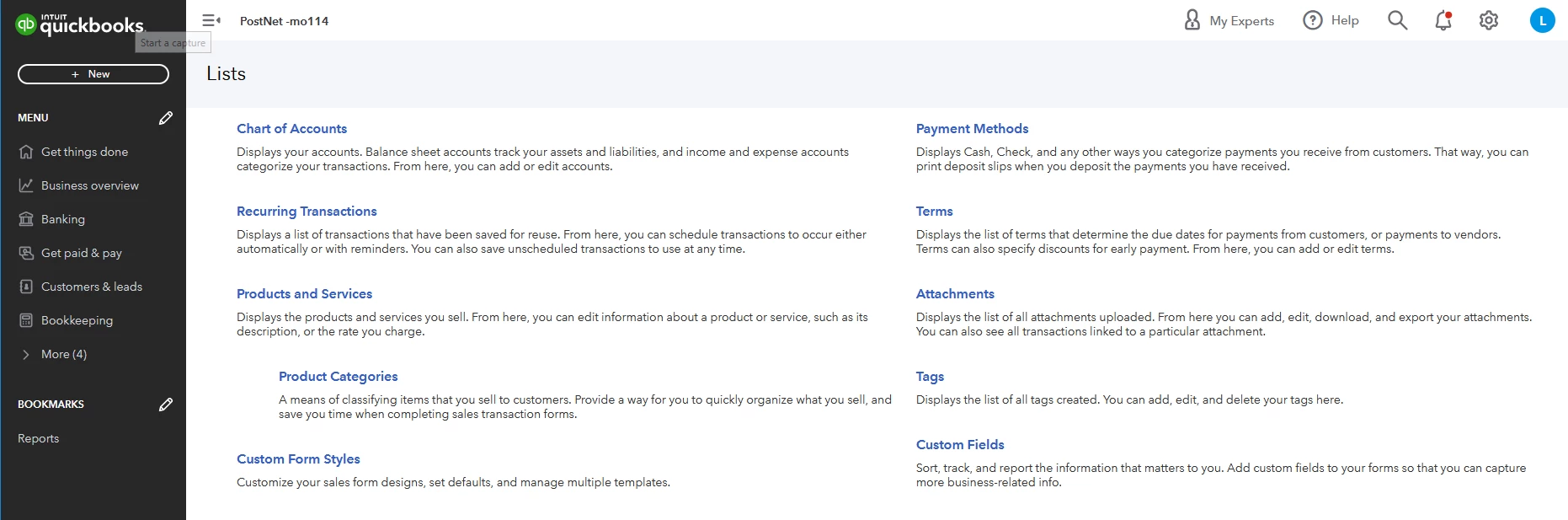
That isn't what I'm trying to see. I am trying to get to the "Reminder List". Which doesn't appear on the even on the "All Lists" screens.

The only way to reach it appears to be to go to the "Recurring Transactions List" and then click on the button at the top right for the "Reminder List".


Then finally I can see the reminders list that shows items I need to take action on.

OK when I tried to explain how there had been a path to that screen from the old Get Things Done screen, I clicked there and that screen, which I was sure had changed, is back to what I had been seeing and it appears there. So, I'm OK now. And I am embarrassed that I even started this.

1 reply

MaryLandT
December 3, 2022

I'll make sure you'll see the recurring transactions from the Business overview area, PNSTLInc.


You don't need to leave the Business overview page to find recurring payment reminders. Use the Reports menu and open Recurring Template List from here. It may show a different interface, however, it still gives you the same data.


Please see the attached screenshot below as your visual guide.


If you want to see which customers got reminders, here's how to check it.


  1.  Go to Bookkeeping, then Transactions.
  2. Choose All Sales
  3. QuickBooks adds "(Reminded)" to invoices in the Status column after it sends a reminder.


You may also personalize the email message so to the template. I'm adding this article to help you customize it: Send invoice reminders automatically or manually in QuickBooks Online.


Please know that there are two ways to display your QuickBooks. This is the latest update and I'm adding this article for the overview: Switch between Business and Accountant view in QuickBooks Online.


It's important to check the customers' outstanding balances, who are falling behind their payments, how many are still due, and how long they’re past due. Use Aging reports to monitor your Accounts Receivable.


Hope you have a great day. Let me know if you need more help with this. I'm always around here in the Community forum to answer your QuickBooks concerns.

PNSTLIncAuthorAnswer
December 3, 2022

That isn't what I'm trying to see. I am trying to get to the "Reminder List". Which doesn't appear on the even on the "All Lists" screens.

The only way to reach it appears to be to go to the "Recurring Transactions List" and then click on the button at the top right for the "Reminder List".


Then finally I can see the reminders list that shows items I need to take action on.

OK when I tried to explain how there had been a path to that screen from the old Get Things Done screen, I clicked there and that screen, which I was sure had changed, is back to what I had been seeing and it appears there. So, I'm OK now. And I am embarrassed that I even started this.

December 3, 2022

Thanks for replying back here in the Community, @PNSTInc.


I truly appreciate you providing more details about your concern and for utilizing your tools to figure things out. 


Feel free to post again if you have other concerns. We're always here giving our best to help you out.


As always, the Community team is here to help you. Keep safe!
