September 16, 2021
Solved

Can we delete invoices in batch in QuickBooks online. Like there is 500 plus transactions so can I delete all these with one click?

  • September 16, 2021
  • 3 replies
  • 0 views
Original commenter did not share additional details

Best answer by jamespaul

Hello, maryam-asghar-va.


You might find Fiat's suggestion helpful, but I have another option for you to help you delete invoices in batch. 


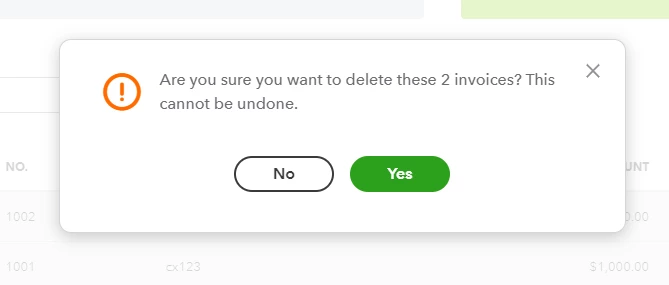
You can use the Batch action function to delete multiple invoices. Here's how:
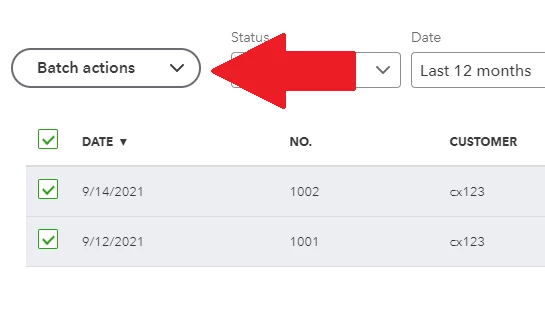
 

  1. Go to the Sales menu, then select the Invoices tab.
  2. Check the invoices you want to delete (or check the box column to select all of them). 
  3. Click the Batch actions button.
  4. Select Delete.


Need to take care of other transactions by voiding or deleting them? This article can help you out with the details: Void or delete transactions in QuickBooks Online


If you managed to recreate the correct invoices, you can start recording their payments when ready. This guide can help you record partial or full payments: Record invoice payments in QuickBooks Online.


Please let me know if there's anything else you'd like to take care of in QuickBooks Online. I'm ready to help you with your invoices, reports and other processes. Just reply here and I'll get back to you as soon as possible. 

3 replies

Fiat Lux - ASIA
September 16, 2021

You need a deleter tool

https://transactionpro.grsm.io/qbo


jamespaulAnswer
September 16, 2021

Hello, maryam-asghar-va.


You might find Fiat's suggestion helpful, but I have another option for you to help you delete invoices in batch. 


You can use the Batch action function to delete multiple invoices. Here's how:
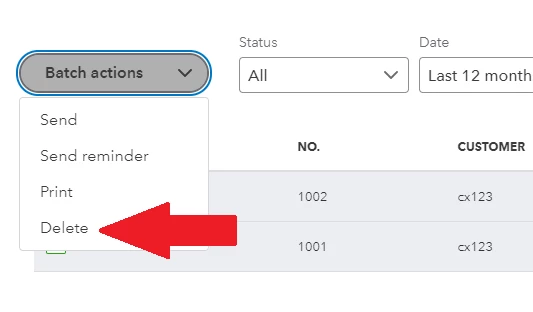
 

  1. Go to the Sales menu, then select the Invoices tab.
  2. Check the invoices you want to delete (or check the box column to select all of them). 
  3. Click the Batch actions button.
  4. Select Delete.


Need to take care of other transactions by voiding or deleting them? This article can help you out with the details: Void or delete transactions in QuickBooks Online


If you managed to recreate the correct invoices, you can start recording their payments when ready. This guide can help you record partial or full payments: Record invoice payments in QuickBooks Online.


Please let me know if there's anything else you'd like to take care of in QuickBooks Online. I'm ready to help you with your invoices, reports and other processes. Just reply here and I'll get back to you as soon as possible. 

February 1, 2022

Mine doesn't have Delete as an option. My Batch Actions only show, Print Transactions, Print Packing Slip, Send Transactions, or Send Reminders.


Adrian_A
February 1, 2022

Welcome to the Community, EricB.


You may be experiencing browser-related issues thus don't have the Delete option. Therefore, running some troubleshooting steps helps eliminate this possibility.


To start with, try deleting an invoice on an incognito window. It is the safest place to isolate browser-related issues. You can use these keyboard keys to open one:


  • For Google Chrome: Ctrl Shift N
  • For Mozilla Firefox: Ctrl Shift P
  • For Microsoft Edge: Ctrl Shift P
  • For Safari: Command Shift N


If you're able to delete an invoice, you can go back to a regular browser and clear its cache. A piled of cache causes an unexpected error on the opened pages.


You can also use a different browser like Microsoft Edge, Google Chrome, Safari, or Mozilla Firefox.


Feel free to pin this article to record customer payments:


Please know that I'm just around whenever you have other QuickBooks concerns. Keep safe, EricB.

November 15, 2022

I have tried the same advice but to no avail this is what I get when I try the batch deletion of invoices. Kindly assist because I'm painfully deleting 3,000 invoices one by one 

Angelyn_T
November 15, 2022

Hi, Michael. 


I can see how important it is for you to delete your invoices in bulk to save time and effort from deleting them one at a time. The option isn't available at this time. However, you can look for a third-party application that supports deleting transactions in batches from the app store.


I want you to know that our engineers are working nonstop to enhance the product and deliver the best experiences for all QuickBooks users. For now, I suggest this idea to them. This way, they'll know how useful this feature is for your business and consider this in future updates.


Here's how:


  1. Sign in to your QBO account.
  2. Go to the Gear icon at the top, then Feedback.
  3. Enter your comments or product suggestions.
  4. Hit Next.


After that, your valuable suggestion goes to our designated team to help improve your experience in QBO. You can track your feature requests through the QuickBooks Online Feature Requests website.


For additional tips, while managing your invoices and other customer entries in the future, check out the resources from these links:


Leave a comment below if you have other questions while working with your invoices or other QuickBooks entries. I'm always here to help. Keep safe!