Solved
Can you pay a 50% deposit on an invoice?
I have a bill from a vendor who needs a 50% deposit. Can I enter the invoice and only pay 50%? If so, how?


Sorry. I reread your message. It sounds simple but I don't see a "make payment" on the bill screen. I see "schedule online payment" or "mark as paid". And the link to the "how to record and pay bills" doesn't show how to make partial payment. Where is the link to "make payment"?
Thanks for getting back to us, @leslief-wataugah.
I'll walk you through the steps on how to record a partial payment. Let's go to the Bill Payment screen to see it.
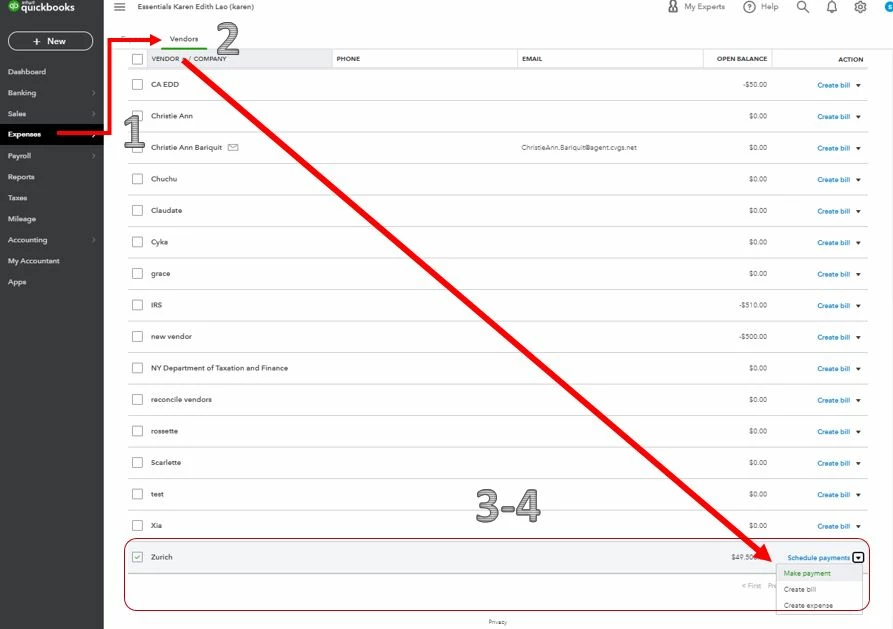
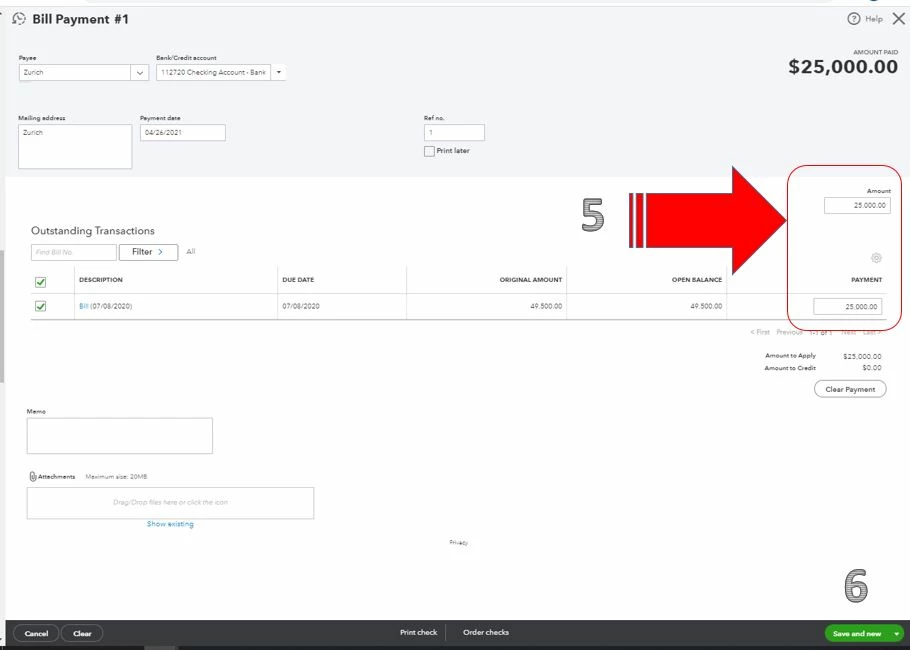
Additionally, you can enter the partial payment by going to +New, and then Pay bills. Just type in the amount in the Payment field.
If you need help with other vendor tasks, click this link to go to our general topics with articles.
Don't hesitate to reach out to me anytime if you still have questions or concerns with vendor transactions. I'm always here for you. Take care and have a lovely day ahead.
Enter your E-mail address. We'll send you an e-mail with instructions to reset your password.