Thank you for taking the time to get back to us, leen-wvodesigns-.
I understand that you came across an article regarding creating Cash Disbursements Journal, and it left you feeling unsure about how to proceed.
Upon checking the link, it seems that the procedures highlighted are for the desktop version (QBDT). But don't worry, I'll walk you through the correct steps to generate that record in QuickBooks Online Advanced.
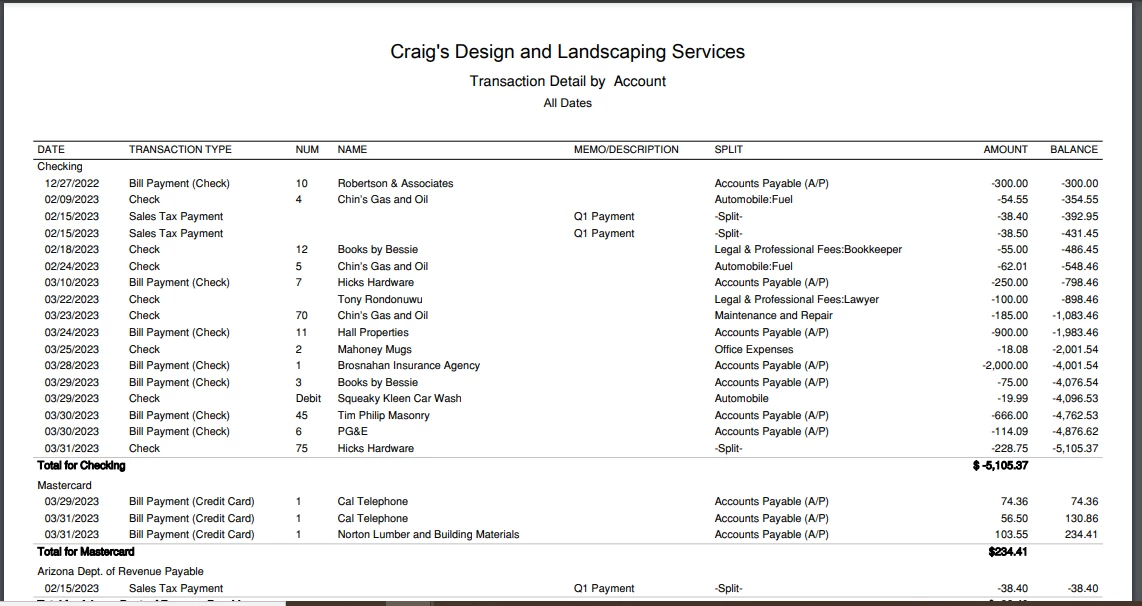
This time, we'll have to customize the Transaction Detail by Account report to show your itemize financial expenditures paid through cash, check, or electronic funds transfer. Here's how:
- Go to the Reports menu.
- Under For my accountant, choose Transaction Detail by Account.
- Click the Customize button.
- Set the appropriate period and accounting method.
- Head to the Rows/Columns section, then group the data according to your preferences.
- Make sure to tick the Type, Date, Num, Memo, Clr, Split, and Amount checkboxes.
- Select Check, Bill payment (Check & Credit Card), Paycheck, Liability payment (Check, Credit Card & Epay), and Sales tax payment from the Transaction Type filter.
- Hit Run report.
Take a look at my screenshot below:
To get the most out of QBO's reporting capabilities, I encourage reading these articles:
Please know that I'm always here to support you every step of the way. Don't hesitate to tap me if you have product questions. Together, we can ensure that you're able to effectively manage your books and feel confident in using our platform.


