
November 26, 2019
Solved

Category doesn't show on invoices, 3rd request

  • November 26, 2019
  • 1 reply
  • 0 views
Original commenter did not share additional details

Best answer by ShiellaGraceA

You were very helpful to tell me reasons it doesn't work. Is there any way you can tell me how to have a Produce/Service/Category/anything in QB that will show up on the invoices as Time shows on invoices.  The feed from Time entries flows right through to invoices in all aspects. Other expense do not. See attached.

We are still in the same place when I started this request. 


Hi cloyd1,


I'd like to add some insight about the Product/Service category doesn't show up in your invoices.


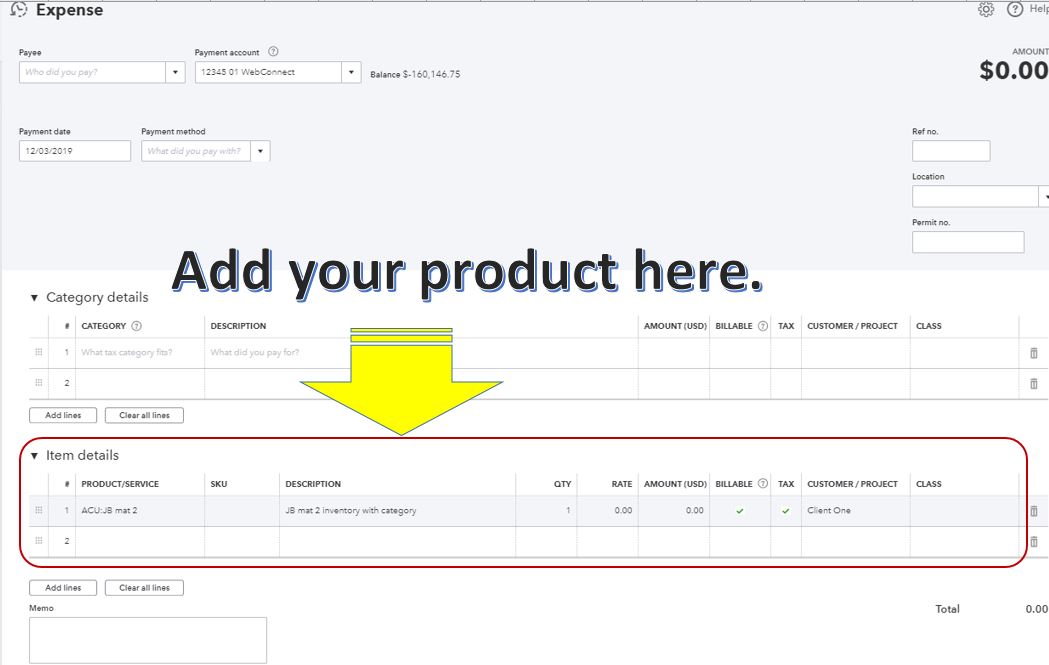
To see the product/service category in your invoice, you can add it to the item details section. This way, you'll be able to see the category in your invoices. Let me walk you through how.

  1. Click +New.
  2. Click Expense.
  3. In the Expense page, scroll down to the Item details section.
  4. Select the product/service item and other expense information. Make sure to mark the Billable box and choose the Customer/Project.
  5. Click Save and close.

Once done, go back to your invoice and add the billable expense.


Otherwise, check the list of these items that have no category to verify if the field is blank or not.

  1. Click Gear.
  2. Click Products and Services.
  3. In the Find products and services field, type the product or item name.
  4. Click the Edit link.
  5. Click Save and close.

The screenshot will show how it looks like to add an item to your expense and in the invoice.


I've also added our page about income and expenses for additional resources.


Please know that we're always here to help if you have other questions.


1 reply

November 26, 2019

Hello there, @cloyd1.


I can see that this is your third post about category not shown in the invoice. If you already enabled the Category box in the invoice template and checked the Product/Service column as suggested by my colleagues, you can perform basic troubleshooting steps to get this resolved. 


Please start with accessing your account through a private browser. You can refer to the shortcut keys depending on the browser you're using:

  • Google Chrome, press CTRL  Shift N
  • Mozilla Firefox: press CTRL  Shift P
  • Internet Explorer: press CTRL  Shift P
  • Safari: press Command Shift N

If you're able to succeed by following the steps above, switch back to your regular browser and clear cache. I also suggest switching to a different supported browser if all fails.


For additional reference, you can use the following link about how to categorize the products and services you sell, use them in transactions, and how they can help you with reporting: Group your products and services into different categories.


Let me know if you need more help. Just hit that Reply button below to post any other questions. Thanks.

cloyd1Author
November 27, 2019

I’m not being clear to you in my statement. See attached link which is the view my customer sees on the invoices. I put a Category as I’m entering the Expense or Bill from the vendor because QB will not allow me to complete the entry until I do . The invoices to my customer come from QB not my email. 
I’ve used the QB app and Chrome on two different computers. 

https://www.dropbox.com/s/59zxwcep8av67om/no%20Category.JPG?dl=0

November 27, 2019

Hello there, @cloyd1.


In QuickBooks category is used and was set as billable to the customer. This will not show up on your Invoices or sales receipt.


You have to turn on Show Items on expenses then use Product and Services on your bills and expenses. This way when you set this to billable it will show up what was billed as a product and service.


Category in Quickbooks Online is an internal record that isn't allowed to be shown on your customers. Only the user of QuickBooks Online can see this data and restricted to be added on your invoices and sales receipt


Also, you can always visit our Help articles page for QuickBooks Online to learn and read some related articles that can help guide you in your future tasks.


I'm here anytime you need help or if you have other questions. Have a good one.