October 11, 2023
Solved

Chart of accounts balance doesn't match account balance

  • October 11, 2023
  • 2 replies
  • 0 views

I created and then deleted a $50,000 transfer between two accounts. The account balances are correct on both account pages when I look at the list of transactions, but the Chart of Accounts doesn't reflect the deletion and lists $50K too much in one account and $50K too little in the other.


I've searched the full list of transfer transactions to see if the transfer is still listed there, and it's not listed, but it's obviously lingering somewhere. Any suggestions for clearing this data so that the chart of accounts is accurate?


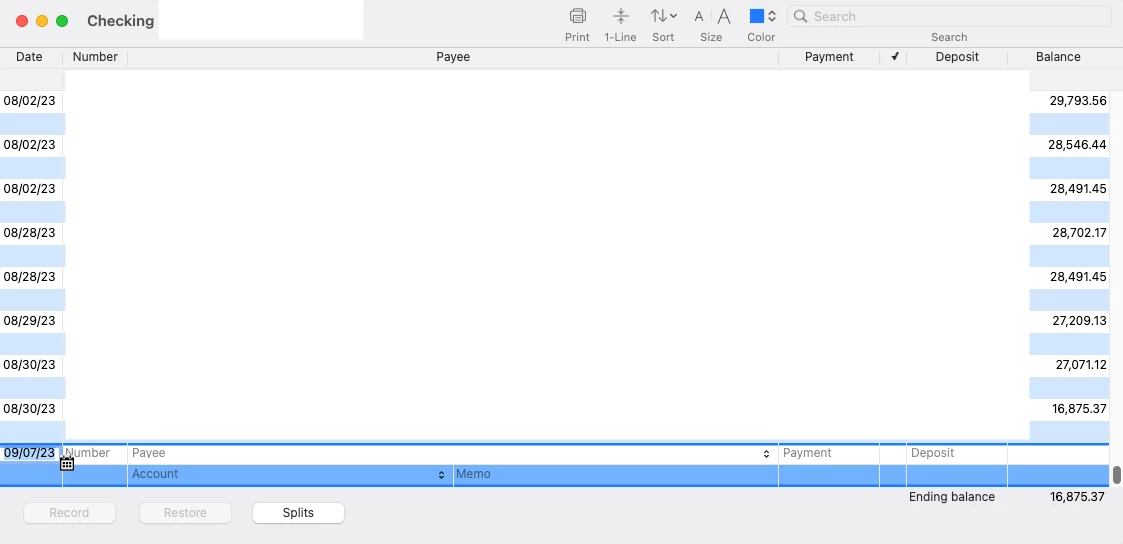
(See below for one account. COA says ~$66K, actual balance is ~$16K as reflected on the account.)


Best answer by AlcaeusF

Hi there, tilfoundation.


I'm here to help locate the deleted transaction to correct and match your Chart of Accounts (COA) and account balances in QuickBooks Desktop (QBDT) for Mac.


Deleting, voiding, or modifying previously cleared and reconciled transactions can potentially result in balance discrepancies within your COA and accounts.


To isolate and identify the cause of the discrepancy, we can run the Reconcile Discrepancy report. This report shows cleared transactions that were changed since you last reconciled a particular account. The report can help you when QuickBooks and your bank statement show different beginning balances for the current reconciliation period.


Here's how to pull it up:


  1. Choose Reports, then Banking.
  2. Select Reconciliation Discrepancy.
  3. Choose the appropriate account, then hit OK.
  4. Edit or Delete the transaction to correct the discrepancy.


You can also run the Audit Trial report to check for the deleted transaction. Here's how:


  1. Go to the Reports menu.
  2. Hover on Accountant & Taxes.
  3. Select Audit Trail.


We can customize the report to filter out the data by clicking on the Customize button. Let's just make sure that the Date Entered/Last Modified drop-down menu covers the date on when the transaction was deleted.


To ensure your account is balanced and accurate, I suggest performing a reconciliation on a regular basis. Refer to this article for future reference: Reconcile accounts in QuickBooks for Mac.


Please let me know if you have follow-up questions about this or anything else. I'm always here to help. Take care.


2 replies

AlcaeusF
AlcaeusFAnswer
October 11, 2023

Hi there, tilfoundation.


I'm here to help locate the deleted transaction to correct and match your Chart of Accounts (COA) and account balances in QuickBooks Desktop (QBDT) for Mac.


Deleting, voiding, or modifying previously cleared and reconciled transactions can potentially result in balance discrepancies within your COA and accounts.


To isolate and identify the cause of the discrepancy, we can run the Reconcile Discrepancy report. This report shows cleared transactions that were changed since you last reconciled a particular account. The report can help you when QuickBooks and your bank statement show different beginning balances for the current reconciliation period.


Here's how to pull it up:


  1. Choose Reports, then Banking.
  2. Select Reconciliation Discrepancy.
  3. Choose the appropriate account, then hit OK.
  4. Edit or Delete the transaction to correct the discrepancy.


You can also run the Audit Trial report to check for the deleted transaction. Here's how:


  1. Go to the Reports menu.
  2. Hover on Accountant & Taxes.
  3. Select Audit Trail.


We can customize the report to filter out the data by clicking on the Customize button. Let's just make sure that the Date Entered/Last Modified drop-down menu covers the date on when the transaction was deleted.


To ensure your account is balanced and accurate, I suggest performing a reconciliation on a regular basis. Refer to this article for future reference: Reconcile accounts in QuickBooks for Mac.


Please let me know if you have follow-up questions about this or anything else. I'm always here to help. Take care.

October 12, 2023

Thanks for your quick reply. I was able to resolve the issue by going to File > Utilities > Verify Data and then File > Utilities > Rebuild Data.

JaeAnnC
October 12, 2023

Thanks for getting back to us, @tilfoundation.
 

We appreciate you returning to this thread to share the troubleshooting steps you've performed to resolve your issue. Your insights have been incredibly valuable and will be helpful for other users who encounter the same concern about incorrect Chart of Account balances in QuickBooks Desktop (QBDT) for Mac.
 

If anything else comes up, please don't hesitate to come back to the Community for further assistance. We're always more than willing to help. Stay safe and have a wonderful day ahead!

May 26, 2024

Hello i have been WORKING WITH QBOS ONLINE AND SAME I DO HAVE AN UNBALANCE BETWEEN QUICKBOOKS ACCOUNT AND BANK ACCOUNT , DO I HAVE TO GO MONTH TRU MONTH TO SEE WHE ARE THE MIXTAKES?? I HAVE NOT REALLY TOO MANY TRANSACTIONS EXCLUED. THANKS   

May 26, 2024

Let me share information that will help you find the discrepancy transactions in QuickBooks Online(QBO), @ERICKHG.


Yes, you're right. You'll need to review each month manually added transactions or by running a Reconciliation report to identify and find the transaction that was either added or removed, causing this discrepancy on your accounts. 


Here's how:


  1. Go to the Reports menu in the left panel.
  2. Type Reconciliation Report in the Find report by name search bar.
  3. Select Reconciliation Reports.
  4. Select the Account for the reconciliation report you want to view.
  5. From the Report period drop-down arrow, choose the reconcile period.
  6. Select View Report.


After verifying the balances, you can check these articles to help you further correct the discrepancies.


Please let us know if you have other questions about correcting your balances. I'm always around to help. Stay safe.