January 7, 2021
Solved

"Connect to PayPal" is not giving me all of my "Chart of Account" options to choose from under "Edit - Sales"? How do I get it to show all of the accounts to choose from?

  • January 7, 2021
  • 1 reply
  • 0 views
When you choose how to categorize the fees I get a long list of categories to scroll through. But when I go down to sales and try to pick my subcategory, hardly anything shows up to pick from.
Best answer by ubiquitous

I'd also like this fixed the soonest time possible, @ubiquitous.


Since the above solutions didn't work, contacting our support team is the best option at this point. They can perform a screen-sharing session to determine why you're unable to select a subcategory for your PayPal sales. They can also provide other fixes and even escalate this case if needed. 


For the new Help menu interface:


  1. Click the (?) Help icon at the top.
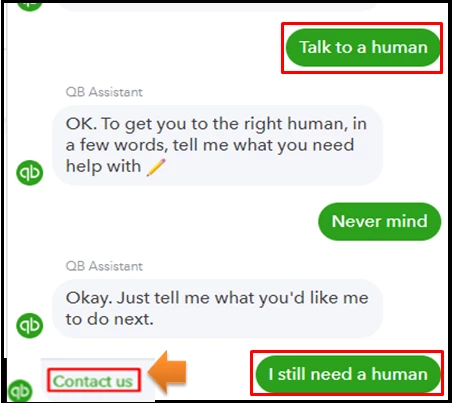
  2. Select the Talk to a human option, and then type it again when prompted.
  3. Choose I still need a human, and then proceed with Contact us.
  4. Enter your question or concern, like "I'm unable to select a subcategory for my PayPal sales."
  5. Click Let’s talk.
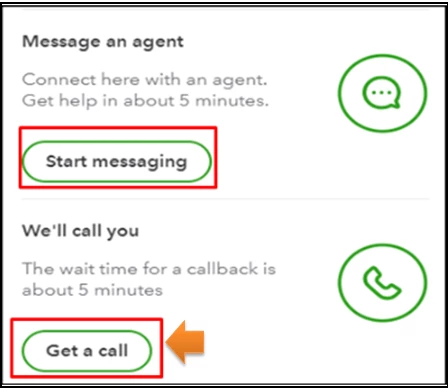
  6. Select Get a call. You can also choose the Start messaging option to reach out to our support.
  7. Please follow the on-screen steps to continue.
For the old Help menu, please see this article for the steps: Contact QuickBooks Online support. It also includes the support hours when you can interact with them.


Also, I'll be adding this handy article for more PayPal insights: Connect to PayPal FAQ.


I'm just a comment away if you need assistance about managing your PayPal account. I'll get back to this thread to take care of your concerns.


I just thought I'd update this thread. This has been finally figured out. What is showing in the drop-down is from the Sales on the right side of screen. So you have to create it there and then categorize it accurately. Very odd way to do it - it really should work like the other bank accounts do so that it is more intuitive... that is the name of this company, right? ;)


I am still waiting for my first transaction to come across to confirm, but I think it has been solved. 

1 reply

JasroV
January 7, 2021

Let’s access your QuickBooks Online (QBO) account on a private window (incognito) and connect your PayPal account from there, @ubiquitous.


This way, we can verify if the issue you’re having is caused by stored cache files. Browsers save data cache to help load the page faster on your next visit. When piled up, this causes issues and affects your QBO performance.


Using a private window doesn’t save any cache files. Thus, this can help us verify the issue easily. To start, here are the keyboard shortcuts you can use in opening a private window:


  • Press keys: Ctrl + Shift + N (Google Chrome browser)
  • Press keys: Ctrl + Shift + P (Mozilla Firefox browser)
  • Press keys: Command + Shift + N (Safari browser)

If you’re able to connect your PayPal account, I’d suggest clearing your regular browser's cache. This will delete all saved data files from your browser and start with a clean slate. If the issue persists, try using other supported browsers. That way, we can check if this is a browser-integrated issue.


When everything is all set, you can now categorize and reconcile your accounts whenever you’re ready.


In case you have other questions in mind, you’re always welcome to share them with me. I’ll be around to listen and help you out. Keep safe! 

January 8, 2021

I typically use Chrome when using a browser and I tried Firefox as well. I did open the incognito window and try that this morning and it still doesn't give me the list. This does not feel at all like a browser issue to me. I believe the program is either limiting the number of categories avialable or for some reason not giving subcategories as an option (which are needed to report correctly).


I feel like I should clarify -  I can get "Connect to Paypal" connected (transactions are coming across), however when I go into "Edit" (either at the top to do it overall, or try within an individual transaction) to change how things are categorized, the list of categories is not complete / does not include subcategories.


While the list for "Expenses/Fees" seems to be complete, there are a lot to scroll through and they all look familiar from my Chart of Accounts. The list for "Sales" is very small, only 10 and there is no scrolling at all. 


I am attaching 3 screen shots to show you 1) where I am talking about for the edit button, 2) the list of categories I have available under "Expense/Fees" and then 3) the list of categories I have available under "Sales".


You will see in the "Expense/Fees" screen show that there is a scroll bar and so there are MANY categories. There is NO scroll bar in the screen shot for "Sales" and only 10 categories available.

MaryLandT
January 8, 2021

Allow me to share some insights on how to categorize your PayPal transactions, ubiquitous.


We use details available from PayPal to decide what category to assign to each transaction. You need to modify mapping settings for your transactions.


Changes in your company processes might require you to change the mapping settings of your Sync with PayPal transactions. Let me show you how to do that:


  1. Log in to Intuit App Center.
  2. Select the My Apps tab.
  3. Locate the Sync PayPal app card, then select Settings.

If you create PayPal accounts under a sub-account, the drop-down menu in mappings settings won't show them appropriately indented. Though it will display them with the associated parent account. 


All transactions imported after the mapping settings changed will be imported using the new mapping. All previously imported transactions will continue to remain in their appropriate accounts as per the previous mapping.


See the attached screenshot below to know what does each of the mapping screen drop-down means.


I've also added these articles for additional information:

Stay in touch with me by commenting below if there's anything else you need. I'll be around to help categorize your PayPal transactions.