May 6, 2020
Solved

creating an income statement while showing monthly sales

  • May 6, 2020
  • 2 replies
  • 0 views

Hello community- hope all are staying safe! How do I create last year's income statement showing monthly sales? Thanks! 

Best answer by Mark_R

We're all safe and doing fine, @pial. I hope you as well.


You can run and customize the Profit and Loss by Month report to show your monthly sales. Let me guide you through the steps.
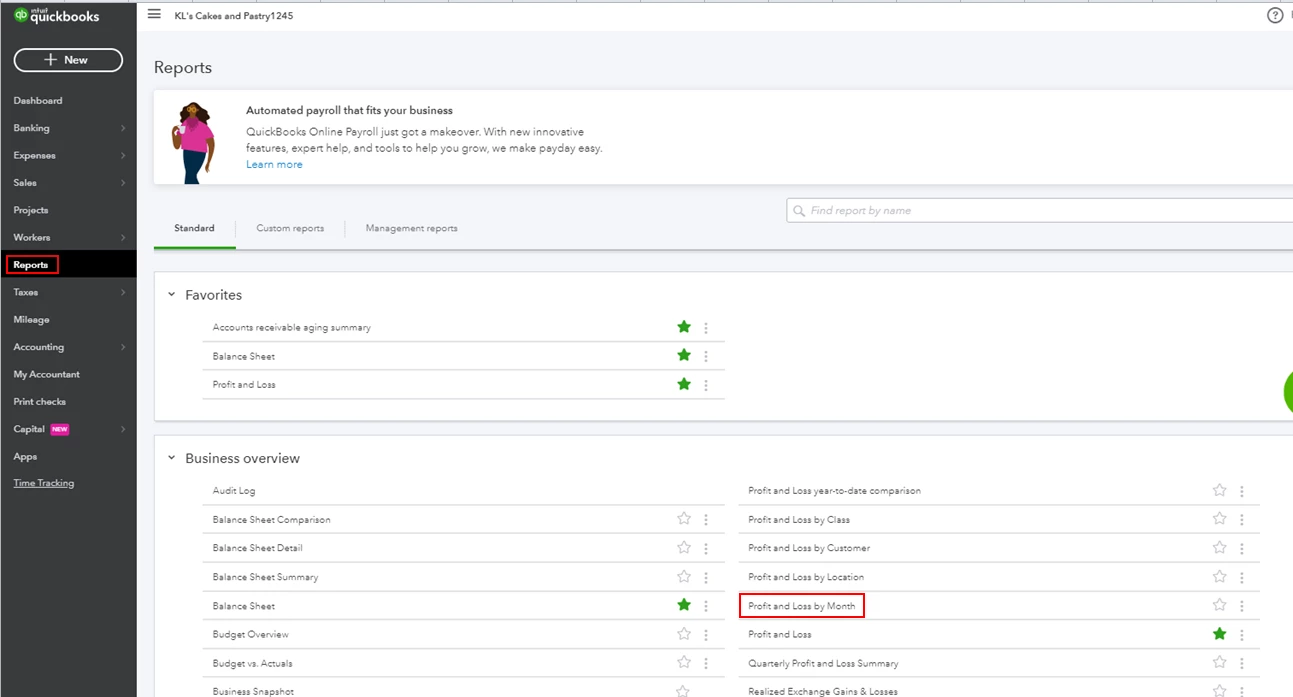
 

  1. Click Reports from the left menu.
  2. Select the Profit and Loss by Month report in the Business overview section.
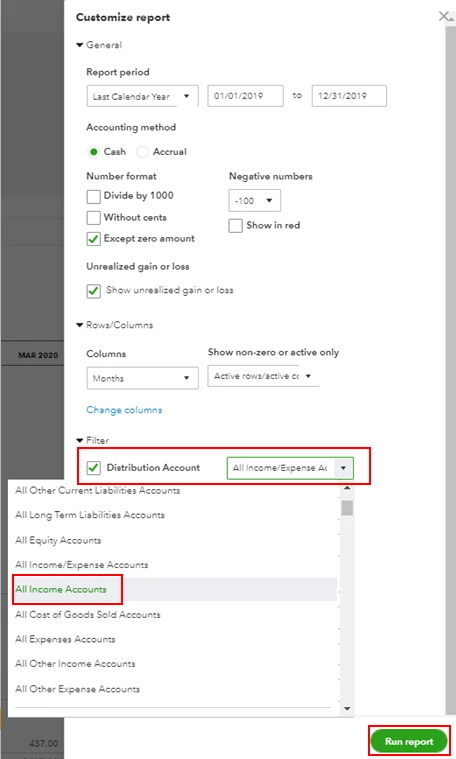
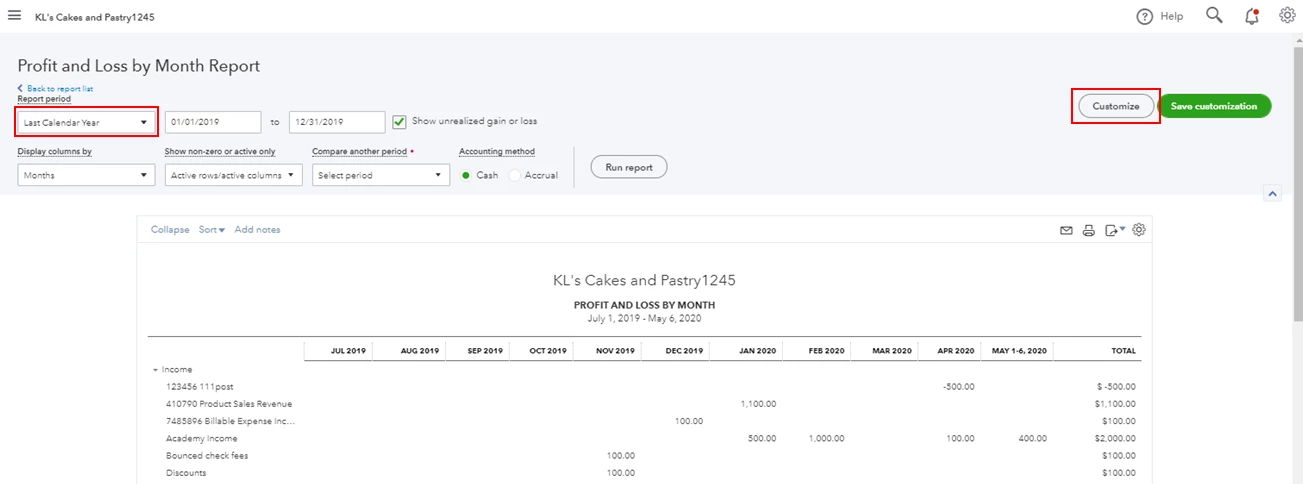
  3. In the Report period drop-down, select Last Calendar Year.
  4. Click Customize.
  5. Go to the Filter section, then select All Income Accounts from the Distribution Account.
  6. Hit Run report.

Here's an article you can read for more details: Customize reports in QuickBooks Online.


Just in case you want to memorize this report, feel free to check out this article for the detailed steps and information: Memorize reports in QuickBooks Online.


Please let me know if you need clarification about this, or there's anything else I can do for you. I'll be standing by for your response. Have a great day and keep safe.

2 replies

Mark_RAnswer
May 6, 2020

We're all safe and doing fine, @pial. I hope you as well.


You can run and customize the Profit and Loss by Month report to show your monthly sales. Let me guide you through the steps.
 

  1. Click Reports from the left menu.
  2. Select the Profit and Loss by Month report in the Business overview section.
  3. In the Report period drop-down, select Last Calendar Year.
  4. Click Customize.
  5. Go to the Filter section, then select All Income Accounts from the Distribution Account.
  6. Hit Run report.

Here's an article you can read for more details: Customize reports in QuickBooks Online.


Just in case you want to memorize this report, feel free to check out this article for the detailed steps and information: Memorize reports in QuickBooks Online.


Please let me know if you need clarification about this, or there's anything else I can do for you. I'll be standing by for your response. Have a great day and keep safe.

pialAuthor
May 6, 2020

Thank you for the detailed explanation, Mark!

April 8, 2022

How do I create an income statement, breaking it out by month in QB Premier Plus Contractors Edition 2021?  Thank you.

April 8, 2022

Good day, @Libby10.


Let me help you accomplish your task in QuickBooks Desktop (QBDT) Premier.


To view your income statement, simply run the Profit & Loss Standard report. Then, customize it so you would only see your monthly income transactions. 


Let me show you how:
 

  1. Go to Reports and select Company & Financial.
  2. Click the Profit & Loss Standard report.
  3. Filter the Dates to All. Then, choose Months in the Show Columns drop-down list. 
  4. Click Customize Report and select Filters
  5. Search for Account and choose Income and other income accounts.
  6. Click OK


You can now review your monthly income statements in QuickBooks. 


For additional reference in customizing reports, please check out this article: Customize reports in QuickBooks Desktop.


If you have any follow-up questions or concerns, don't hesitate to post again here in the Community or leave a comment on this thread, @Libby10. Take care and have a good one.