December 15, 2022
Solved

Custom Expense Account Reports

  • December 15, 2022
  • 1 reply
  • 0 views

Has anyone been able to successfully create a custom report for their expense accounts? I have QBO Advanced and when working in the custom reports, I started with adding the data columns from the chart of accounts drop-down. I want to see the balance only for specific accounts. The parent accounts are COGS, Fringe Pool, G & A Pool, Overhead Pool, and Facilities Pool. I would like to see the sub-accounts fall under the parent account with a rollup to the parent. Is that possible?


Thanks for the help!

Best answer by SirielJeaB

Hello there, @mgilkessmith. Thank you for reaching out to us.


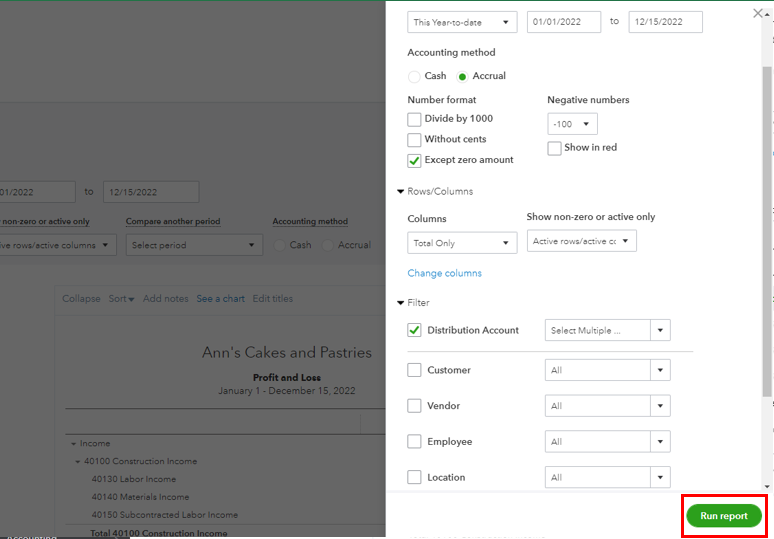
You can run a Profit and Loss report to view your expense accounts in QuickBooks Online. Then, customize it by choosing the parent and sub-accounts that you want to display in your report. I'll show you how:


1. Select the Reports tab, then search the Profit and Loss report.


2. To modify the accounts, click the Customize option.


3. Click Filter, then check the Distribution Account

4. Hit the dropdown button, then select the expense accounts you want to display. 


5. Click Run report.


You can memorize reports in QuickBooks Online.   After you customize your report, it allows you to save it with the current customization settings. 


Please comment down below if you have further concerns about your financial reports in QuickBooks Online. We're available 24/7. Stay safe, mgilkessmith.

1 reply

December 15, 2022

Hello there, @mgilkessmith. Thank you for reaching out to us.


You can run a Profit and Loss report to view your expense accounts in QuickBooks Online. Then, customize it by choosing the parent and sub-accounts that you want to display in your report. I'll show you how:


1. Select the Reports tab, then search the Profit and Loss report.


2. To modify the accounts, click the Customize option.


3. Click Filter, then check the Distribution Account

4. Hit the dropdown button, then select the expense accounts you want to display. 


5. Click Run report.


You can memorize reports in QuickBooks Online.   After you customize your report, it allows you to save it with the current customization settings. 


Please comment down below if you have further concerns about your financial reports in QuickBooks Online. We're available 24/7. Stay safe, mgilkessmith.