
Solved
Custom Transaction Detail Report
Why is the item name showing a second time in the parentheses when running the custom transaction detail report?
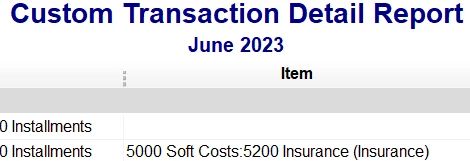

Why is the item name showing a second time in the parentheses when running the custom transaction detail report?
Hello, AXie.
I'll shed some light on the item name that is showing on the report twice.
This is generally caused by the Show Items By setting in your Preferences. It looks like it is set to Name and Description. If you only want to show it once, we'll want to set it to Name Only.
Here are the complete steps:
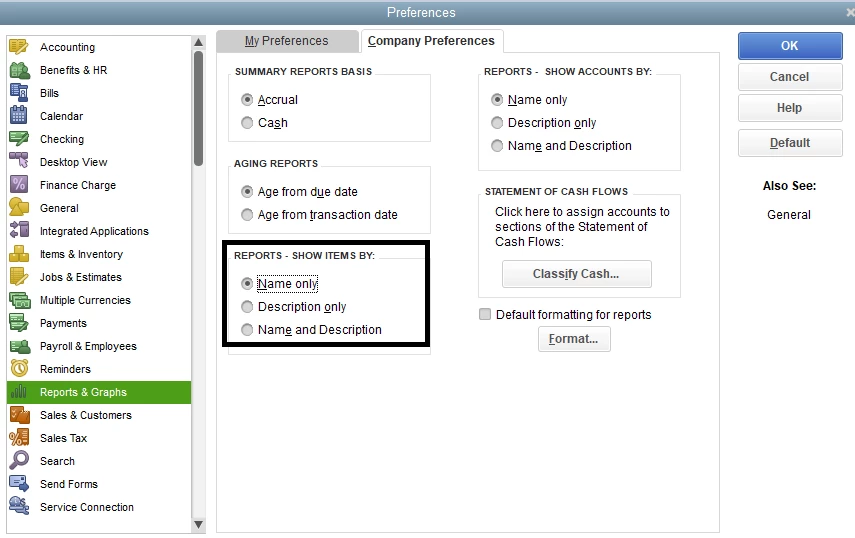
Click on the Refresh button if the report window is still open. This should remove the parentheses for the name on any reports.
If you need a hand managing other reports, I'll add this article as a guide: Understand reports.
After managing your reports, I'll also include this guide if you need to reconcile your accounts: Reconcile an account in QuickBooks Desktop.
Let us know if you have other concerns about your report data. If you need some assistance in managing your entries, items, or lists, feel free to add the details below. We're here to help.
Enter your E-mail address. We'll send you an e-mail with instructions to reset your password.