May 1, 2023
Solved

Customer:Jobs in reports

  • May 1, 2023
  • 1 reply
  • 0 views

I am trying to run a report of AMEX transactions that includes the Customer:Job. Name and Source Name default to the vendor. How do I get the Customer:Job to show up in the report? I know how to do it if I want transactions for just one job but I'm trying to pull the whole AMEX GL. 


Additionally, is there any way to control which MEMO field appears in reports? 

Best answer by BigRedConsulting

To include the Job name, include all the details of each transaction, not just the "source" rows of the transaction, the ones that use the credit card account.


A Journal report will show these details.  To create one, start at Reports  | Accountant & Taxes | Journal.


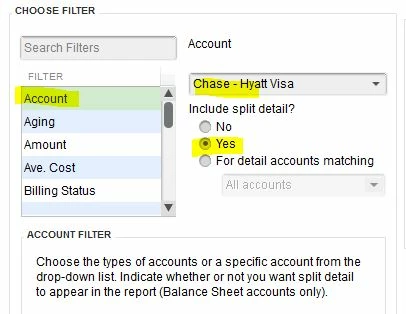
Then click Modify Report and filter it for the credit card account, including split details. The Account filter options should look like this, only using the desired credit card account on your chart of account:


On the resulting report, the Customer:Jobs - where entered - will appear in the Name column on the detail rows of the credit card transactions.

1 reply

BigRedConsulting
May 2, 2023

To include the Job name, include all the details of each transaction, not just the "source" rows of the transaction, the ones that use the credit card account.


A Journal report will show these details.  To create one, start at Reports  | Accountant & Taxes | Journal.


Then click Modify Report and filter it for the credit card account, including split details. The Account filter options should look like this, only using the desired credit card account on your chart of account:


On the resulting report, the Customer:Jobs - where entered - will appear in the Name column on the detail rows of the credit card transactions.

loilarsAuthor
May 2, 2023

This answered both questions, thank you so much!