August 15, 2017
Solved

Customize Profit and Loss to compare two date ranges.

  • August 15, 2017
  • 4 replies
  • 0 views

Is there a way with Quickbooks to run a P&L with two custom date ranges for comparison? For example I want to run a P&L with the dates of 07/26/2017-08/08/2017 and compare it to the date of 07/26/2016 - 08/09/2016 from last year. I ended up running them individual and exporting them and then creating them manually. I am looking for a faster way.


(Title has been edited by moderator for clarity)

    Best answer by QBSuperGenius

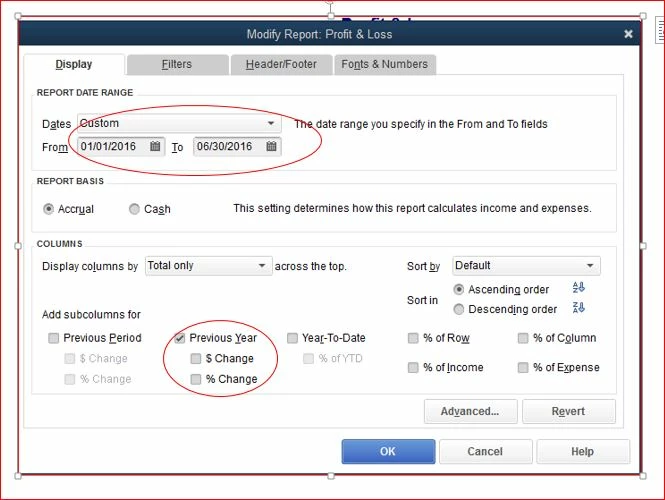
    Yes.  You would create the time period you want for the report and then customize the report and select "Prior Year".  This will create a comparison column for the same time period for the prior year.


    Hope this helps!


    -Dawn Brown

    4 replies

    QBSuperGenius
    August 15, 2017

    Yes.  You would create the time period you want for the report and then customize the report and select "Prior Year".  This will create a comparison column for the same time period for the prior year.


    Hope this helps!


    -Dawn Brown

    August 15, 2017

    Thank you, but the problem is the weeks are off by one day. Our year last year ran from 12/30/2016 - 01/03/2017 and this year it is 01/04/2017-01/02/2018. Our weeks start on a Wednesday and end on a Tuesday, so every year it is a bit different.

    QBSuperGenius
    August 15, 2017

    It is not possible to set-up the comparative columns with different custom date ranges within the basic QB program.  There are some 3rd party custom report writers that will allow you to do this or you can set-up templates within excel.


    -Dawn

    June 12, 2018

    Patricia - Did you ever get a positive response to your question?  In retail, its important to compare similar time frames like Monday to Sunday so the busy weekends don't get split up.  I could really use the ability to plug in custom dates for both periods in the comparison.

    Please let me know if you were ever able to make this work for you without downloading to Excel.  Thanks.  - Carol

    MorganB
    June 13, 2018

    Hi, PDXFinns.


    I appreciate you turning to the Community for support. I'd like to help point you in the right direction for this custom report.


    I think the idea of a comparison Profit and Loss report is a great one. While QuickBooks has many reports available for customization, there isn't an option for P and L comparison. To see this report added, I invite you to leave feedback for the Product Development Team. This is the best way to ensure meaningful products are added in the future. Your ideas and suggestions can be submitted directly through your account by clicking the Help tab in the top navigation bar, then Send Feedback Online.


    I wish you and your business continued success. Please let me know if you have any other questions.

    June 14, 2018

    Morgan - Why do you say that?  I run this report in QBDT, are we just talking QBO here?

    September 12, 2019

    How do I get the prior month I'm comparing to be before the current month I am running the report for?

    AlexV
    September 12, 2019

    I can walk you through on how to create a comparative reports, stl06.


    There are lot of reports available that you can customize. But we're unable to add a new column for prior dates to all them.


    What I can suggest is to create your own custom report if you're using QuickBooks Desktop. From there, we can add a column for previous dates.


    Here's how:

    1. Go to Reports menu, hover your cursor to Custom Report. Then, select Summary.
    2. On the pop-up, select Display. Modify the date range. 
    3. From the Add subcolumns for section, select either Previous Year, Previous Date, or  Year-To Date.
    4. Go to the Filters tab. Choose or enter additional information that you want to include on the report.
    5. Click on OK button.

    If you're using QuickBooks Online, there are ready to use comparative reports. Those are Balance Sheet Comparison, Profit and Loss Comparison, and Profit and Loss year-to-date comparison.

    1. Go to the Reports tab.
    2. Search and select any of those mentioned reports.

    If none of these works for you, the best option I can suggest is to export them to an excel file. From there, you can merge the previous data and the new into one. Simply click on the Export button and select Export to Excel.


    I've listed an articles below about customizing reports:

    This should help you to achieve your goal for today. I'm always here if you need additional help.

    September 6, 2023

    I would like to compare two different periods that do not share the same timeframe. For example, last calendar year compared to this year through August 6, for example.  One column would have 2022's 12 months' activity, the other column would have 7 months' plus 6 days' activity.


    The fact that I apparently cannot customize a report this way is a terrible indictment of QBDT's manifest limitations.  How this simple customization isn't built into QBDT is astonishing.

    December 7, 2021

    Is there a way to compare YTD 2021 and 2019 (take the COvid year out? or compare all 3 years Year to Date?

    Candice C
    December 7, 2021

    Greetings, @toshea1111


    Thanks for chiming in on this thread. Let's work together and get this handled. 


    At this time, there isn't a way to skip a year when running a report for a particular period. However, I suggest running the report with different periods and exporting them to Excel to compare the information as needed. 


    Let me know if this works out and does the trick. I want to ensure that you get back to running your business as soon as possible. Take care! 

    December 7, 2021

    Thanks for your message, I wouldn't mind all 3 years if that was possible. I have exported all the years to excel but it is a pain as some of the accounts are not in each of the years so the rows do not line up and it is hard to compare.