November 5, 2024
Solved

CUSTOMIZE VENDOR REPORT

  • November 5, 2024
  • 1 reply
  • 0 views

Good Morning 

I would like to modify the vendor report through filters, just I need it to only show me the name of the vendor and the total of their debt How can I do that? I tried with the filter but I couldn't find the specific field to view this report manner. 

Thank you 


Andrea [Removed]

Best answer by LeizylM

I'm here to provide valuable insights on generating a report that shows only the vendor names and their total debts in QuickBooks Online (QBO), Andrea.


Before doing so, what vendor report are you trying to generate? We have an available report that will suit your needs.


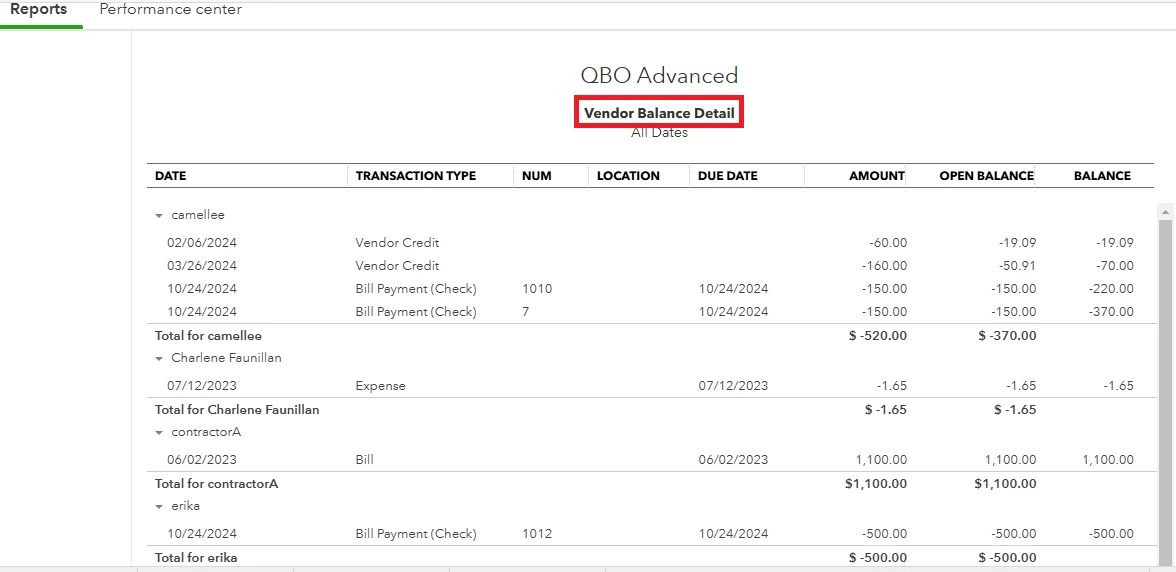
We can utilize the Vendor Balance Detail report to show the vendor names along with their total debts. I've included a screenshot for your reference.
 

Additionally, you can use this reference to apply filters to your report, allowing you to display specific accounts or customers. You can customize the report layout to ensure that the relevant data appears in the appropriate sections: Customize reports in QuickBooks Online.


Lastly, memorize your report to save it with its current customization settings.


Feel free to update me if you have additional concerns about customizing reports in QBO. I'll be available to assist you. Take care and stay safe!


1 reply

LeizylMAnswer
November 5, 2024

I'm here to provide valuable insights on generating a report that shows only the vendor names and their total debts in QuickBooks Online (QBO), Andrea.


Before doing so, what vendor report are you trying to generate? We have an available report that will suit your needs.


We can utilize the Vendor Balance Detail report to show the vendor names along with their total debts. I've included a screenshot for your reference.


Additionally, you can use this reference to apply filters to your report, allowing you to display specific accounts or customers. You can customize the report layout to ensure that the relevant data appears in the appropriate sections: Customize reports in QuickBooks Online.


Lastly, memorize your report to save it with its current customization settings.


Feel free to update me if you have additional concerns about customizing reports in QBO. I'll be available to assist you. Take care and stay safe!