

August 24, 2021
Solved

Decimal Places On Inventory

  • August 24, 2021
  • 2 replies
  • 0 views

Hello,

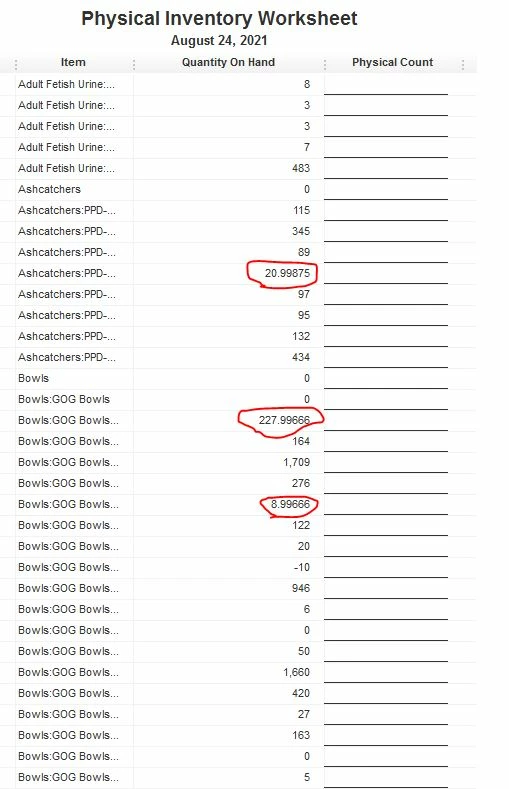
              I'm trying to fix an issue related to quantity's displayed for items. When viewing certain items it will show a non-whole number as the value.....none of our items are sold in parts/pieces, so I need everything to be whole numbers. When looking at why certain items are displaying as such...I can identify where an invoice was transacted maybe 6 months ago...and the quantity on the invoice will be 0.000125, or something like that, yet the price and the price subtotal will be zero. I'm wondering how I can avoid this in the future, and also how to change the display of a current item, that's being effected by something invoiced 6 months- a year ago. I did try going to Edit-----> Preferences and clicked the box "Automatically Place Decimal Point" & that didn't' appear to fix anything. Any help on this issue would be much appreciated, thank you so much. 
Best answer by Catherine_B

Hello there, PhreshPicks.


Let me provide information as to why the quantity on hand is in a decimal figure. 


If you're using a unit of measure, it's possible the conversion caused the decimal amounts in your reports. Also, the amount you entered in your sales and purchases may be entered in decimals. You can try drilling down to the report and review the transactions further. You can also add the Unit of Measure column. 


Here's how to add the column: 


  1. Open the report and click the Customize Report button.
  2. Under the Display tab, search for U/M and select it.
  3. Select OK to refresh the display. 

However, if you didn't use the unit of measure, we can try repairing the company file by running the Verify and Rebuild Data process. You can proceed to Solution 2 if the same thing happens. 


I'm just here to keep an eye on your reply if you have any other questions. Take care!

2 replies

August 24, 2021

Hello there, PhreshPicks.


Let me provide information as to why the quantity on hand is in a decimal figure. 


If you're using a unit of measure, it's possible the conversion caused the decimal amounts in your reports. Also, the amount you entered in your sales and purchases may be entered in decimals. You can try drilling down to the report and review the transactions further. You can also add the Unit of Measure column. 


Here's how to add the column: 


  1. Open the report and click the Customize Report button.
  2. Under the Display tab, search for U/M and select it.
  3. Select OK to refresh the display. 

However, if you didn't use the unit of measure, we can try repairing the company file by running the Verify and Rebuild Data process. You can proceed to Solution 2 if the same thing happens. 


I'm just here to keep an eye on your reply if you have any other questions. Take care!

August 25, 2021

Thank you so much for your help. I really appreciate this. I'm going to dive in now & see what I can figure out with your guidance. Thank you again......i'll post an update once I'm done researching. 

BigRedConsulting
August 25, 2021

Double click on the problem item quantity values to get a detail report. Then locate the transactions that don't have whole numbers and edit them and correct them so they do use whole number Quantities, since you always buy and sell this way.


Note that you may need to change the Price and the Qty so the Amount stays the same as the actual purchase or sale.

August 25, 2021

Thank you so much for your response. I'm really grateful to have found this message board.