


nolabookkeeper
November 2, 2018
Solved

Deleted Clients in "Go to client's QuickBooks" Menu

  • November 2, 2018
  • 1 reply
  • 0 views

I am a Pro Advisor using QuickBooks Online via Chrome on Windows 10 Home OS Build 17134.345.


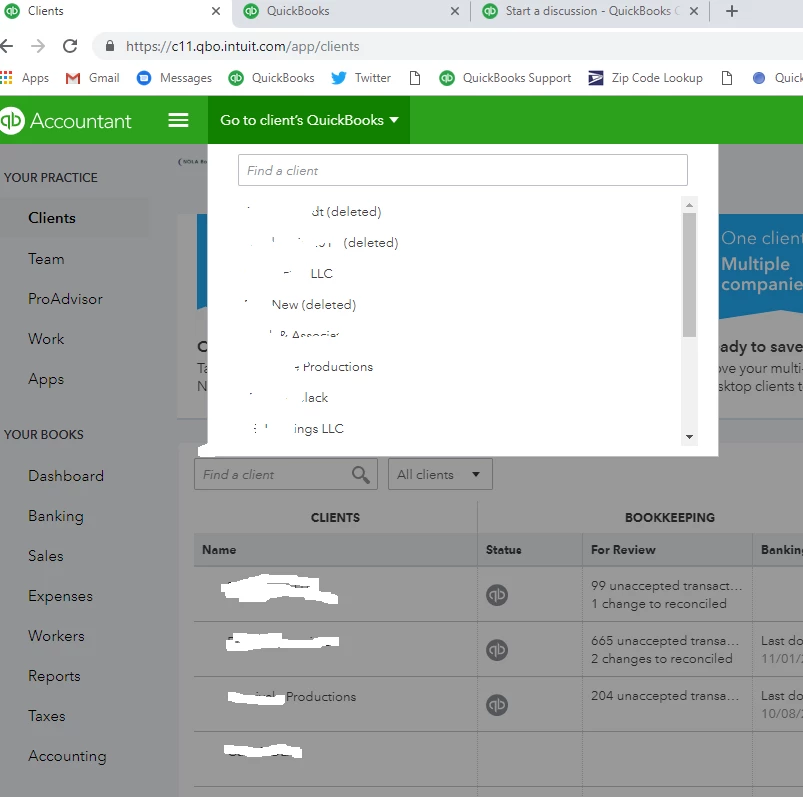
All of a sudden, long-deleted clients appear by default in the "Go to client's QuickBooks" drop-down menu on QuickBooks Accountant. I tried clearing the cache and cookies, and logged in used Microsoft Edge—I still see the deleted clients. I logged in with the QBO—same thing.


They do not appear in the client list below ("Show Inactive" is unchecked), and for various reasons I can't permanently delete them, but I don't like seeing in my menu, so help! Here's a screenshot:



Best answer by Rose-A

Thank you for getting in touch with us, nolabookkeeper.


I appreciate your efforts in trying out the basic troubleshooting steps to resolve the issue. I'd be happy to route you to the right support.


This has been a reported issue affecting some QuickBooks Online Accountant users. Our engineers are working closely to get this issue resolved.


I suggest you contact our Customer Care Team so they can add you to the list of affected customers. Any progress will be communicated via email.


Please know that I'm only a post away if you have any questions. Have a great rest of the week.

1 reply

Rose-A
Rose-AAnswer
November 2, 2018

Thank you for getting in touch with us, nolabookkeeper.


I appreciate your efforts in trying out the basic troubleshooting steps to resolve the issue. I'd be happy to route you to the right support.


This has been a reported issue affecting some QuickBooks Online Accountant users. Our engineers are working closely to get this issue resolved.


I suggest you contact our Customer Care Team so they can add you to the list of affected customers. Any progress will be communicated via email.


Please know that I'm only a post away if you have any questions. Have a great rest of the week.