October 17, 2020
Solved

Download list of historical Exchange Rates

  • October 17, 2020
  • 1 reply
  • 0 views

I am using QuickBooks online. Are there any ways to download a complete list of historical day-by-day Exchanges Rates for all currencies?


I am doing some expense analysis. I have exported a list of all expenses, then look up with the corresponding currency of the vendors. The problem is we paid many different currencies but the list of all expenses exported from QB does not show the reporting currency (which is USD), it only shows the original currency. 

Best answer by LieraMarie_A

I'm here to show you how to get the reporting currency added to your report, @howardtm!


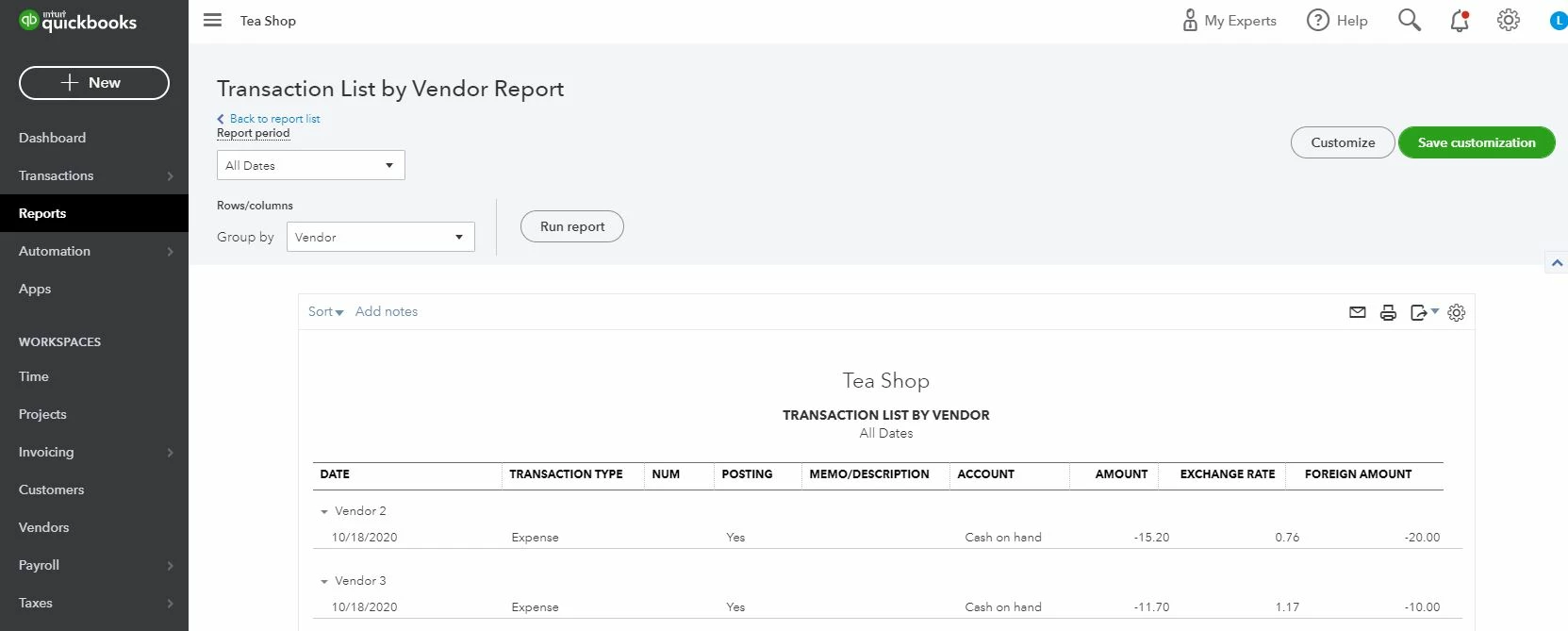
The closest variation of your desired report achievable in QuickBooks Online is the Transaction List by Vendor report, which can be customized to show the foreign amount, exchange rate, and currency.


Here's how:

  1. Go to the Reports menu.
  2. Scroll down to the Expenses and Vendors section.
  3. Select the Transaction List by Vendor report.
  4. Click on the Customize button.
  5. Modify the reporting date.
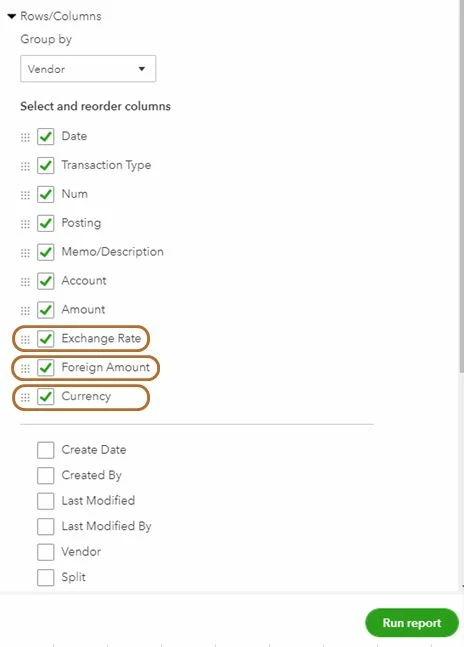
  6. Under the Rows/Columns section, click Change columns.
  7. Select the Exchange RateForeign Amount, and Currency checkbox.
  8. Click Run report.


You can check out this article to see the complete list of available reports for your QuickBooks Online version: Reports included in your QuickBooks Online subscription.


You can also export them to Excel to help give you the flexibility to use them. Simply click the Export icon and select Export to Excel


Please let me know if there's anything else that I can help with your reports. I'm always here to assist. Have a wonderful day.


1 reply

LieraMarie_A
October 18, 2020

I'm here to show you how to get the reporting currency added to your report, @howardtm!


The closest variation of your desired report achievable in QuickBooks Online is the Transaction List by Vendor report, which can be customized to show the foreign amount, exchange rate, and currency.


Here's how:

  1. Go to the Reports menu.
  2. Scroll down to the Expenses and Vendors section.
  3. Select the Transaction List by Vendor report.
  4. Click on the Customize button.
  5. Modify the reporting date.
  6. Under the Rows/Columns section, click Change columns.
  7. Select the Exchange RateForeign Amount, and Currency checkbox.
  8. Click Run report.


You can check out this article to see the complete list of available reports for your QuickBooks Online version: Reports included in your QuickBooks Online subscription.


You can also export them to Excel to help give you the flexibility to use them. Simply click the Export icon and select Export to Excel


Please let me know if there's anything else that I can help with your reports. I'm always here to assist. Have a wonderful day.

howardtmAuthor
October 18, 2020

Thanks Liera, that solved my problem. 


Just a a minor difference, in my QuickBooks version, it's under Expenses and suppliers section -> Transaction List by Supplier.