

March 28, 2023
Solved

Downloaded Transactions from Bank Account in QBO

  • March 28, 2023
  • 1 reply
  • 0 views

I have a new client that just set up their QBO. I just connected their bank accounts with Quickbooks online and it downloaded all transactions  the way it should. However, when i click to review them to go in and code them and add them to the register, it only allows me to view "one transaction at a time," and will not let me move onto code the next one or even show me the next one, until i code the one it's showing me at that time.  I've never seen this happen. All of my other clients it lets me view everything that's been downloaded all at once instead of just one at a time. Any idea why it's doing this and how to fix it?

Best answer by LieraMarie_A

Don't sweat it, @Bre1208. I'll help you display all transactions in the For Review tab. 


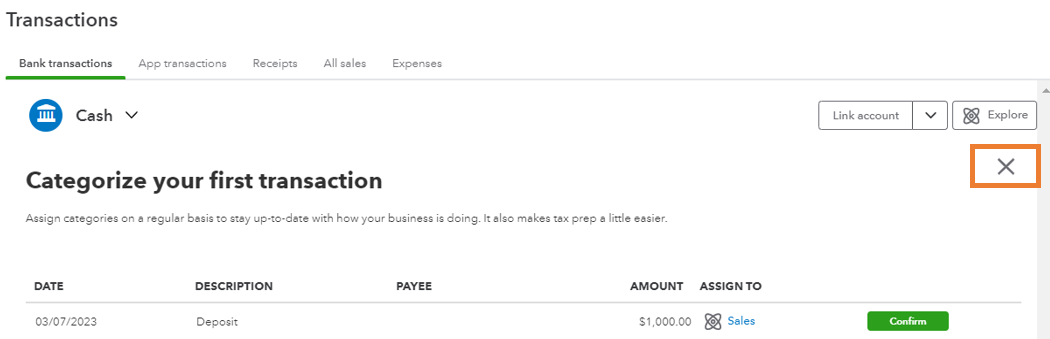
You can simply click the X icon to view everything that's been downloaded.


Here's how:


  1. Go to the Transactions page.
  2. If you see the same display as in the screenshot below, select Skip for now.
  3. Click the X icon below Explore


Additionally, it's a good practice to reconcile accounts regularly so they always match your bank and credit card statements.


Leave a comment below if you have any other questions or concerns about categorizing transactions. I want to make sure everything is taken care of for you. Take care always!

1 reply

LieraMarie_A
March 28, 2023

Don't sweat it, @Bre1208. I'll help you display all transactions in the For Review tab. 


You can simply click the X icon to view everything that's been downloaded.


Here's how:


  1. Go to the Transactions page.
  2. If you see the same display as in the screenshot below, select Skip for now.
  3. Click the X icon below Explore


Additionally, it's a good practice to reconcile accounts regularly so they always match your bank and credit card statements.


Leave a comment below if you have any other questions or concerns about categorizing transactions. I want to make sure everything is taken care of for you. Take care always!