April 16, 2019
Solved

Emailing multiple reports not respecting "Fit report to 1 page(s) wide"

  • April 16, 2019
  • 2 replies
  • 0 views

I am trying to email multiple memorized reports at once. My problem is that they are splitting the reports to two pages wide every time I try to email them as a group. I have gone to "Printer Setup" and clicked the option under reports for "fit report to 1 page(s) wide" but it does not seem to effect emailing multiple reports at once. If I open an individual report and then click the "Email as PDF" option it attached it to the email correctly at one page wide. But when using the process multiple reports at once it will not put them at once page wide. Can anyone tell me if this is possible or how to do this? (processing multiple reports at once to email but keeping reports 1 page wide)


I'm using Quick books Desktop 2018 Premier Edition. 
Best answer by AlcaeusF

Hello there, @wolffixer.


I appreciate you getting back to us and for providing additional information. Allow me to chime in and share some insights about emailing reports in QuickBooks Desktop (QBDT).


After reading your conversation with my colleague and doing some research, I found out that QBDT doesn't currently have the option to fit the report to 1 page wide when emailing them by batch through the Process Multiple Reports window. This option is only available when sending/emailing individual report and you can do this as a workaround.


Here's how:


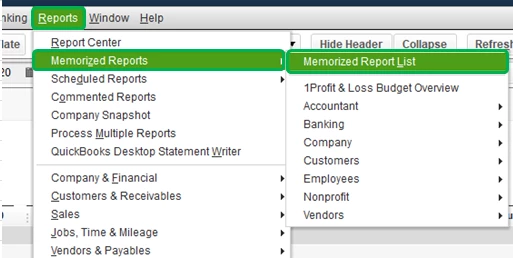
1. Go to the Reports menu at the top, then pick Memorized Reports and Memorized Reports Lists.

2. Locate and double-click the report to open.

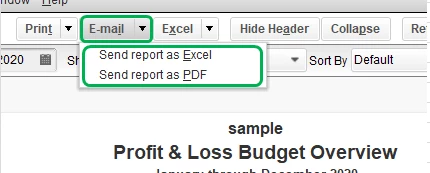
3. Click the Email option at the top and choose how you want to send it.


For additional information, you can also visit these articles for future reference:


This should answer your concern for today. Please let me know how it goes or if you have any other questions. I'm here to help. Cheers!

2 replies

IamjuViel
April 16, 2019

Greetings, @wolffixer.


Let me provide you with some resources about emailing reports in QuickBooks Desktop.


You can email reports as an attachments. It could either be as an individual Adobe PDF files or Excel workbooks. May I ask what type of memorized report are you trying to email?


Yes, you're correct changing the settings in your printer setup will not affect the emailed reports. When sending reports as PDF attachments by bulk there is no other way to modify how it will appear on your recipient's end.


However, once the recipient view the report on their end, they can always change its set up.


Let us know here in the Community if you have other questions about emailing reports in QuickBooks Desktop. I'm always here to help.

wolffixerAuthor
April 16, 2019

I am trying to email a couple different types of reports. Most are memorized to get the data and accounts I want included in them. Mostly either customized "Profit and Loss Budget Performance" report with added columns for difference and the percentage. The other is just a customized transaction journal. It is the Budget report I have the trouble with. When I open one of the memorized reports by itself and click "email/PDF" it will generate into an outlook window correctly at one page wide. But when I do the same report in the "process multiple reports" window I get a PDF in outlook that is multiple pages wide vs the needed one page wide report. I could go export each report individually every time to my local computer then go email them from there but it would be so much easier if I didn't have to open everyone each time I have to email them all. 

November 9, 2024

Hi there, @netdweeb. Thank you for joining this conversation.
 

First and foremost, we want to ensure that we provide you with the most accurate and helpful information possible.
 

To achieve this, I would ask if you could share more details about your concerns or inquiries. By doing so, you'll enable us to tailor our responses to your unique situation and offer the most relevant guidance.
 

Please know that we're standing by, ready to offer our support and expertise, @netdweeb. We look forward to your response and the opportunity to assist you further.