Employee's Hours Are Different in "Time by Job Detail" report vs "Item Actual Cost Detail" report
I am using QuickBooks 2019 Desktop Contractor Edition.
I’m trying to get a total for the number of hours one employee spent on a particular item for a customer job.
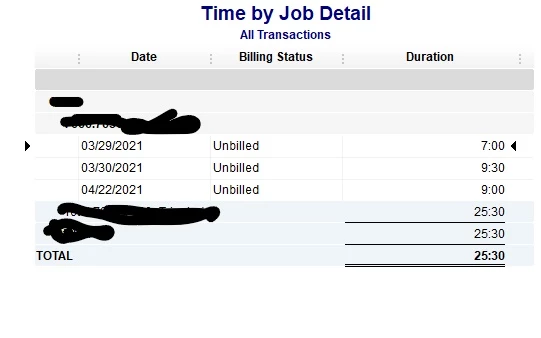
When I run a “Time by Job Detail” report, the hours show as 16.5 in the first week and 9 in the second week for a total of 25.5.
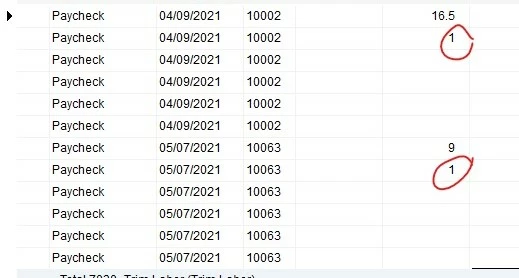
However when I run a “Job Profitability” report and click on the particular item, the numbers aren’t quite the same. Specifically, the “Item Actual Cost Detail” report has one extra hour added to each week. As I’ve been investigating this, I’ve noticed that all of the “Item Actual Cost Detail” reports for this employee have an extra hour added each week.
When I click on the numbers, the paychecks show 16.5 and 9 hours.
The employee is on salary and had no vacation or sick time during this period.
Also, I noticed that for another employee who is paid on an hourly basis, those extra one hours don’t show on the report.
Where are those 2 extra hours on the report coming from? I’m attaching a couple screenshots in case I’m not explain this clearly.