June 4, 2022
Solved

entered the incorrect amount for a customer's opening balance. How do I correct this?

  • June 4, 2022
  • 1 reply
  • 0 views
A customer's opening balance was incorrect when i imported my list from desktop 2018 leaving him an over due of $.01. How do I correct this?

Best answer by JenoP

Allow me to jump in and help you edit or remove the balance, MMFgardener.


You can create a journal entry to correct the opening balance. Here's how: 
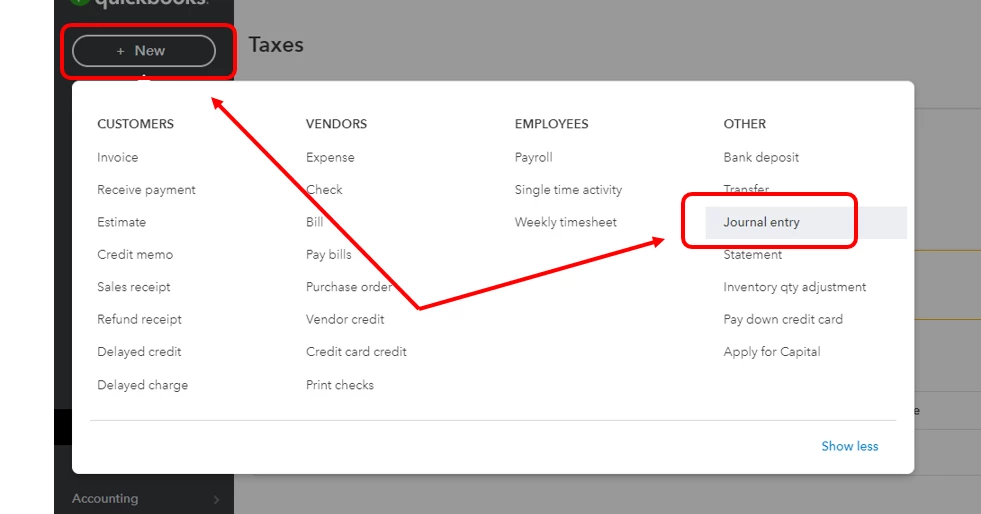
 

  1. Click the + New button and select Journal entry
  2. On the first and second lines, select an account in the Account field. Depending on if you need to debit or credit the account, enter the amount in the correct columns. You might need to reach out to your accountant to provide additional advice in case you're not sure what accounts to use.
  3. Enter 0.01 in the Amount columns.
  4. Type in all the details required for the journal entry, then click Save.


Let me share this article in case you want to read more details about this feature: Create a Journal Entry in QuickBooks Online.


Alternatively, you can also create a credit memo to remove outstanding balances. Go to this article if you want to go that route instead: Create and Apply Credit Memos or Delayed Credits in QuickBooks Online.


I also have more articles to add here for additional guidance when managing customer balances or journal entries in QBO: 


Never hesitate to join us back in the Community if you need anything else. We're always here to help. 

1 reply

JenoP
JenoPAnswer
June 4, 2022

Allow me to jump in and help you edit or remove the balance, MMFgardener.


You can create a journal entry to correct the opening balance. Here's how: 


  1. Click the + New button and select Journal entry
  2. On the first and second lines, select an account in the Account field. Depending on if you need to debit or credit the account, enter the amount in the correct columns. You might need to reach out to your accountant to provide additional advice in case you're not sure what accounts to use.
  3. Enter 0.01 in the Amount columns.
  4. Type in all the details required for the journal entry, then click Save.


Let me share this article in case you want to read more details about this feature: Create a Journal Entry in QuickBooks Online.


Alternatively, you can also create a credit memo to remove outstanding balances. Go to this article if you want to go that route instead: Create and Apply Credit Memos or Delayed Credits in QuickBooks Online.


I also have more articles to add here for additional guidance when managing customer balances or journal entries in QBO: 


Never hesitate to join us back in the Community if you need anything else. We're always here to help.
