


Toonces
November 2, 2022
Question

Entering bills, but Select Related Purchase Order missing from list

  • November 2, 2022
  • 5 replies
  • 0 views

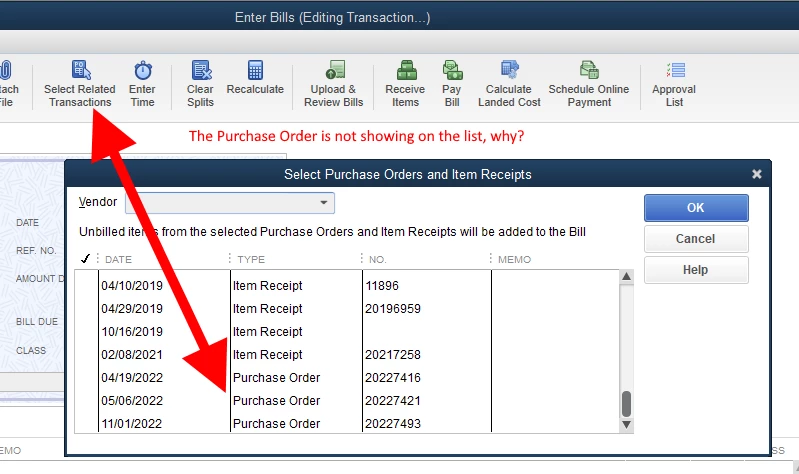
We are entering bills in QB desktop enterprise 22. There are related purchase orders to match with the bills, but the matching purchase order is NOT on the list when we click Select Related Transactions. We have run verify and rebuild with no errors. 

Why are the open purchase orders not appearing on the Select Related Transactions list?
 

5 replies

MariaSoledadG
November 2, 2022

Let's make sure you'll be able to match the purchase order to your bill, Toonces.


Under normal circumstances, QuickBooks matches uploaded bills to existing bill transactions or any existing purchase order. The program will determine if an existing vendor bill matches the vendor name, amount, and date, and display the information for confirmation. It's possible that the purchase order is linked to another bill, that's why it's not showing on your end. Since you've already performed the Verify and Rebuild tool, I suggest reaching out to our phone support team so they can investigate further. They have the tools to pull up your account in a secure environment. 


At the same time, you may also need to review your accounts in QuickBooks to make sure they match your real-life bank and credit card statements. For more information, please read this article for more information: Reconcile An Account In QuickBooks Desktop.


Feel free to let me know if you have any concerns when matching transactions. I'll always be right here to help. 

Toonces
TooncesAuthor
November 2, 2022

The Purchase Order is keyed in by the buying manager. The bill is keyed by AP. Nothing is uploaded. 


The purchase order and bill are from the same vendor. Simply put the Purchase Order is NOT on the list of Select Related Transactions for that vendor. 


We ended up deleting the Item Receipt and then the Purchase Order appeared on the list of Select Related Transactions. We hope this is an isolated incident because we have plenty of purchase orders that need to be matched to bills. 

There's definitely something amiss in the dbase/program matching process. 

January 16, 2023

I have also been experiencing this issue with our program. We noticed this started happening as early as May of 2022. Here's what I've noticed:


  • If the Bill is entered after I enter the Item Receipt, the PO is NOT on the list of "Select Related Transactions". 
  • If the Bill is entered before I enter the Item Receipt, the PO IS on the list of "Select Related Transactions". 


I agree something is massively amiss. This has caused all of our POs for the last 8 months to show line items as Received, but not "on bills". I've called customer support 6 times and still do not have a clear answer about this bug. One rep said this was part of some update, but my gut tells me otherwise. The PO always used to be available to enter a bill against no matter when the item receipt was entered. I've verified/rebuilt data dozens of times with no errors.


Customer support has also recommended I use the Tool Hub to run the tool doctor. We are hosted through Right Networks, so at first chat with them when trying to download the Tool Hub app, they said they can't download the app onto our remote desktop. However, the Right Networks rep downloaded our company file and ran it through the Tool Hub himself and again, showed no errors.


I don't know how to get this resolved.


February 14, 2023

We have been having the same issue since 2019.

Hundreds of hours wasted with Intuit and still no solution.

See the link below we have even filed complaints with the Better Business Bureau and still nothing has been fixed. Pure denial that the system has an issue.

https://quickbooks.intuit.com/learn-support/en-us/other-questions/re-where-can-i-lodge-complaints/01/1213322#M123339

I hope finally this tread can be solved or a patch is programed to fix the obvious fault in the system. 

I would say QuickBooks enterprise is not really fit for purpose nor does it function as advertised. 

September 4, 2023

Hi, 

We have a product line which has a quantity on open PO that is not reflecting correctly in the Prodcut & Services list ? 


September 4, 2023

Good to see you in this thread, @Migrating to On-Line Problem. I appreciate the screenshots you provided. I understand how important it is to have the exact information shown in the Purchase Order (P.O.) in QuickBooks Online (QBO).


Allow me to help you through this time and ensure you get accurate details about why you're still getting incorrect on your P.O.


Based on your screenshot, the purchase order is still open. Moreover, the amount shown in your Product/Service is correct. However, if you already covert it through the Use copy it as a bill option, the quantity will double in the product and services.


In QBO, once you select the vendor's name when entering the bill, an Add to Bill menu will appear on the right side of the form. From there, you'll see the existing purchase order created for them. To link the transaction, simply select the Add option.


I'd be happy to guide you on how:


  1. Open your QBO account and click the +New button.
  2. Next, click Bill under the Vendor column.
  3. Then, select the vendor's name in the Vendor field.
  4. An Add to bill menu will appear on the right side containing the purchase order transaction you create for them.
  5. Click the Add button to link it to the bill.
  6. Once done, select Save and close.


See this article for additional information about this process: Add purchase orders to expenses, bills, or checks in QuickBooks Online


Also, I've added articles to learn more about how P.O works in QBO:


Feel free to share any additional ways I can assist you with your purchase orders by leaving a comment below. I'm here and eager to support you. Wishing you a fantastic day ahead!

September 4, 2023

Hi there, 

Thank you for the answer. I don't see where you say it's being relfected correctly though. Have a look at this screenshot. As you are aware from the previous screenshot there is an open PO for this particular product item however when I run a report for Out of Stock Items - you can see the orders quantity from the PO is not being pulled through / reflected against the product item. It reflects as Zero in the Qty on PO Column ?

December 23, 2024

I know I am a little late to the party but I have had this issue & called QB multiple times about it.  They have no idea why it's happening.  I have realized that all you have to do it change the PO date & save it, then change it back to the original date, resave it & the PO will be on the open PO list again.  I've done this half a dozen times now & it works every time.

December 23, 2024

I know I am a little late to the party but I have had this issue & called QB multiple times about it.  They have no idea why it's happening.  I have realized that all you have to do it change the PO date & save it, then change it back to the original date, resave it & the PO will be on the open PO list again.  I've done this half a dozen times now & it works every time.

Toonces
TooncesAuthor
December 23, 2024

Thanks for the reply.