

October 29, 2023
Solved

Expenses paid with credit card

  • October 29, 2023
  • 1 reply
  • 0 views

I have expenses that are paid automatically via credit card and I am a little confused with the proper way to enter the bills.

I have the credit card linked to quickbooks so I can categorize them as they come in. Is it recommended to enter the bill for the expense paid via credit card as well (concurrently with the imported transaction)? I'd also like to start recording the credit card bill when it arrives in a statement, but I am unsure of how quickbooks treats a credit card bill since the transactions within the credit card statement are already recorded. 


For example:

  1. I pay for insurance via a credit card automatically
  2. Quickbooks brings imports the transaction automatically
  3. The insurance company sends me a bill which I think I should record as a bill (I think I've seen the option to match the transaction to this?)
  4. The credit card company sends me a monthly bill that includes the insurance bill (how do I record this bill and make sure I am not double paying the insurance bill)
Best answer by Jane Reyzel

Hello there, @MoscosoPayments.


We value the importance of recording expense transactions via credit card here in QuickBooks Online. It can be a little confusing but no worries, I'm here to help. 


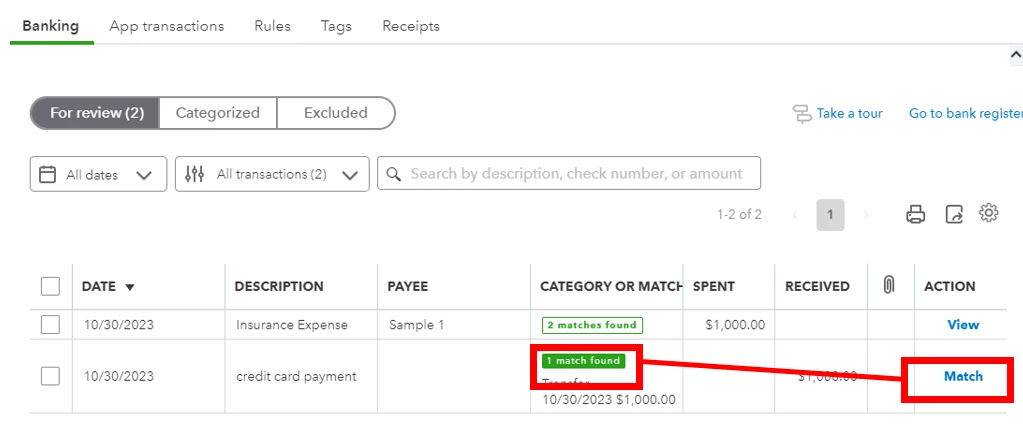
Yes, you are correct. It is all right to record a bill even though there's already an imported transaction because we can just match it. 


For detailed steps, here's how:


  1. Create a bill. 
  2. Then, go to the banking tab. 
  3. Click the Credit card account you used. Transactions that belong to this account will appear below.
  4. Find your insurance transactions.
  5. Then, click the Match option. 


This way, we can match both the bill you manually created, and the credit card expense transaction recorded. 


Next, to record the credit card bill once it arrives in the statement, we can transfer it and then match it. 


Here's how: 


  1. At the upper left part of the screen, click + New
  2. Under the Others menu, choose transfer
  3. Fill in the needed information. 
  4. Then, Save and close (located at the lower right screen, once you click the dropdown arrow beside Save and create new.)
  5. Once done, go to the banking tab. 
  6. Select the credit card account.
  7. Locate the insurance transaction.
  8. Then, Match it. 


Additionally, I've provided some articles below that might help you moving forward:


Feel free to comment down below for more questions. We're here happy to help. Have a good day.

1 reply

October 29, 2023

Hello there, @MoscosoPayments.


We value the importance of recording expense transactions via credit card here in QuickBooks Online. It can be a little confusing but no worries, I'm here to help. 


Yes, you are correct. It is all right to record a bill even though there's already an imported transaction because we can just match it. 


For detailed steps, here's how:


  1. Create a bill. 
  2. Then, go to the banking tab. 
  3. Click the Credit card account you used. Transactions that belong to this account will appear below.
  4. Find your insurance transactions.
  5. Then, click the Match option. 


This way, we can match both the bill you manually created, and the credit card expense transaction recorded. 


Next, to record the credit card bill once it arrives in the statement, we can transfer it and then match it. 


Here's how: 


  1. At the upper left part of the screen, click + New
  2. Under the Others menu, choose transfer
  3. Fill in the needed information. 
  4. Then, Save and close (located at the lower right screen, once you click the dropdown arrow beside Save and create new.)
  5. Once done, go to the banking tab. 
  6. Select the credit card account.
  7. Locate the insurance transaction.
  8. Then, Match it. 


Additionally, I've provided some articles below that might help you moving forward:


Feel free to comment down below for more questions. We're here happy to help. Have a good day.

November 4, 2023

Hello,


Thank you for the help, I was able to match the expense transaction on the credit card to the insurance bill.


Now that the credit card bill, how do I process a bill for the credit card? Do I put the payee as the credit card bill company and then the category as accounts payable?

November 4, 2023

Hello there, MoscosoPayments.


I'll be happy to guide you in processing a bill for the credit card company in QuickBooks Online (QBO).


You'll have to enter the name of the credit card company in the Vendor field and choose the appropriate expense account that corresponds to the type of expense incurred on the credit card in the Category field.


To do this, let me show you how:


  1. In the left menu, click the + New button.
  2. Choose Bill.
  3. Enter the name of the credit card company or the vendor associated with the credit card bill in the Vendor field.
  4. Select the appropriate expense account that corresponds to the type of expense incurred on the credit card in the Category field.
  5. Enter the amount of the credit card bill in the Amount field.
  6. Optionally, you can add a memo or any other relevant information in the respective fields.
  7. Choose Save and close or Save and new to save the bill.


By categorizing the bill under the appropriate expense account, the system will track the expenses and update your accounts payable accordingly.


For more details in recording expenses, see this article: Enter and manage expenses in QuickBooks Online. It also contains a video for your visual reference.


For future help, I'm attaching our Community link if you need assistance managing your expenses: Expenses and vendors.


I'm here to help if you have more questions about recording a bill or any QuickBooks concerns. Feel free to click the Reply button. Have a great day.