I'm glad you've posted here in the Community, sarasota. Let's work together to find your transactions.
Are you trying to use location tracking to track your transactions? QuickBooks Online (QBO) has certain reports you can run to view your entries with or without locations.
To achieve this, you can generate a Profit and Loss by Location report and adjust the location filter to Non-specified. Here are the steps:
- Go to the Reports menu.
- Search for Profit and Loss by Location report and open it.
- Click Customize.
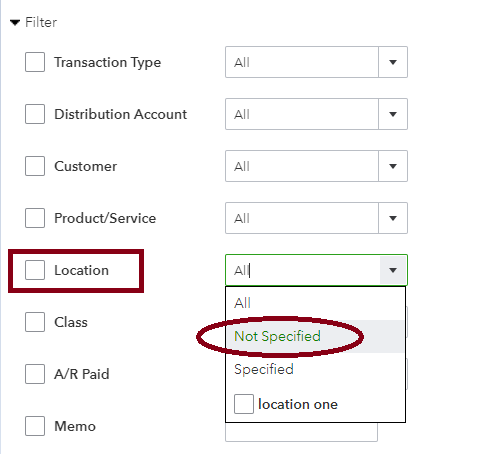
- Select Filter and check Location.
- On the dropdown arrow, choose Not Specified.
- Hit Run report.
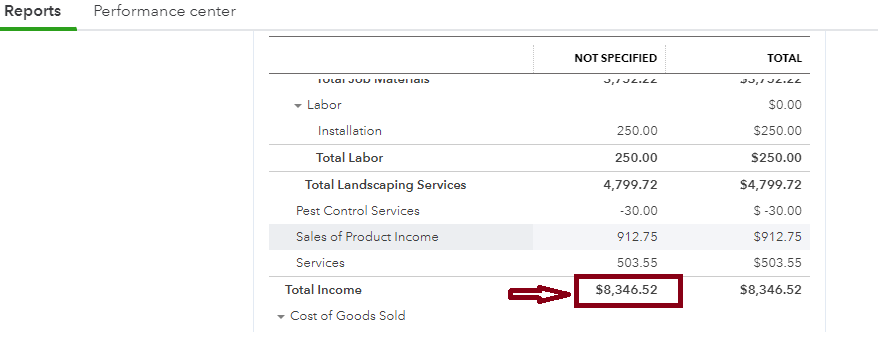
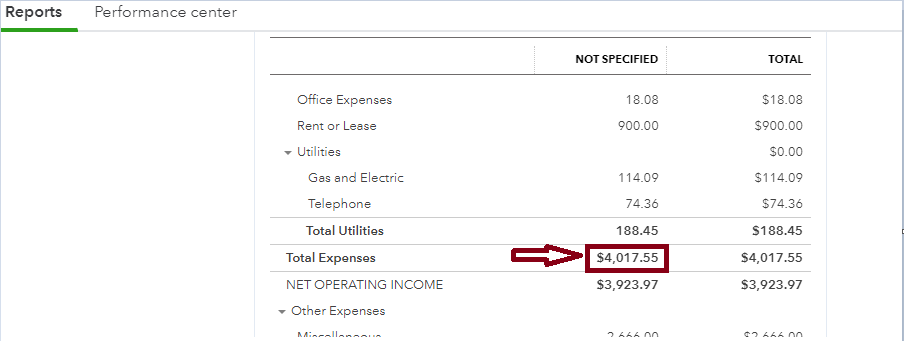
Once done, click Total Income or Total Expenses to view transactions without assigned locations. I've included some photos below for your reference:
Also, to monitor sales without assigned locations, run a Sales by Location Detail report and use the Non-specified filter option.
Finally, I've included these helpful articles so you get the most out of your financial reports and have great information about your business:
Please know that you're always welcome to swing by if you need further assistance finding missing transactions in QBO. Have a good one!

