March 18, 2021
Solved

Foreign currency bank account year-end adjustment

  • March 18, 2021
  • 2 replies
  • 0 views

I am using QBO.

My client has 3 PayPal foreign bank accounts listed in the Chart of Accounts (PP AUD, PP EUR, PP GBP). The Quickbooks balance on the chart of accounts screen shows 0.00 for each account. 

The Balance Sheet shows small amounts for each account. The transactions in those balances stem from 2017. I need to zero out all 3 accounts but am unsure as to how to do it. Thanks for your help!

Best answer by Mark_R

Let's get these balances zeroed out so you can get back to working order, @maryg2.


You'll want to create home currency adjustments to zeroed out the small amounts showing on your balance sheet report. The home currency adjustments change the home currency value of your foreign balances, recalculating them based on a new rate. These adjustments affect your balance sheet accounts. 


Here's how to create home currency adjustments:


  1. Click the Gear icon, then select Currencies.
  2. Locate the currency you want to adjust.
  3. Under the Action column, select Revalue Currency from the drop-down.
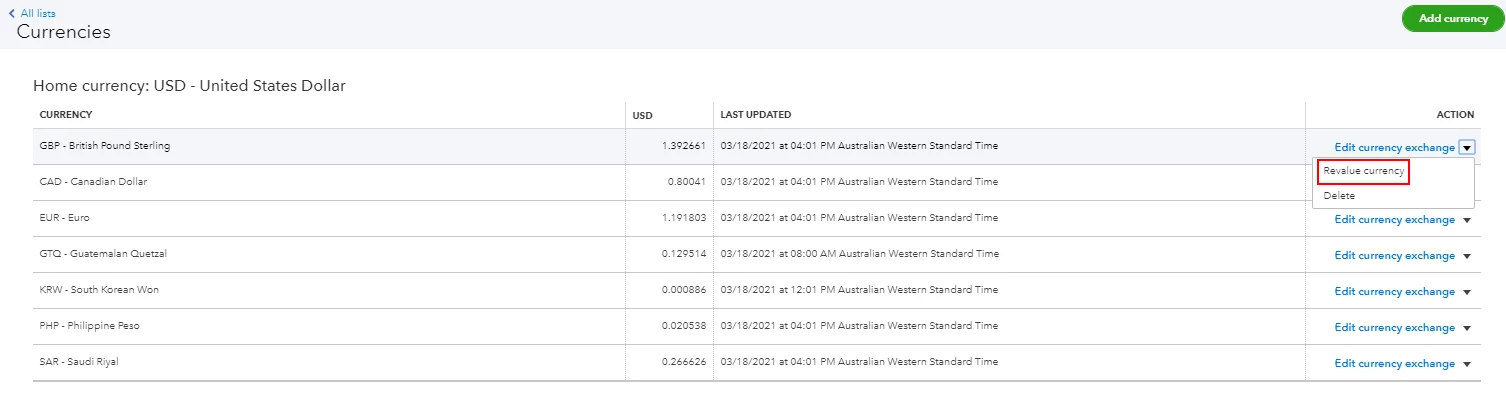
  4. Select a date (today or a day in the past) to run a currency revaluation.
  5. Choose whether you'd like the revaluation to be based on the market exchange rate or a rate you specify.
  6. Select the account(s) you want to apply the revaluation to.
  7. Click Revalue.


I'm adding this article for more details: Enter home currency adjustments for your foreign balances.


Moving forward, you'll want to perform this every month to make sure the Chart of Accounts (COA) balance and the conversion amount balance on the Balance Sheet will match the actual bank. Not doing this will show a difference in the balances between the Balance Sheet and COA.


You might also want to check out this article to learn more about multi-currency in QuickBooks: Multi-currency FAQ.


Keep in touch if you need any more assistance with this, or there's something else I can do for you. I've got your back. Have a good day.


2 replies

Mark_RAnswer
March 19, 2021

Let's get these balances zeroed out so you can get back to working order, @maryg2.


You'll want to create home currency adjustments to zeroed out the small amounts showing on your balance sheet report. The home currency adjustments change the home currency value of your foreign balances, recalculating them based on a new rate. These adjustments affect your balance sheet accounts. 


Here's how to create home currency adjustments:


  1. Click the Gear icon, then select Currencies.
  2. Locate the currency you want to adjust.
  3. Under the Action column, select Revalue Currency from the drop-down.
  4. Select a date (today or a day in the past) to run a currency revaluation.
  5. Choose whether you'd like the revaluation to be based on the market exchange rate or a rate you specify.
  6. Select the account(s) you want to apply the revaluation to.
  7. Click Revalue.


I'm adding this article for more details: Enter home currency adjustments for your foreign balances.


Moving forward, you'll want to perform this every month to make sure the Chart of Accounts (COA) balance and the conversion amount balance on the Balance Sheet will match the actual bank. Not doing this will show a difference in the balances between the Balance Sheet and COA.


You might also want to check out this article to learn more about multi-currency in QuickBooks: Multi-currency FAQ.


Keep in touch if you need any more assistance with this, or there's something else I can do for you. I've got your back. Have a good day.

maryg2Author
March 19, 2021

Thank you for the quick and correct answer to my question. I appreciate it so much! You saved me a lot of time!

June 10, 2022

Hello. I am using QB Pro Desktop. I recently closed our Euro account that we have had since 2013 or so. The Euro account is reconciled to zero, but the balance sheet is showing ~34K balance. Do you have any ideas on how to clear this out without claiming it as a loss? 


Thank you, 


Rachel 

June 10, 2022

Hi there, rdenker28. 


I'll share a way on how you can handle it without claiming it as a loss.


You can create a journal entry to get this done. Here's how:


  1. Go to the Company menu and select Make General Journal Entries.
  2. Fill out the fields to create your journal entry. Make sure your debits equal your credits when you’re done.
  3. Fill in the necessary information. Optional: Under Memo, enter the item reference.
  4. Click Save & Close.


Note: I would suggest reaching out to your accountant to guide you with the correct accounts to debit and credit. If you're looking for an accountant, you can find one by clicking on this link: Find an accountant.


For additional information and tips, you can read through this article: Create a journal entry in QuickBooks Desktop.


Feel free to visit this guide when reconciling your account:


If you have additional questions, please let me know by posting another one below. I'm here to assist you more, rdenker28. Take care and stay safe always.