
Solved
Gross Sales Report
Hello,
I need to run a a gross sales report by month but I can't seem to find one. Can you direct me to the EASIEST way to accomplish this?
Thanks.

Hello,
I need to run a a gross sales report by month but I can't seem to find one. Can you direct me to the EASIEST way to accomplish this?
Thanks.

I would rather have a normal report and not a graph....can I convert that into something besides a graph?
Thanks for getting back to us, @nchambler.
Currently, the option to convert graph reports to a standard report is not possible in QuickBooks Desktop (QBDT). However, you can consider opening the Sales by Item Details report and customize it to your desired date. Let me show you how.
Here's how:
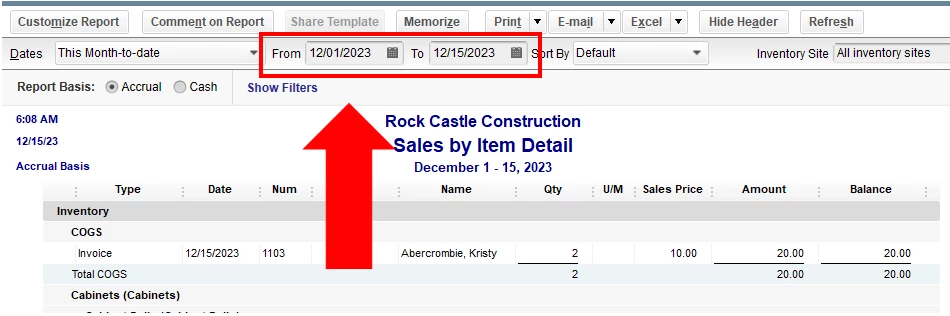
For more insights, you can refer to this article on how to generate reports to shows the information you need: Customize reports in QuickBooks Desktop. Then, memorize it to save its current settings. This saves you time in generating a report again to show the details you need.
I'll take note of this feature request to our product engineers so they'll consider adding this in the future updates. In the meantime, I encourage checking our Product Updates page to stay updated on what's new in QuickBooks.
Do get back to us whenever you have other concerns or questions. I'm always here ready to help. Take care!
Enter your E-mail address. We'll send you an e-mail with instructions to reset your password.