
February 6, 2020
Solved

Hello. Is there a way to see which customers haven't ordered in a while?

  • February 6, 2020
  • 2 replies
  • 0 views
Original commenter did not share additional details

Best answer by AlcaeusF

Welcome to the Community, @sergei.


In QuickBooks Online (QBO), there isn't a direct way to see which customers haven't ordered in a while. However, you can run the Transaction List by Customer report. This will give you the list of invoices, sales receipts, and other customer-related transactions. You can use this as a reference to determine when was the last time they ordered.


Here's how to pull it up:
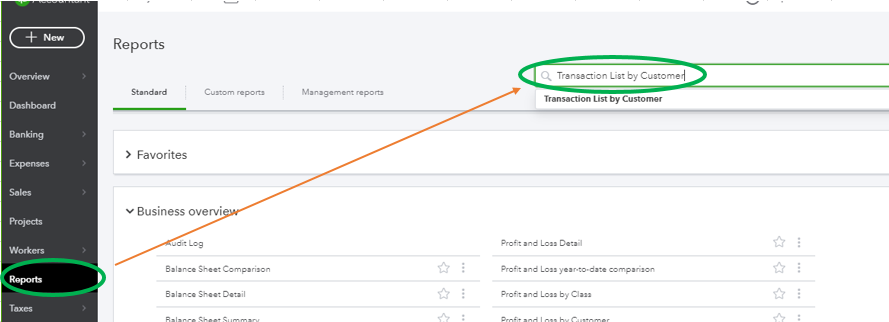
 

  1. In QBO, go to the Reports menu at the left pane to get to the Standard reports page.
  2. In the search field, type Transaction List by Customer, then press enter. 
  3. Choose your preferred date in the Report period section and hit Run report


Just in case, I'll add these articles for future reference:


I'll pass along your suggestion to our Product Developers. They're always looking for ideas to consider on how to improve QBO. In the meantime, I recommend visiting our Blog site. This is where we share recent happenings and future developments, such as updates to newly added features.


Reach out to me in the comment section if you have any other issues or concerns, and I'll get back to you right away. I'm always here to help. Have a good one!

2 replies

AlcaeusF
AlcaeusFAnswer
February 6, 2020

Welcome to the Community, @sergei.


In QuickBooks Online (QBO), there isn't a direct way to see which customers haven't ordered in a while. However, you can run the Transaction List by Customer report. This will give you the list of invoices, sales receipts, and other customer-related transactions. You can use this as a reference to determine when was the last time they ordered.


Here's how to pull it up:
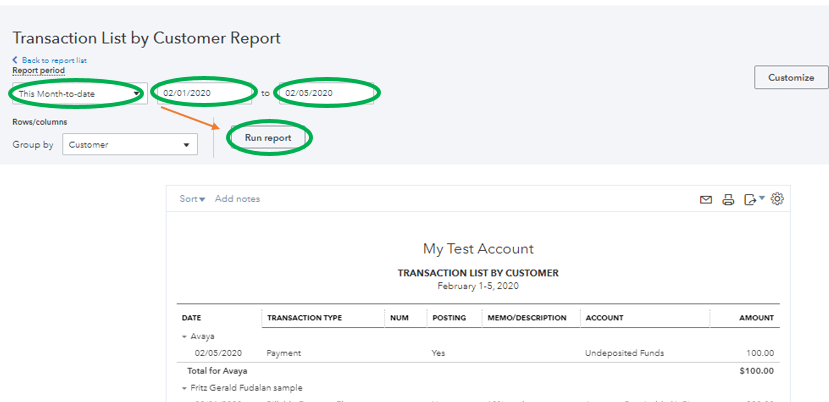
 

  1. In QBO, go to the Reports menu at the left pane to get to the Standard reports page.
  2. In the search field, type Transaction List by Customer, then press enter. 
  3. Choose your preferred date in the Report period section and hit Run report


Just in case, I'll add these articles for future reference:


I'll pass along your suggestion to our Product Developers. They're always looking for ideas to consider on how to improve QBO. In the meantime, I recommend visiting our Blog site. This is where we share recent happenings and future developments, such as updates to newly added features.


Reach out to me in the comment section if you have any other issues or concerns, and I'll get back to you right away. I'm always here to help. Have a good one!

September 9, 2022

We need reminders to service customers so they do not go elsewhere.  This tracking is needed.

September 9, 2022

Hello, susan7717.


I understand how important it is for your company to track customers who haven't ordered in a while and remind them so you can provide service to them again.


This option is currently unavailable because the reminders feature is for invoices that soon become past due. In the meantime, you can run the Transaction List by Customer as outlined above by my colleague to determine when they last ordered. Then, you can manually send an email to remind them of the service you provided.


The idea of including this option for future product enhancement is fantastic because it will help them remember the services provided by your company. I encourage you to submit your product suggestion. This allows our engineers to review your request and, if approved, include it in the next update.


Here's how:


  1. Go to the Gear icon.
  2. Select Feedback.
  3. Enter your request.
  4. Hit Next to submit.


You can also visit this link to track feature requests in QuickBooks Online: QuickBooks Online Feature Requests.


I've included the following resources below to help you set up recurring templates and schedule recurring transactions in the future:


If you require any additional assistance, the Community is always available to help you. Have a great day.

December 21, 2023

Hi Sergei,

We might be able to help (we are in the QuickBooks Online marketplace -- search for Crik-IT).  We have a "Customers Who Haven't Purchased" report that I think may do what you're looking for.  You can see all customers who haven't purchased any items (or a specific item, or any item in a particular product category) since a date that you can specify.  Here's where you set the filter options -- the options below will show us all customers who have not purchased "rocks" since 6/1/2023:


Here's the report that is produced:


Let me know if you would like more information.
