

June 28, 2022
Solved

Hourly Pay versus Invoiced Cost

  • June 28, 2022
  • 1 reply
  • 0 views

Hello everyone,

My employees are paid on an hourly basis and their pay rate depends on the work they're performing.  I would like to know how to enter an employee's time into the weekly timesheet and attribute that time to a customer's job and service item.  The service item drives the customer's billing rate and employee's pay rate.  Is it possible for the customer to see a specific service item rate on their invoice with the employee's lesser rate showing up on some type of wage report?


A little background, I use a 3rd party for payroll and need to report hours and rates monthly to my accountant.


Thank you!
Best answer by LeizylM

Good to see you here, awthomas85. 


I'd like to share what I know about timesheets in QuickBooks Desktop.


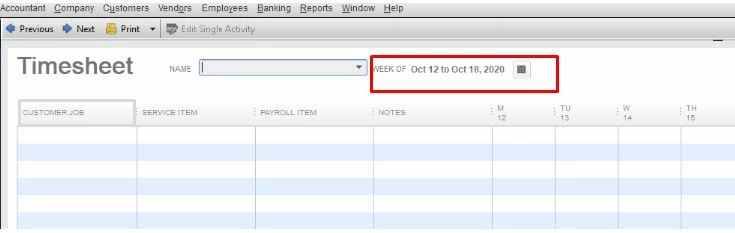
You can enter the CUSTOMER: JOB hours in the Weekly Timesheets. Ensure to use the prior date the job was done. This way, it won’t affect your future payroll. Let me show you how to do it in your QuickBooks Desktop (QBDT) software:


  1. Go to the Employees tab.
  2. Click Enter Time.
  3. Choose either Use Weekly Timesheet or Time/Enter Single Activity.
  4. Select an employee from the NAME field.
  5. Click the Calendar icon and select the prior date when your employee worked for the job.
  6. Enter the needed details to complete the Timesheet activity and click Save & Close.


You may refer to this article to learn more about entering timesheets: Create timesheets and time data report


Please know that you can always get back to us if you have any other clarifications or questions about managing employees' timesheets. I'm always here to help. Have a great day!

1 reply

LeizylMAnswer
June 28, 2022

Good to see you here, awthomas85. 


I'd like to share what I know about timesheets in QuickBooks Desktop.


You can enter the CUSTOMER: JOB hours in the Weekly Timesheets. Ensure to use the prior date the job was done. This way, it won’t affect your future payroll. Let me show you how to do it in your QuickBooks Desktop (QBDT) software:


  1. Go to the Employees tab.
  2. Click Enter Time.
  3. Choose either Use Weekly Timesheet or Time/Enter Single Activity.
  4. Select an employee from the NAME field.
  5. Click the Calendar icon and select the prior date when your employee worked for the job.
  6. Enter the needed details to complete the Timesheet activity and click Save & Close.


You may refer to this article to learn more about entering timesheets: Create timesheets and time data report


Please know that you can always get back to us if you have any other clarifications or questions about managing employees' timesheets. I'm always here to help. Have a great day!

July 5, 2022

Thank you!

Your post helped me get setup where the "Payroll Item" field now shows for each employee.  I've also got each employee set up with their respective pay rates.


Could you point me in the direction of a report that I could run monthly, that shows the number of hours worked for each "payroll item" by employee name?  I haven't been able to find that one.


Thank you for your guidance.

Adrian_A
July 5, 2022

Hi awthomas85,


I've got the information you're looking for about a report that shows the employee's number of hours worked per item. 


You can pull up the Payroll Item Detail report and customize it to the data needed. Let me show you how:


  1. Click on Reports Employees & Payroll, then Payroll Item Detail.
  2. Click on Customize.
  3. From the Display tab, select Qty in the Columns list.
  4. From the Total by dropdown, select Employee.
  5. Go to the Filters tab and select Payroll Item.
  6. Choose the specific item associated from the dropdown.
  7. Click OK.


You can check this resource page for future reference in case you want to learn more about the recording of timesheets by an employee in QuickBooks Desktop: Create and print timesheets.


Please let me know if there's anything I can do to help. I'm always around to assist you. Have a good day!