August 2, 2023
Solved

How are you adding a second client email to invoices in the new quickbooks self-employed version?I don't see how to do it in the new version and chat support can't help.

  • August 2, 2023
  • 1 reply
  • 0 views
In the previous version, I could add in the second client's email as a cc or bcc when previewing the invoice. This is no longer an option as the email to the client pulls from the "customer information" field which only allows for 1 email.
Best answer by Carneil_C

I'd also feel the same way when something isn't working the way it is, @ritapfabi. I'm here to assist you in adding a second email to an invoice in QuickBooks Self-Employed.


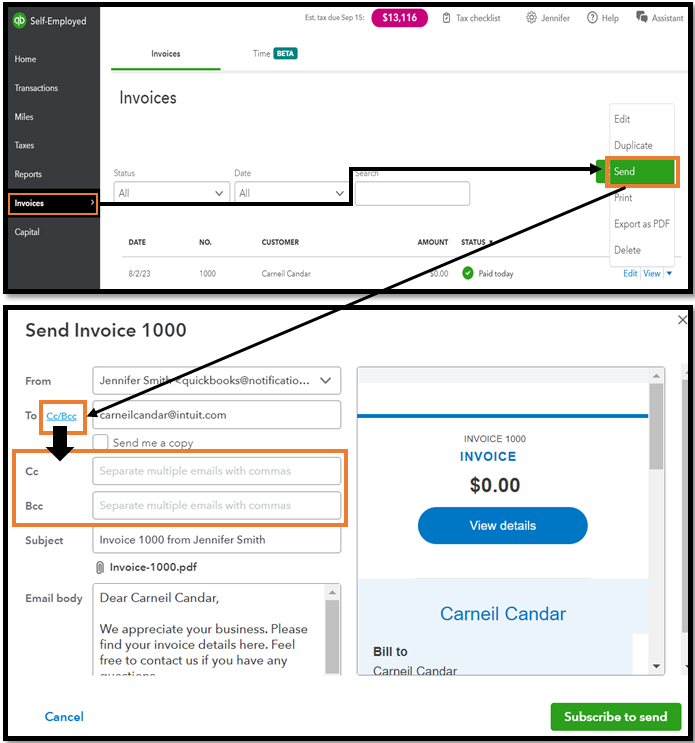
You can go to the invoice page, where it has a preview of them. Click the drop-down icon and choose Send. Hit the hyperlink cc/Bcc beside the To in the second box. You can then see that it will add another box for you to fill in.


Please refer to the screenshot below for your visual reference:
 

I understand you already contacted our support, but if the option is still unavailable, I recommend contacting our QuickBooks Self-Employed Support team again. Thus, they have the tools to pull up your account in a safe environment and investigate this matter.


To learn more about personalizing your invoices in QBSE, visit this handy article: Create invoices in QuickBooks Self-Employed.


Keep me posted if you have any other questions or concerns about managing your invoices or QBSE-related tasks. I'll be around for you. Take care always.


1 reply

Carneil_CAnswer
August 2, 2023

I'd also feel the same way when something isn't working the way it is, @ritapfabi. I'm here to assist you in adding a second email to an invoice in QuickBooks Self-Employed.


You can go to the invoice page, where it has a preview of them. Click the drop-down icon and choose Send. Hit the hyperlink cc/Bcc beside the To in the second box. You can then see that it will add another box for you to fill in.


Please refer to the screenshot below for your visual reference:


I understand you already contacted our support, but if the option is still unavailable, I recommend contacting our QuickBooks Self-Employed Support team again. Thus, they have the tools to pull up your account in a safe environment and investigate this matter.


To learn more about personalizing your invoices in QBSE, visit this handy article: Create invoices in QuickBooks Self-Employed.


Keep me posted if you have any other questions or concerns about managing your invoices or QBSE-related tasks. I'll be around for you. Take care always.

ritapfabiAuthor
August 2, 2023

Thank you, Carneil! That worked. Thank you for taking the time to respond and for providing the screenshots.

August 2, 2023

Hi there, @ritapfabi.


I'm glad to hear that the steps provided by my colleague Carneil_C worked for you.


If there's anything else you need help with in QuickBooks Self-Employed, feel free to post in the Community again. We're here to lend a hand. Have a great day!