December 20, 2018
Solved

How can I calculate the profit per invoice in order to pay commissions on profit?

  • December 20, 2018
  • 4 replies
  • 0 views

Hi there,


I currently use quickbooks online and this is something that we have been trying to do for years!!!
We pay our sales reps based on profit per invoice (Selling price - cost of product).

We have been doing the profit liquidation for years in excel but we are completely tired of this. 

Is there any way to get the report of the profit per invoice in quickbooks online? Anyone there having this same issue and can help?

Thanks in advance for your time,

Andres

btw, I have tried:
*Sales by Class Summary (Each sales rep is in Class)
*Profit and loss by Class (But this one doesn't show the cost of good sold of the product the sales rep sold.

Best answer by IamjuViel

Thanks for the great suggestions, @Pipe3001.


 Our goal is to make QuickBooks as user friendly as possible and a one-stop shop for all small business owners like you.


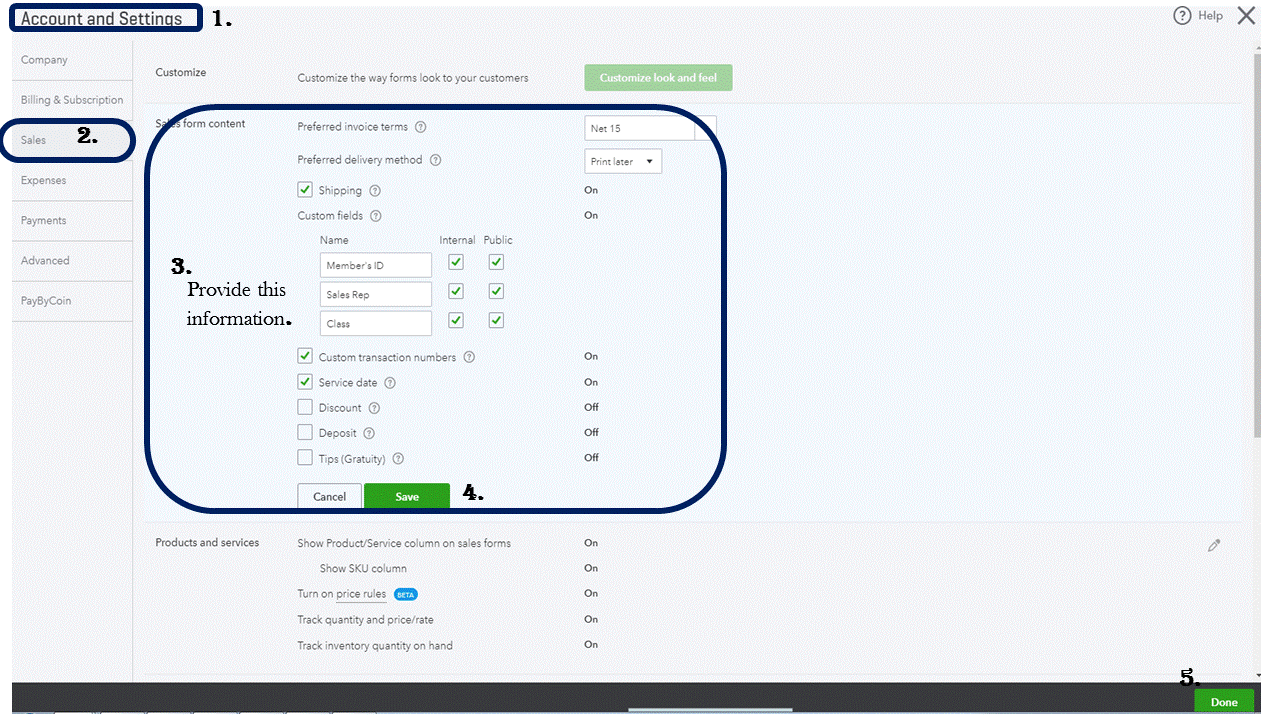
With QuickBooks Online, you have the ability to customize your invoice form which include adding the names of your Sales Representative. 


Here's how:

  1. Go to the Gear icon.
  2. Choose Accounts and Settings.
  3. Select Sales.
  4. Under Sales from content tab, click Custom Fields.
  5. Type in the name Sales Rep on the first box..
  6. Put a check mark on Internal and Public.
  7. Click Save.
  8. Hit Done.


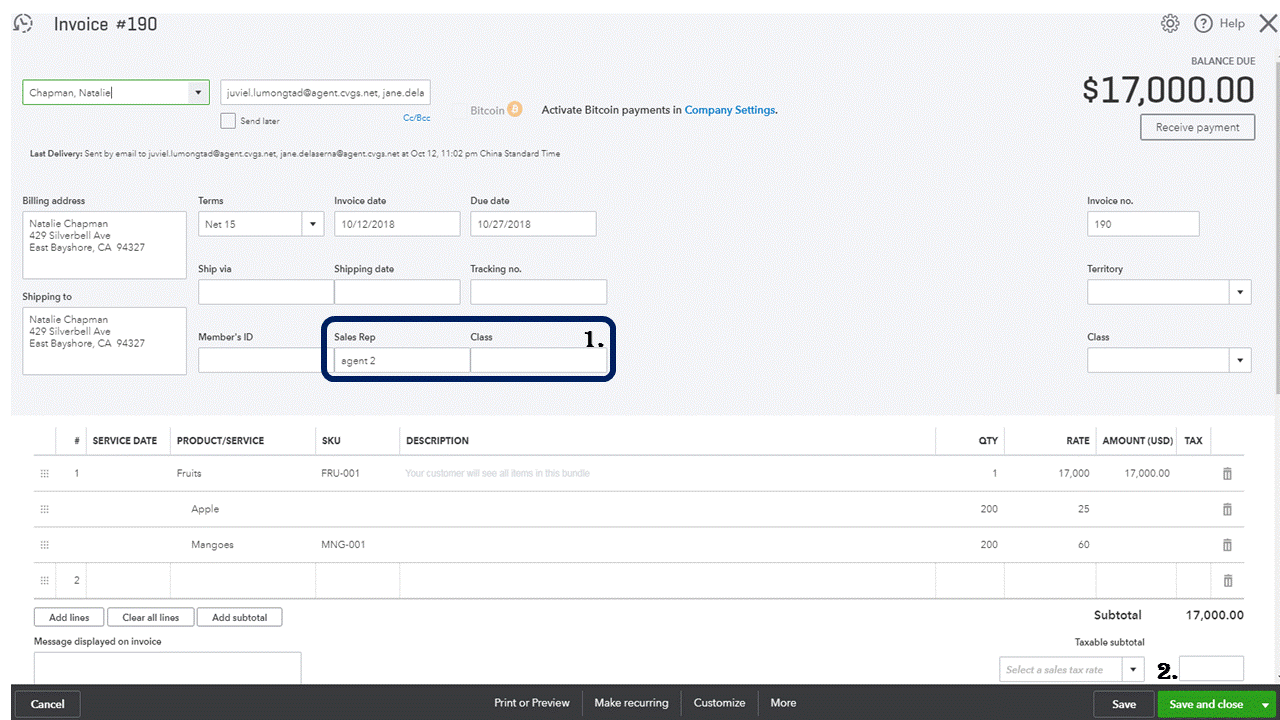
Once completed, you can now add the name of the sales rep everytime you create an invoice, sales receipt, estimate and credit memo.


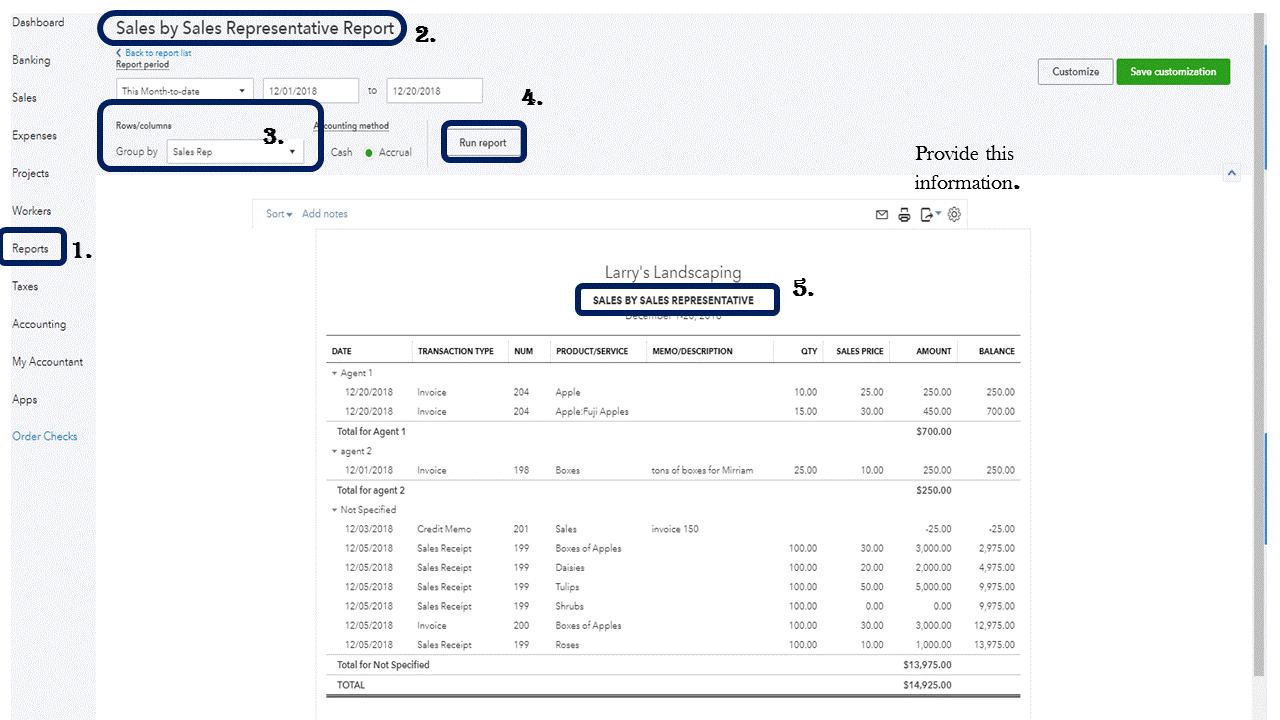
To run a report show sales per representative, here's how:

  1. Go to Reports.
  2. Choose Sales by Class Detail.
  3. Under group by, choose Sales Rep.
  4. Click Run Report.


You also have the ability to change the name of the report from Sales by class detail to Sales by Sales Representative.


On the other hand, Profit and Loss is a type of report that shows a detailed view of your income, expenses, and net income (profit or loss). Shows individual transactions. On the P&L the number in COGS is displayed as positive ( debit) the P&L does not show debits and credits unless you drill down. In cash basis reporting for sales, COGS is only posted when the sale is paid.


Lastly, feel free to send your suggestions for improvement  and I'll do the same thing from my end.


Here's how:

  1. Go to the Gear icon.
  2. Select Feedback.
  3. Enter your request/product suggestion, then click Next.
  4. Click Skip and send message.
  5. Select Feedback as the Category.

New features are often added to this app, so be sure to keep an eye on our blog for announcements: https://intuit.me/2L2zqTv.


That should do it! Let me know if you have any other questions about running and customizing reports in QuickBooks Online. I'd be glad to help.

4 replies

December 20, 2018

Hello Pipe3001,


We currently don't have a report that shows profitability per sales rep or profit by invoice. The work around is to export different reports in Excel and merge them. As I can see, you're already doing it. You did a great job on that. For now, I'll send your feedback to our development team for review.


On the other hand, we have a couple of expert members here that can jump into this thread. They might give pieces of advice how they can handle this kind of situation.


We appreciate your time, and we're happy to help you if you need anything else. 

Pipe3001Author
December 20, 2018

Hello,

thank you for your prompt response. That is a feature that we have been requesting for years and still QB won't come out with it, please submit it and try to prioritize it. I am sure there is a lot of companies with the same issue.

On the other hand, We are currently checking item by item of every invoice in order to identify the purchase cost and the sales price and calculating the profit in a manual way. If there is a way to export different reports in excel and merge them to do that in a faster way I would appreciate that insight. Anything that help us save time doing that tedious work. Currently taking a lot of time and time is money. This is a job that currently must be done by management and needs to be perfect in order for our sales reps to get the exact amount of commission earned.

Once again thank you for your input and I encourage anyone else that have the same issue to participate here and let us know how they are currently doing this to save time and money calculating commissions based on profit per invoice/per sales rep.

Andres.

December 20, 2018

@Pipe3001 wrote:


btw, I have tried:
*Sales by Class Summary (Each sales rep is in Class)
*Profit and loss by Class (But this one doesn't show the cost of good sold of the product the sales rep sold.


The Profit and loss by Class WILL show the profit by sales rep, if each sales rep is a Class (not "in" a Class), and if you use inventory items. Do you use inventory items?

July 1, 2020

Hi,


Has anyone yet been able to figure out a Profit by Invoice report hack? The whole point of me using quickbooks was that I needed to analyze how much % profit I am making on every invoice?


Someone mentioned we can download multiple reports and export them on excel to achieve that. Can anyone guide me which reports I should download? I'm still very new to quickbooks, but pretty good with excel, so just giving an idea would help.


Thanks

July 1, 2020

Thanks for joining in on the thread, Broken Wrestler.


Yes, this type of report is still not available in QuickBooks Online. We have the Profit and Loss as % of total income report. However, it only has the summary amounts by accounts.


We can export the Profit and Loss Detail report to Excel. Then, create a formula with the amount of a single invoice divided by the total amount if income. After that, you can convert it to percentage. 


You can also export the Invoice List to Excel and use if for reference. Get the total of the invoices. Then, get the income percentage of every invoice.


Those are the reports that I think we can export to Excel to get the income percentage of every invoice.


You can also visit this link on how to get profit percentage of your data: How to run a profit margin analysis for your small business.


I hope this helps. Please let us know how this goes so we can further check on this.

July 6, 2020

Hello,


Is this feature going to be in Quickbooks any time soon? Merging spreadsheets and running different reports to get commission numbers is not a good use of our time. Simply adding "cost" as a column in the invoice reports would help us get the actual margins on our products and services sold. 

katherinejoyceO
July 6, 2020

Hello there, @AllBlue.


Thanks for joining this conversation. At the moment, we don't have the exact turnaround time as when will this feature be available in QuickBooks Online. 


Please note that all our suggested plans are subject for further study. Any feature updates and improvements will be published in the QuickBooks blog


I'd recommend visiting our blog site regularly to get you in the loop to what's new in our products and services. 


For future reference, check out available resources in the QuickBooks Article hub. You'll find great topics related to your concern today such as customizing, memorizing, and sharing reports. 


Let me know if you have more questions. We're always here to help in any way we can. 

February 14, 2021

I would agree that this type of information per invoice would be fantastic.  I'm currently looking for a program that will. Please add this! 

February 14, 2021

Hello, Natettu. 


I know the importance of having this kind of feature. I'll make sure to tap this to our developer's team. This way, having this kind of report might be given a chance to be included in the next product updates.  


In the meantime, you may want to consider visiting our QuickBooks Blog. From there, you can see the future developments and the latest news about QuickBooks and what our Product Care Team is working on.   


You can always get back here in the Community for additional QuickBooks related questions. Doing so helps us to further explain everything to you.