October 3, 2022
Solved

How can I change the Paid From on Payroll checks?

  • October 3, 2022
  • 1 reply
  • 0 views
They came out of the Cash payment instead of the checking account

Best answer by Mark_R

Hello there!


You can go to the Payroll settings to change the default bank account. This way, your checking account will show when you process payroll. I'll guide you how.


  1. Sign in to your QuickBooks Online (QBO) account.
  2. Click the Gear icon, then select Payroll settings.
  3. Go to the Accounting section and click the pencil (✎) icon to edit.
  4. In the Paycheck and payroll tax payments section, select the checking account from the Bank account drop-down.
  5. Click Continue, then Done.


If ever you already processed payroll checks with cash payment, you'll need to delete and recreate them. That way, the updated account will reflect on your payroll checks. For more guidance, you can follow steps 3 and 6 in this article: Change your payroll bank account.


In addition, you can also change the account directly from the Paid from drop-down upon processing payroll. I'll attach a screenshot below for your visual reference.
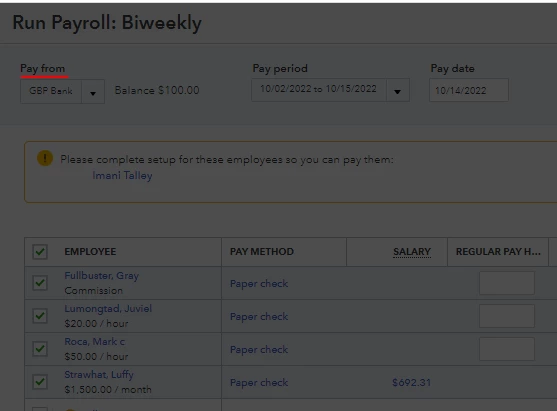
Let me know if you need more assistance with this. I'll be right here to help if you need further assistance.


Just in case you want to learn how to pay and file payroll taxes in QuickBooks, you can check out this article for more information: Common payroll questions and answers.


Wishing you all the best!

1 reply

Mark_RAnswer
October 3, 2022

Hello there!


You can go to the Payroll settings to change the default bank account. This way, your checking account will show when you process payroll. I'll guide you how.


  1. Sign in to your QuickBooks Online (QBO) account.
  2. Click the Gear icon, then select Payroll settings.
  3. Go to the Accounting section and click the pencil (✎) icon to edit.
  4. In the Paycheck and payroll tax payments section, select the checking account from the Bank account drop-down.
  5. Click Continue, then Done.


If ever you already processed payroll checks with cash payment, you'll need to delete and recreate them. That way, the updated account will reflect on your payroll checks. For more guidance, you can follow steps 3 and 6 in this article: Change your payroll bank account.


In addition, you can also change the account directly from the Paid from drop-down upon processing payroll. I'll attach a screenshot below for your visual reference.

Let me know if you need more assistance with this. I'll be right here to help if you need further assistance.


Just in case you want to learn how to pay and file payroll taxes in QuickBooks, you can check out this article for more information: Common payroll questions and answers.


Wishing you all the best!

October 5, 2022

THANK YOU!!!!

DivinaMercy_N
October 5, 2022

You're always welcome @kathymom_2002@ya.


I'm glad to know that the recommendation of my colleague above help you resolve your payroll issue. 


You may also visit our QuickBooks Help page, for more tips and resources for performing your QuickBooks tasks.


Please know that you can always post here again here in the Community if you have any questions or concerns about payroll. Have a good day ahead.
