November 15, 2018
Solved

How can I match the split payment received with the open invoices? Once I split the payment the invoices has still shown as "make payment"

  • November 15, 2018
  • 1 reply
  • 0 views
Original commenter did not share additional details

Best answer by MariaAlmaT

Thanks for the quick response, @sabrinasfaraujo.


I appreciate you clarifying your issue. I have some information to add to detail the steps in matching split payments to the open invoices.


For online payments, you can only apply one bank transaction to multiple invoices. There's not a way to match split bank payments to a single invoice.


If this is your case, just exclude the split transactions and manually clear the payments from the register. To close the invoices, follow the detailed steps below:


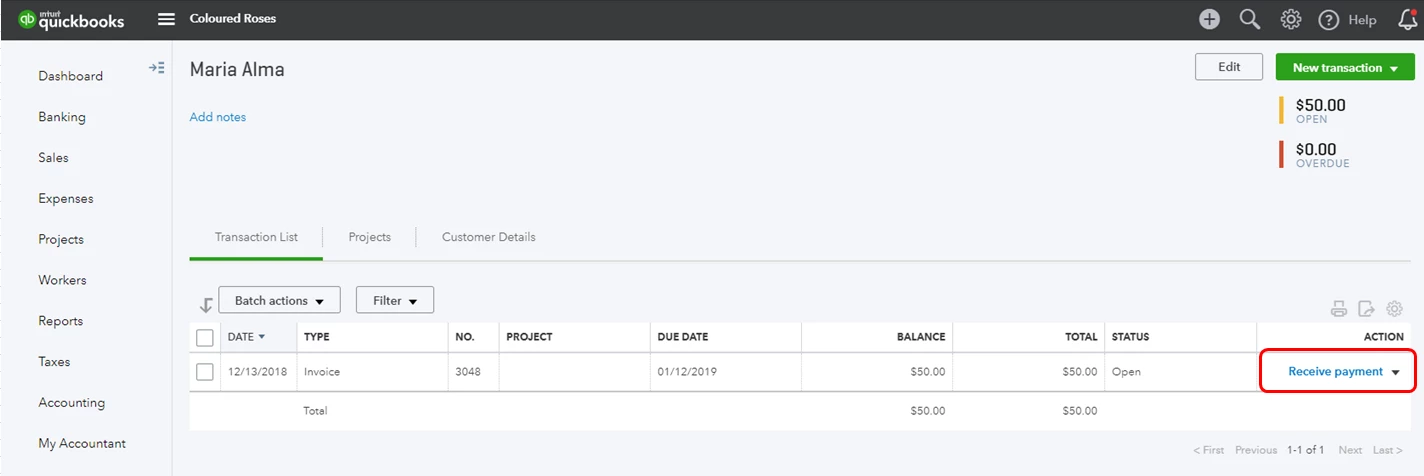
You'll need to use the Receive Payments to pay the invoices.
 

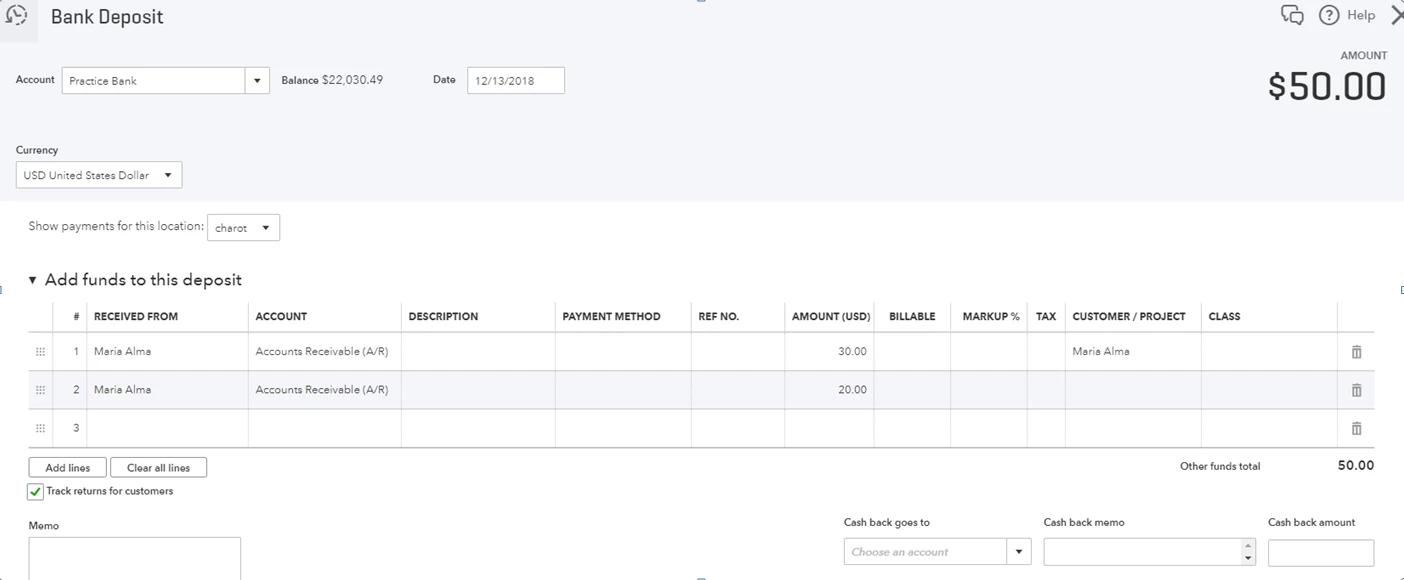
Then, make a split payments through the Bank Deposit window.
 

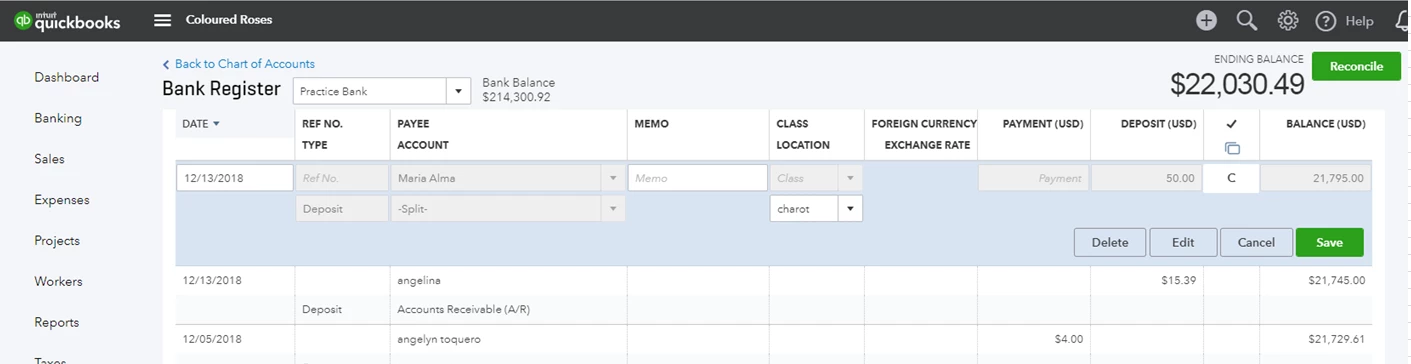
Go to the Accounting tab and manually clear the bank deposit transactions from the account register.
 With this information, you should be able to close invoices with the split payment transactions. Let me know how this goes after following the steps above. If you have other questions, don't hesitate to leave a comment below. I'd be glad to answer.

1 reply

HoneyLynn_G
November 15, 2018

Hello there, @sabrinasfaraujo.


Welcome to the Community. I can help you match the payments to close the open invoices. Since it's showing "Make Payment" most likely the split payment wasn't successfully linked.


Please follow these steps to resolve:

  1. Click Sales.
  2. Choose the Invoices tab.
  3. Look for the invoice.
  4. Under the Action column, click Receive payment.
  5. Fill out the necessary information.
  6. Click Save and Close.

For additional information, you can refer to this article: Record customer payment in QuickBooks Online.


There you go. Don't hesitate to add a comment if you have other questions about invoices and payments. Have a good one!

December 13, 2018


Wondering if I have to match my received and afterwards “make the payment” in every single customers, even though I have had split the payment as I received. Not sure if there are 2 different and separated process. I've just split what I received when I went to check and my invoices were still opened. 


December 14, 2018

Thanks for the quick response, @sabrinasfaraujo.


I appreciate you clarifying your issue. I have some information to add to detail the steps in matching split payments to the open invoices.


For online payments, you can only apply one bank transaction to multiple invoices. There's not a way to match split bank payments to a single invoice.


If this is your case, just exclude the split transactions and manually clear the payments from the register. To close the invoices, follow the detailed steps below:


You'll need to use the Receive Payments to pay the invoices.


Then, make a split payments through the Bank Deposit window.


Go to the Accounting tab and manually clear the bank deposit transactions from the account register.

 With this information, you should be able to close invoices with the split payment transactions. Let me know how this goes after following the steps above. If you have other questions, don't hesitate to leave a comment below. I'd be glad to answer.
