June 10, 2020
Solved

How can I print the details of a bill I entered?

  • June 10, 2020
  • 2 replies
  • 0 views
After I enter a bill to a vendor in QB, I enter several lines of items that I owe for each job they complete. How do I print out this detail so I can give them a copy with the check?

Best answer by AileneA

Hi there, @greenfg17.  


Currently, printing a bill is unavailable in QuickBooks Online (QBO). As a workaround, you'll want to run and customize the Transactions List by Vendor report to access the bills of your vendors.  


Here's how: 
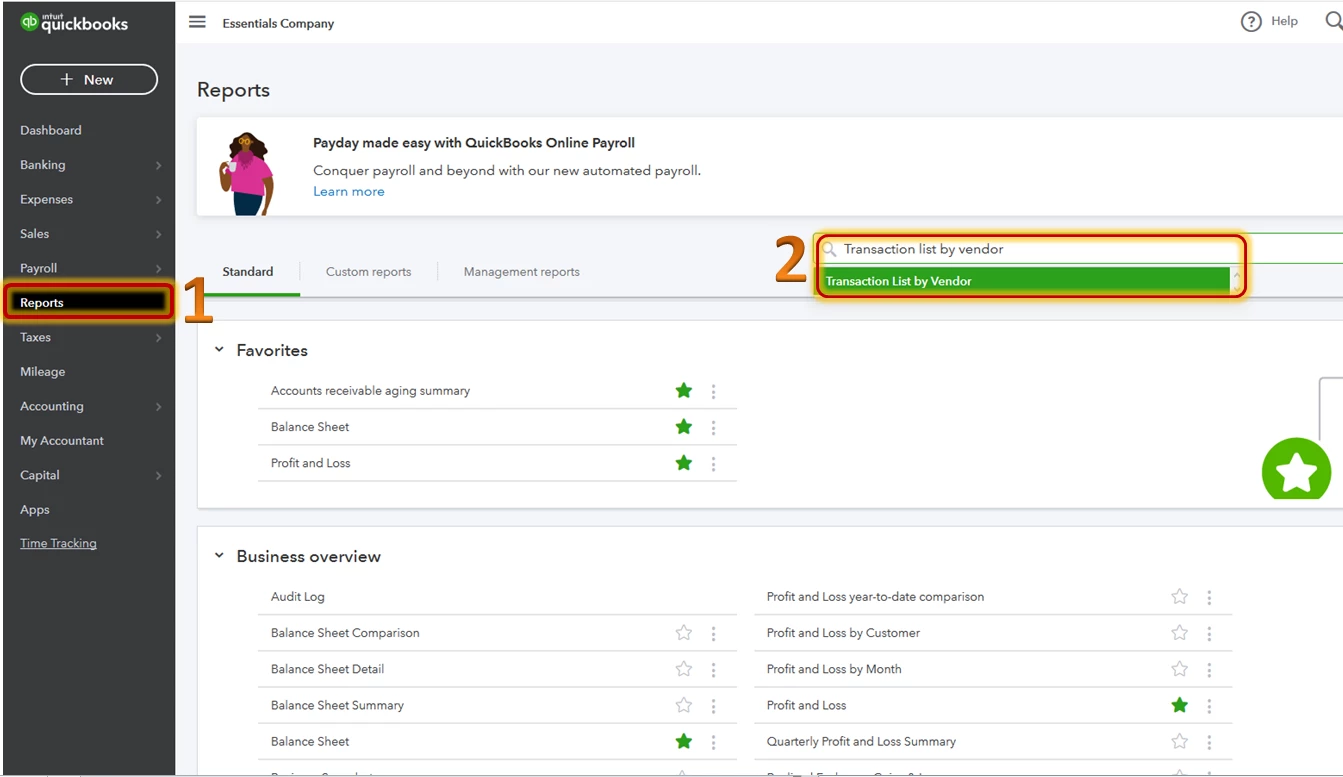
  1. Click Reports on the left panel.
  2. On the search bar, type Transactions List by Vendor.
  3. Under the Report period, select the correct date.
  4. Click Run Report. 

​​​​​​​ 


You may also customize this report to show the data you need. Here’s an article that will guide in customizing report: Customize Your Reports in QuickBooks Online


I'll also pass this along to our product team to let them know your business needs.  


To learn more about new features being added every month, you can check out our blog at: https://quickbooks.intuit.com/blog/whats-new/.  


Please let me know if I can be of additional assistance or should you have any follow up questions. I’ll be here to help. Have a good one!

2 replies

AileneAAnswer
June 11, 2020

Hi there, @greenfg17.  


Currently, printing a bill is unavailable in QuickBooks Online (QBO). As a workaround, you'll want to run and customize the Transactions List by Vendor report to access the bills of your vendors.  


Here's how: 
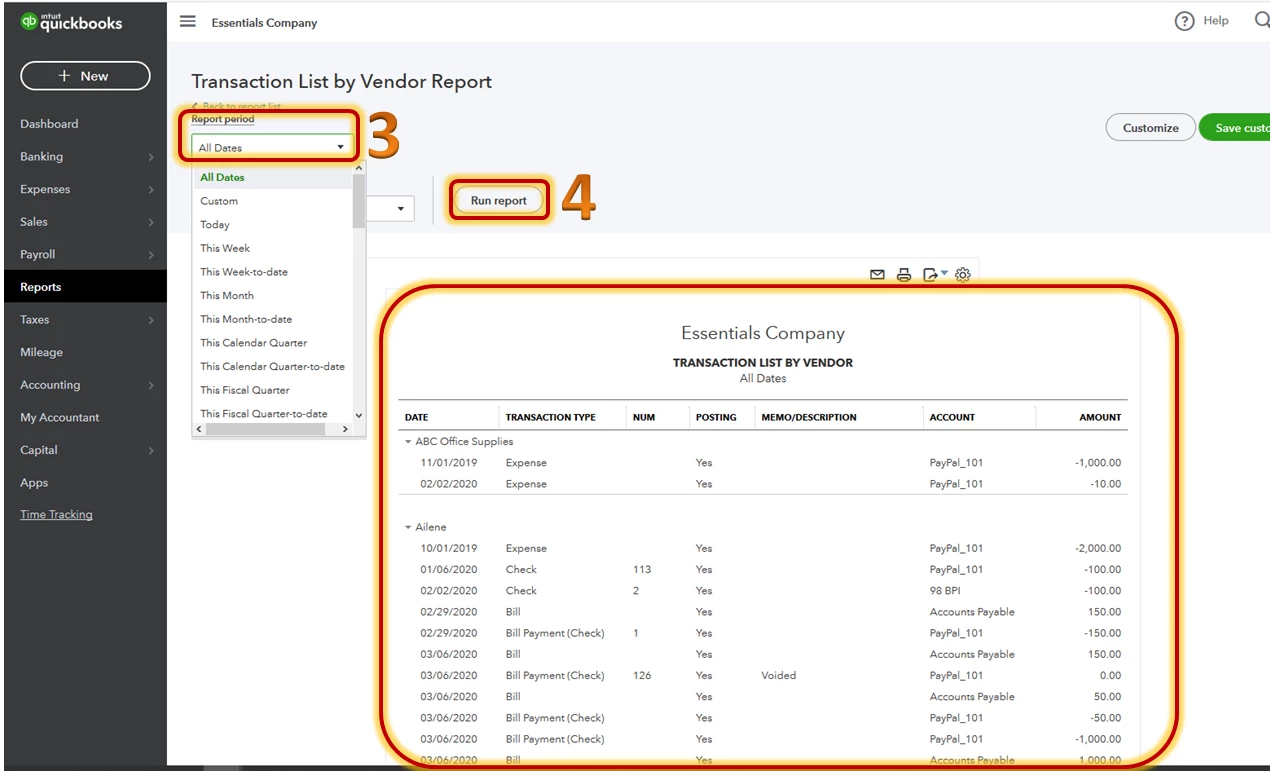
  1. Click Reports on the left panel.
  2. On the search bar, type Transactions List by Vendor.
  3. Under the Report period, select the correct date.
  4. Click Run Report. 

​​​​​​​ 


You may also customize this report to show the data you need. Here’s an article that will guide in customizing report: Customize Your Reports in QuickBooks Online


I'll also pass this along to our product team to let them know your business needs.  


To learn more about new features being added every month, you can check out our blog at: https://quickbooks.intuit.com/blog/whats-new/.  


Please let me know if I can be of additional assistance or should you have any follow up questions. I’ll be here to help. Have a good one!

August 11, 2020

Hello QB Online, 


My business also needs to print a bill to send to send back to vendors. Do you think this feature will be added in the near future? I like that QB Desktop has this feature. 


Please advise. 

Thank you.

JenoP
August 11, 2020

For now, not all features in the Desktop version is already available in QBO, annguyenarg.


We're also unable to provide a timeline when will be added in QuickBooks Online. I recommend checking out this website from time to time to see the later updates and newly added features in the program: https://quickbooks.intuit.com/blog/whats-new/.


In the meantime, you can follow the work around given in the original response on how to print the details of the bill. There's also an option to use an accredited third-party app that offers this type of service. Just go to the Apps menu and proceed to the Find Apps tab. 


The Community is always here if you have other questions.

December 17, 2022

Hi. Saw another thread that suggested how to print what you need. Once you save the bill, click More (bottom of screen) > Transaction Journal > Small Gear Icon (Report Settings). Customize it to show what you need and then you can save, print or email.  If you need to use this report frequently or in bulk, you can click the 'Save customization' button. Hope this helps 🙂

November 10, 2023

While this doesn't print the bill itself, this has been the only workaround that even comes close as it can provide a detailed list of what is on the bill.  Thank you for this!
