December 3, 2021
Solved

How can I set a parent-level account in my chart of accounts? What I see in help articles is different than what I see in my account when I create a new account.

  • December 3, 2021
  • 1 reply
  • 0 views
I want to be able to create a top-level/parent level account (e.g. "building expenses" that I would like to then put accounts like "maintenance", "grounds keeping", and "funishings" underneath, but it seems like I'm only allowed to select from already existing accounts.
Best answer by JenoP

Hi there, bdeshazer.


Your QBO might be on a Business view. This can be the reason why you're seeing a different sets of buttons.


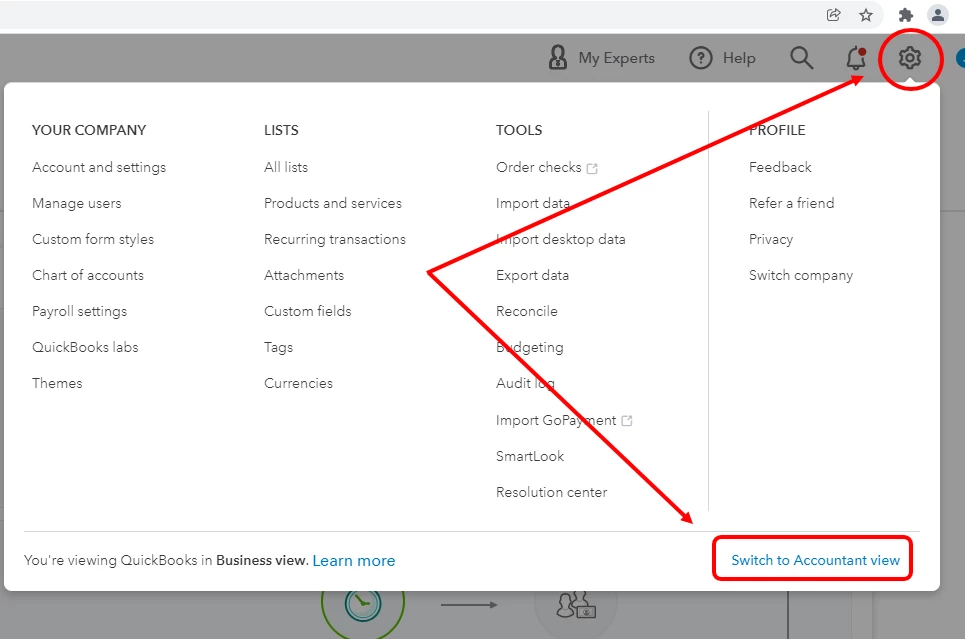
Let's switch it to Accountant View to see similar choices. Just go to the Gear icon and select Switch to Accountant View


Please take note that this only changes the appearance and will not affect your data. Feature, menu, and button names are different in each view, but the actions are identical in most cases. 


Here's an article about this for more details: Switch between Business and Accountant view in QuickBooks Online.


Once done, go back to your Chart of Accounts and check if you can already see the box for sub-account. 


I'd also like to share a couple more of our Community articles for additional references and guidance:


Don't hesitate to reply to me or post more questions in the Community if you need anything else with QuickBooks. We're always here to help. 

1 reply

KimMcCPA
December 3, 2021

For the parent:

Accounting>Chart of accounts>New

use the same Account type and Detail type as the existing accounts (that will soon be sub-accounts!)

What makes it a parent account is that the box "is sub-acct' is NOT checked.

Save and close.


Now, edit the existing accounts so that they are sub-accounts of the parent:

Click on box to left, and then all the way to the right for Action, choose Edit.

Check box "is sub-acct" and use dropdown to choose parent account.

Save and close.


View the Chart of accounts to verify.

Sub accounts should appear indented under the parent.


bdeshazerAuthor
December 13, 2021

There is no "is sub-account" checkbox in my account creation interface. Mine looks like this. It does not allow me to not select a category in the "create category under" field.

JenoP
JenoPAnswer
December 13, 2021

Hi there, bdeshazer.


Your QBO might be on a Business view. This can be the reason why you're seeing a different sets of buttons.


Let's switch it to Accountant View to see similar choices. Just go to the Gear icon and select Switch to Accountant View


Please take note that this only changes the appearance and will not affect your data. Feature, menu, and button names are different in each view, but the actions are identical in most cases. 


Here's an article about this for more details: Switch between Business and Accountant view in QuickBooks Online.


Once done, go back to your Chart of Accounts and check if you can already see the box for sub-account. 


I'd also like to share a couple more of our Community articles for additional references and guidance:


Don't hesitate to reply to me or post more questions in the Community if you need anything else with QuickBooks. We're always here to help.