How can I view sales by Invoice
Hi, QuickBooks Community!
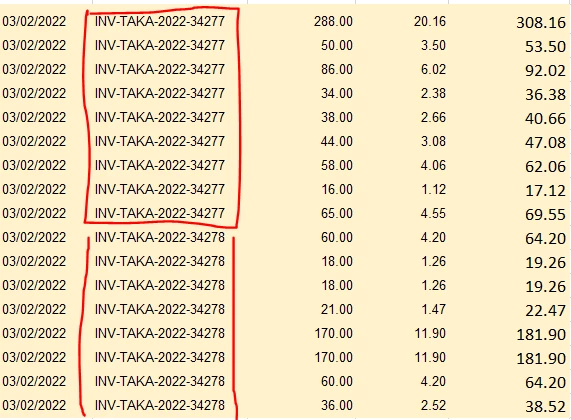
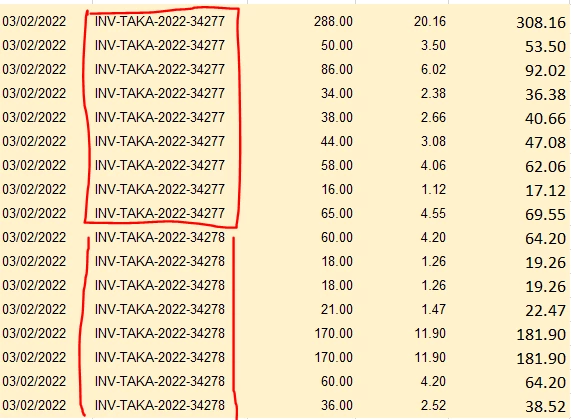
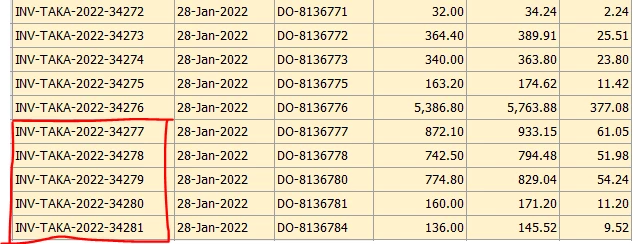
I am facing a problem. We are basically migrating data from another Cloud based accounting system to QuickBooks online. We just sync data into QuickBooks. I just want to double check sales figure, that's why I run sales monthly report on both systems and download it to double check sales figures and match it, So, nothing should be skipped. Our previous accounting system show All sales by Invoice, But when I comes to QuickBooks it shows sales by product. For example In one invoice we sold 5 items. Previous accounting system show's Invoice number and whole sales figure one time, but QuickBooks shows 5 times Same sales invoice number and sale figures separately by each item. I just want QuickBooks show one invoice number and whole sales figure instead of 5 times separately. So, I double check my sales figures and match my sales on both systems easily. By splitting Sales create much problem for me and difficult to match, as there are huge number of invoices per month. I attach both systems files how they show sales figures. Hope so, my question make sense and expert's give me a solid solution.
Thanks & regards.