

February 17, 2021
Question

How come some customer statements are shown as "unavailable"?

  • February 17, 2021
  • 1 reply
  • 0 views

What does it mean when a customer statement is "unavailable"? How can I make it available?


I see open and overdue invoices for the "unavailable" customers and their balances are not $0.00 either.
1 reply

RenjolynC
February 17, 2021

I'll help you fix this, Prosperbk.


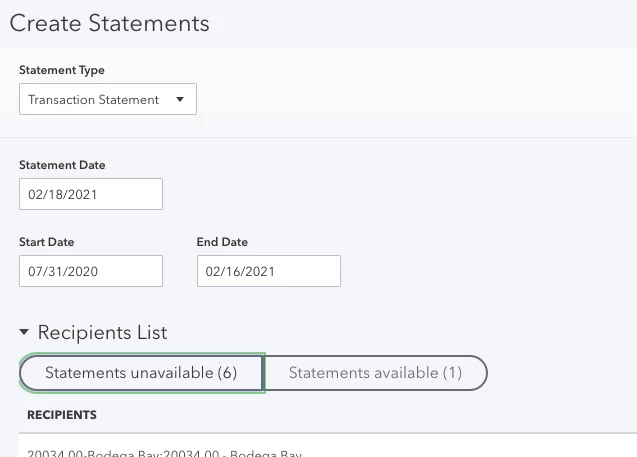
When customers have no outstanding balances or overdue invoices, the transactions will show up in the Statements unavailable.


Here's a sample screenshot for reference:


Since this is not the case from your end, we can do some troubleshooting steps to get those customer transactions transferred over to the Statements Available section.


Here's how:


  1. Open a private browser or incognito mode, and log in to your QuickBooks Online account. Private browser doesn't store cache.
  2. Try to open a new tab. If it works, go back to your regular browser and clear the cache.
  3. You can also use other supported browsers as an alternate solution.


You can also read this article for more information about statements in QuickBooks Online: Create and send customer statements in QuickBooks Online.


Please reply to this post letting me know how it goes. I want to make sure this is resolved for you. Thanks!

ProsperbkAuthor
February 17, 2021

Hello,


It is not a browser issue / solved with going incognito. It looks like some weird "bill with parent company" vs. "bill this company" selection. But I do not understand why "bill with parent company" will not have the statements show as available. The balance and invoice is still overdue regardless who is to be billed.

Candice C
February 17, 2021

Good afternoon, @Prosperbk


Thanks for reaching back out to the Community and adding some extra clarification on this issue. It's my priority that you're able to make these customer statements available in your QuickBooks Online (QBO). 


With the information you gave me about the "bill with parent company" details, I recommend contacting our Customer Support Team. My team will use a screen share to review your account further to get a better understanding of what's causing this to occur. Here's how: 


  1. Go to the Help icon in the top right-hand corner. 
  2. Click the Contact Us option. 
  3. Type in your question and then tap Let's Talk
  4. Scroll down and choose to Get a callback


Afterward, you'll receive an estimated time of when they'll be in touch with you. In addition, you can check out our tutorials page to see other available features in your account. 


Let me know how the phone call goes. I want to ensure that you're able to get back to running your business. I value you as a customer. I'm only a post away if you need me. Take care!