March 22, 2022
Solved

How do I add email addresses to cc anytime I send an invoice?

  • March 22, 2022
  • 3 replies
  • 0 views
Original commenter did not share additional details

Best answer by Kevin_C

I've got your back, @tim-swett. I'll make sure you can add an email address using carbon copy in QuickBooks Online (QBO).


You can enter a default email address to avoid entering it each time you create a sales form. Here's how:
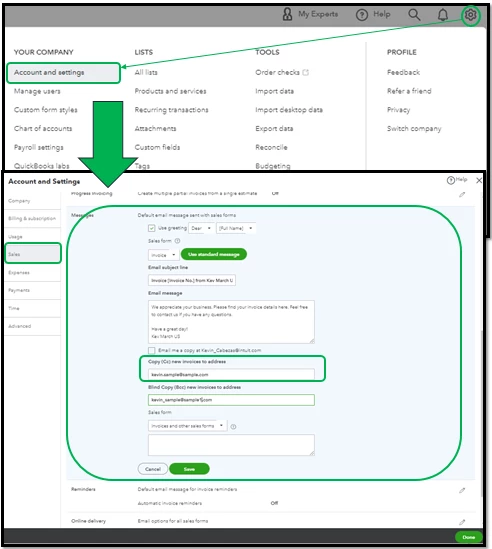
 

  1. Go to Settings ⚙.
  2. Click Account and Settings.
  3. Select Sales tab, then go to Messages section.
  4. Select Edit ✎, then enter the default email addresses in the Cc.
  5. Click Save, then Done.


When you create an invoice or other sales forms, you can still edit the email you've added. 


For more information about emailing a sales form or report to multiple email addresses, please refer to this article: Email a sales form or report to multiple email addresses.


You can also personalize the appearance by adding specific info to your sales forms. Check out this article for more information: Customize invoices, estimates, and sales receipts in QuickBooks Online.


I'm including this article that shows you how to group multiple payments into a single record, track a partial payment, and so on: Record invoice payments in QuickBooks Online.


I'd like to know how you get on after performing these steps, as I want to ensure this is taken care of. Feel free to message me again. Have a great day!

3 replies

Kevin_CAnswer
March 22, 2022

I've got your back, @tim-swett. I'll make sure you can add an email address using carbon copy in QuickBooks Online (QBO).


You can enter a default email address to avoid entering it each time you create a sales form. Here's how:


  1. Go to Settings ⚙.
  2. Click Account and Settings.
  3. Select Sales tab, then go to Messages section.
  4. Select Edit ✎, then enter the default email addresses in the Cc.
  5. Click Save, then Done.


When you create an invoice or other sales forms, you can still edit the email you've added. 


For more information about emailing a sales form or report to multiple email addresses, please refer to this article: Email a sales form or report to multiple email addresses.


You can also personalize the appearance by adding specific info to your sales forms. Check out this article for more information: Customize invoices, estimates, and sales receipts in QuickBooks Online.


I'm including this article that shows you how to group multiple payments into a single record, track a partial payment, and so on: Record invoice payments in QuickBooks Online.


I'd like to know how you get on after performing these steps, as I want to ensure this is taken care of. Feel free to message me again. Have a great day!

tim-swettAuthor
March 22, 2022

Got it! Thank you!

March 22, 2022

Hello,


Go to Gear Icon/Account and Settings/Sales/Messages


You'll have options to email yourself a copy as well as CC and BCC other email addresses.

tim-swettAuthor
March 22, 2022

Thank you!!

October 14, 2022

Is there a way to add a default email to be cc.ed at within the customer master record? i.e. for company ABC Ltd, [email address removed] is emailed and [email address removed] is cc.ed (for every invoice sent to the company ABC Ltd.)

DHeraV
October 14, 2022

Hi there, @heneghae,


I'm happy to help! Yes, you can add a default email address to be your Cc and Bcc.


To add a default Cc and Bcc email, you can simply follow these steps:
 

  1. Go to Settings.
  2. Select Account and Settings.
  3. Choose the Sales tab, then go to the Messages section.
  4. Select Edit, then add the default Cc and Bcc email you desire.
  5. Click Save, then Done.
     

For detailed information, you can visit: Email a sales form or report to multiple email addresses.
 

You can also refer to this article for future use if you want to customize transactions: Customize invoices, estimates, and sales receipts in QuickBooks Online


If you need any additional assistance with changing and managing your email addresses, please don't hesitate to reach us or simply leave a comment below this post. I'll be happy to help you anytime. Have a great day ahead!

October 14, 2022

Hi Dorothy, that would be the same cc email address for every customer. What I am trying to achieve is a customised default cc for each customer I have clarified the example.


I know this can be done after creating the invoice, by editing the invoice. But I would prefer it to be the default for each customer as I import my invoices. 


i.e. for my company XYZ ltd. for customer ABC Ltd, [accounts email] is emailed and [customer contact email address] is cc.ed (for every invoice sent to the customer ABC Ltd. by my company XYZ ltd.)
