I can help in applying the check to an open bill, @JodieS.
Checks can help you in recording your bills without showing in your reports how much you owe.
You can link the check to the bill by using the Pay bills feature. It will show the regular check as the payment. This works if the check has been reconciled.
Let me show you how:
- Open the check you created and update the Expense account to Accounts Payable.
- Choose the vendor name from the Customer: Job drop-down.
- Select Save & Close.
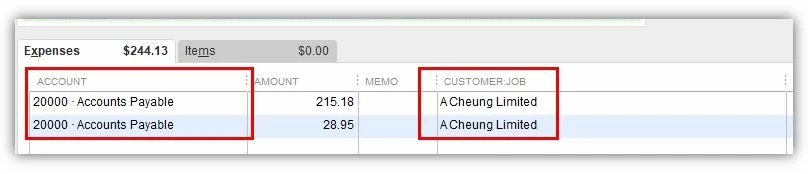
Then pay the bill.
- Go to the Vendors menu and click on Pay Bills.
- Choose the bill connected to the check.
- Click on Set Credits, then go to the Credits tab.
- Put a check on the credit and update the amount as needed.
- Select Done and pick Pay Selected Bills.
You may refer to this article for more information: Bill shows as unpaid after writing a check in QuickBooks Desktop.
If you also want to learn how to use Online Bill Pay in QuickBooks Desktop, feel free to read this article: Use Online Bill Pay in QuickBooks Desktop.
Let me know if there's anything else that I can help in managing your checks and bills. Have a great rest of the day!


