December 12, 2021
Solved

How do i change an invoice template from net 30 to due upon receipt?

  • December 12, 2021
  • 2 replies
  • 0 views
Original commenter did not share additional details

Best answer by JessT

Hi there, tutslady88!


It's great to see you in the Community! I'll guide you in changing your invoice terms.


You can change the term in your settings, which will apply to all future invoices. However, if a particular customer has a term assigned to their profile, that will be used.
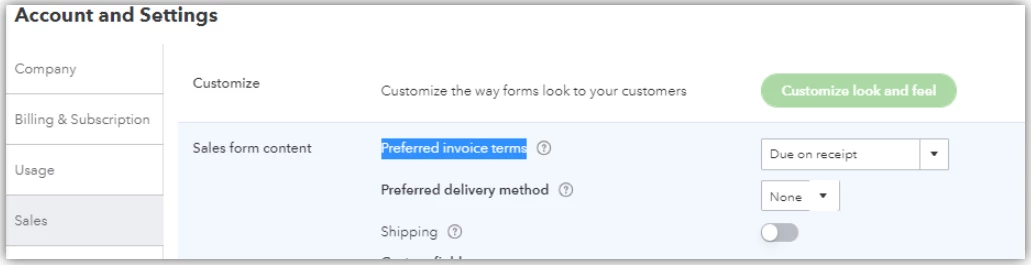
 

  1. Go to the Gear icon and choose Accounts and settings.
  2. Select the Sales bar and click the Sales form content section.
  3. Set the Preferred invoice terms to Due on receipt.
  4. Click Save and click Done.


If some of your customers have different terms and you want to apply Due on receipt, you can clear the Terms field in the Payment and billing section of their profiles.


You might find this article interesting: How to Adjust Invoice Payment Terms in QuickBooks Online.


I'm just right here if you have any other concerns regarding terms or anything in particular. Take care and enjoy the rest of the day!

2 replies

JessT
JessTAnswer
December 12, 2021

Hi there, tutslady88!


It's great to see you in the Community! I'll guide you in changing your invoice terms.


You can change the term in your settings, which will apply to all future invoices. However, if a particular customer has a term assigned to their profile, that will be used.


  1. Go to the Gear icon and choose Accounts and settings.
  2. Select the Sales bar and click the Sales form content section.
  3. Set the Preferred invoice terms to Due on receipt.
  4. Click Save and click Done.


If some of your customers have different terms and you want to apply Due on receipt, you can clear the Terms field in the Payment and billing section of their profiles.


You might find this article interesting: How to Adjust Invoice Payment Terms in QuickBooks Online.


I'm just right here if you have any other concerns regarding terms or anything in particular. Take care and enjoy the rest of the day!

February 24, 2023

Does anyone know how to do this in reverse for quickbooks desktop? I want to change it from due upon receipt to Net30
